Ana içeriğe geç
Onarım Topluluğuna Katılın - Hesap Oluşturun

Samsung Chromebook Pro Battery Replacement

Neye ihtiyacın var

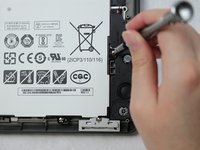
    1. Samsung Chromebook Pro Battery Replacement, Battery: adım 1, 2 resimden 1. Samsung Chromebook Pro Battery Replacement, Battery: adım 1, 2 resimden 2.
      • Remove the eight 30 mm screws from the edges of the case with the JIS J000 screw bit.

      FixBot'a Sor

      Yorum Ekle

    2. Samsung Chromebook Pro Battery Replacement: adım 2, 3 resimden 1. Samsung Chromebook Pro Battery Replacement: adım 2, 3 resimden 2. Samsung Chromebook Pro Battery Replacement: adım 2, 3 resimden 3.
      • Slide the plastic opening tool in a corner at a steep angle, and lift to remove the outer case.

      FixBot'a Sor

      Yorum Ekle

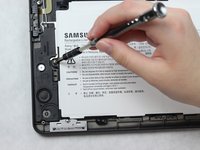
    3. Samsung Chromebook Pro Battery Replacement: adım 3, 2 resimden 1. Samsung Chromebook Pro Battery Replacement: adım 3, 2 resimden 2.
      • Remove the four 30 mm screws surrounding the battery with the JIS J000 screw bit.

      FixBot'a Sor

      Yorum Ekle

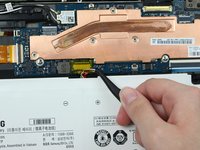
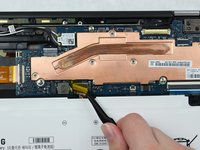
    4. Samsung Chromebook Pro Battery Replacement: adım 4, 3 resimden 1. Samsung Chromebook Pro Battery Replacement: adım 4, 3 resimden 2. Samsung Chromebook Pro Battery Replacement: adım 4, 3 resimden 3.
      Bu adımda kullanılan alet:
      Tweezers
      $4.99
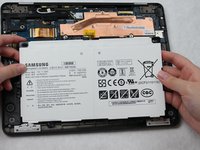
      • Lift the connecting wires to disconnect from the slot with the precision tweezers.

      • Lift battery to remove once the wire is disconnected.

      FixBot'a Sor

      Yorum Ekle

Sonuç

To reassemble your device, follow these instructions in reverse order.

İptal et: Bu kılavuzu tamamlamadım.

4 farklı kişi bu kılavuzu tamamladı.

Amber Castro-Beltran

Üyelik tarihi: 10/09/18

933 İtibar

5 adet Kılavuz yazıldı

Ekip

1Rehber Yorum

How do I know which battery to order? Is there a specific part number?

Will - Yanıt Paylaş

Yorum Ekle

İstatistikleri Görüntüle:

Son 24 Saat: 0

Son 7 gün: 6

Son 30 gün: 25

Her zaman: 3,315