Ana içeriğe geç
Onarım Topluluğuna Katılın - Hesap Oluşturun

Samsung Galaxy Note 3 Display Assembly Replacement

Neye ihtiyacın var

  1. Samsung Galaxy Note 3 Display Assembly Replacement, Remove the rear case: adım 1, 1 resimden 1.
    • Insert a fingernail or plastic opening tool in the gap between the rear case and the base of the phone.

    FixBot'a Sor

    Yorum Ekle

  2. Samsung Galaxy Note 3 Display Assembly Replacement, Remove Case from the Base: adım 2, 2 resimden 1. Samsung Galaxy Note 3 Display Assembly Replacement, Remove Case from the Base: adım 2, 2 resimden 2.
    • Slide your fingernail or plastic opening tool along the edge of the rear case.

    • Lift the case gently from the base.

    FixBot'a Sor

    Yorum Ekle

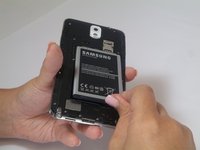
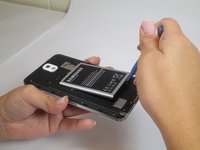
  3. Samsung Galaxy Note 3 Display Assembly Replacement, Battery: adım 3, 2 resimden 1. Samsung Galaxy Note 3 Display Assembly Replacement, Battery: adım 3, 2 resimden 2.
    • Insert a fingernail or plastic opening tool into the small gap between the battery and the phone base.

    • Lift the battery out of its recess.

    FixBot'a Sor

    Yorum Ekle

  4. Samsung Galaxy Note 3 Display Assembly Replacement, S Pen: adım 4, 1 resimden 1.
    • Place your fingernail in the groove of the stylus pen.

    • Pull the stylus pen away from the phone.

    FixBot'a Sor

    Yorum Ekle

  5. Samsung Galaxy Note 3 Display Assembly Replacement, Unscrew Back Chassis: adım 5, 1 resimden 1.
    • Remove the twelve 4mm Phillips #00 screws from the back chassis.

    FixBot'a Sor

    Yorum Ekle

  6. Samsung Galaxy Note 3 Display Assembly Replacement, Remove Back Chassis: adım 6, 1 resimden 1.
    • Insert the plastic opening tool into the Stylus Pen placement holder.

    • Lift the plastic opening tool so that the midframe separates from the base.

    FixBot'a Sor

    Yorum Ekle

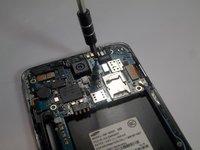
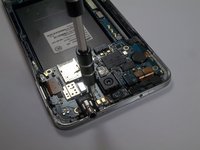
  7. Samsung Galaxy Note 3 Display Assembly Replacement, Screw Removal: adım 7, 2 resimden 1. Samsung Galaxy Note 3 Display Assembly Replacement, Screw Removal: adım 7, 2 resimden 2.
    • Remove the single screw beside headphone jack.

    FixBot'a Sor

    Yorum Ekle

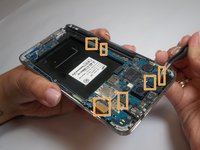
  8. Samsung Galaxy Note 3 Display Assembly Replacement, Unfasten Clips and Cable Connectors: adım 8, 2 resimden 1. Samsung Galaxy Note 3 Display Assembly Replacement, Unfasten Clips and Cable Connectors: adım 8, 2 resimden 2.
    Bu adımda kullanılan alet:
    Tweezers
    $4.99
    • Use tweezers to remove both antenna clips.

    • Use a spudger to disconnect six cable connectors.

    FixBot'a Sor

    Yorum Ekle

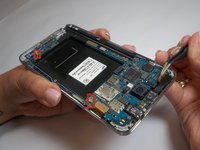
  9. Samsung Galaxy Note 3 Display Assembly Replacement, Motherboard Removal: adım 9, 1 resimden 1.
    • Pull up on the motherboard with tweezers.

    FixBot'a Sor

    Yorum Ekle

  10. Samsung Galaxy Note 3 Display Assembly Replacement, Spudger Tool Placement: adım 10, 1 resimden 1.
    • Insert the spudger into the headphone jack.

    FixBot'a Sor

    Yorum Ekle

  11. Samsung Galaxy Note 3 Display Assembly Replacement, Lift to Separate Headphone Jack: adım 11, 1 resimden 1.
    • Lift the spudger to separate the jack assembly from the motherboard.

    • Pull to remove.

    FixBot'a Sor

    Yorum Ekle

  12. Samsung Galaxy Note 3 Display Assembly Replacement, Metal Bracket Removal: adım 12, 1 resimden 1.
    • Remove the metal bracket located in the top left hand corner.

    FixBot'a Sor

    Yorum Ekle

  13. Samsung Galaxy Note 3 Display Assembly Replacement, Remove Vibrating Motor: adım 13, 1 resimden 1.
    Bu adımda kullanılan alet:
    Tweezers
    $4.99
    • Remove the vibrating motor by pulling up on it carefully with the tweezers.

    FixBot'a Sor

    Yorum Ekle

  14. Samsung Galaxy Note 3 Display Assembly Replacement, USB Port Removal: adım 14, 1 resimden 1.
    • Lift USB port from the front assembly using the tweezers.

    FixBot'a Sor

    Yorum Ekle

  15. Samsung Galaxy Note 3 Display Assembly Replacement, Display Assembly: adım 15, 1 resimden 1.
    • You are now left with the display assembly.

    FixBot'a Sor

    Yorum Ekle

Sonuç

To reassemble your device, follow these instructions in reverse order.

İptal et: Bu kılavuzu tamamlamadım.

147 farklı kişi bu kılavuzu tamamladı.

Brittany Gail

Üyelik tarihi: 09/23/14

8.581 İtibar

8 adet Kılavuz yazıldı

Ekip

USF Tampa, Team 2-2, Blackwell Fall 2014 USF Tampa, Team 2-2, Blackwell Fall 2014 üyesi

USFT-BLACKWELL-F14S2G2

4 Üyeler

25 adet Kılavuz yazıldı

10Kılavuz Yorumları

είναι απόλυτα κατανοητό.

chandr - Yanıt Paylaş

Can you just replace the digitizer or is the digitizer glue down to good to the display where it might damage the LCD display when trying to replace the digitizer?

rob lang - Yanıt Paylaş

to safely remove the LCD display from the front touch screen glass w/o damaging the LCD screen I advise you to invest in and familiarize yourself with an LCD Separator machine and all the accessories that go along with it. Also, search for the machine and watch the videos..

tkflenorl - Yanıt Paylaş

Can you just replace the digitizer or is the digitizer glue down to good to the display where it might damage the LCD display when trying to replace the digitizer?

sunil - Yanıt Paylaş

Can you just replace the digitizer or is the digitizer glue down to good to the display where it might damage the LCD display when trying to replace touch

sunil - Yanıt Paylaş

Yorum Ekle

İstatistikleri Görüntüle:

Son 24 Saat: 6

Son 7 gün: 31

Son 30 gün: 147

Her zaman: 124,916