Ana içeriğe geç
Onarım Topluluğuna Katılın - Hesap Oluşturun

Samsung Galaxy Note 8.0 Headphone Jack Replacement

Görüntüleme: 8 B

İstatistikleri görüntüle:

Son 24 Saat:
2
Son 7 Gün:
18
Son 30 Gün:
84
Her zaman:
7.950
Yorumlar: 13

10 comments on steps, 3 guide comments.

Go to guide comments
Tamamlandı: 6

6 kişi bu kılavuzu "tamamlandı" olarak işaretledi. Sıradaki sen olacak mısın?

Sık Kullanılanlar: 9

9 kişi bu kılavuzu favorilerine ekledi (ve abone oldu). Sıradaki sen olacak mısın?

Gerekli Süre: 15 - 20 dakika
Zorluk: Kolay
Öne Çıkan Öğrenci Kılavuzu

Bu kılavuz, çalışkan öğrencilerimizin alın teriyle üretildi ve iFixit kadrosu tarafından epey havalı bulunuyor.

Samsung Galaxy Note 8.0 Headphone Jack Replacement

The headphone jack is the port you connect your headphone to in order to receive the sound from the tablet through headphones. Over time, the headphone jack or the terminal connections can become worn out or damaged, which may result in headphones not receiving sound properly. In this case, the headphone jack has to be replaced and this guide will show you how.

Neye ihtiyacın var

Parçalar

Aletler

    1. Samsung Galaxy Note 8.0 Headphone Jack Replacement, Back Cover: adım 1, 1 resimden 1.
      • Remove the Samsung S-Pen stylus.

      • Remove the micro SD storage card.

      FixBot'a Sor

      Yorum Ekle

    2. Samsung Galaxy Note 8.0 Headphone Jack Replacement: adım 2, 1 resimden 1.
      • Using the plastic opening tool, start where the S-pen was located and carefully pry up the corner.

      FixBot'a Sor

      Yorum Ekle

    3. Samsung Galaxy Note 8.0 Headphone Jack Replacement: adım 3, 1 resimden 1.
      • Work your way around the entire device by carefully prying and sliding the plastic opening tool.

      • There are clips approximately 2cm apart. As you are removing the back cover you should hear the clips being dislocated from the tablet.

      FixBot'a Sor

      Yorum Ekle

    1. Samsung Galaxy Note 8.0 Headphone Jack Replacement, Battery: adım 4, 2 resimden 1. Samsung Galaxy Note 8.0 Headphone Jack Replacement, Battery: adım 4, 2 resimden 2.
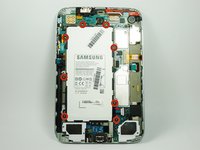
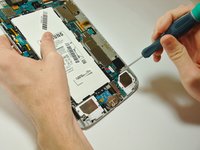
      • Remove the 8 Phillips#00 3-mm screws holding the battery in place.

      FixBot'a Sor

      Yorum Ekle

    2. Samsung Galaxy Note 8.0 Headphone Jack Replacement: adım 5, 1 resimden 1.
      • Lift the top left corner of the battery up by the black tab.

      FixBot'a Sor

      Yorum Ekle

    3. Samsung Galaxy Note 8.0 Headphone Jack Replacement: adım 6, 1 resimden 1.
      • Gently grasp and lift up the white connector located at the bottom right corner of the battery. It is connected to the battery by two blue and two red wires.

      • Do not yank the connector by the wires. If it does not disconnect easily, slide a plastic opening tool between the white connector and the board to lift the connector away from the board.

      FixBot'a Sor

      Yorum Ekle

    1. Samsung Galaxy Note 8.0 Headphone Jack Replacement, Headphone Jack: adım 7, 2 resimden 1. Samsung Galaxy Note 8.0 Headphone Jack Replacement, Headphone Jack: adım 7, 2 resimden 2.
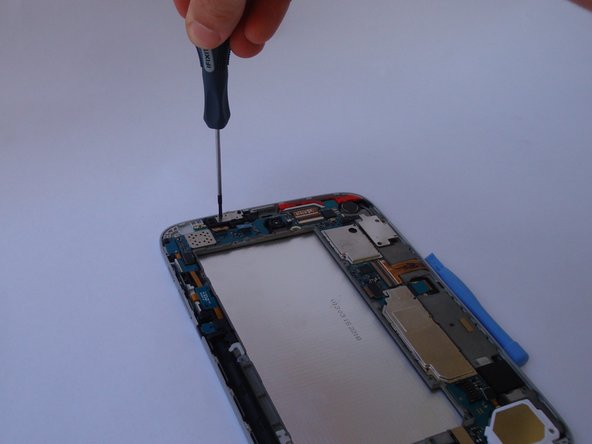
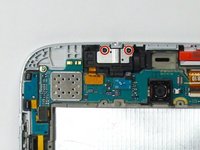
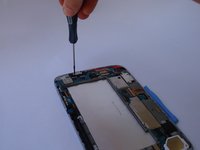
      • Remove the two 4.5-mm black phillips head screws using a #00Phillips screwdriver.

      FixBot'a Sor

      Yorum Ekle

    2. Samsung Galaxy Note 8.0 Headphone Jack Replacement: adım 8, 2 resimden 1. Samsung Galaxy Note 8.0 Headphone Jack Replacement: adım 8, 2 resimden 2.
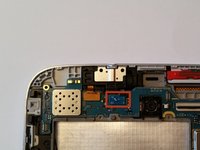
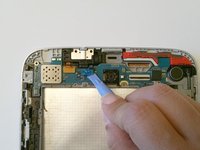
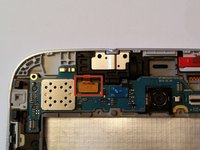
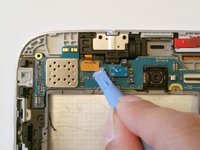
      • Gently pry up the teal connector.

      • Do not yank the connector. If it does not disconnect easily use a plastic opening tool between the connector and the board to lift the connector away from the board.

      FixBot'a Sor

      Yorum Ekle

    3. Samsung Galaxy Note 8.0 Headphone Jack Replacement: adım 9, 2 resimden 1. Samsung Galaxy Note 8.0 Headphone Jack Replacement: adım 9, 2 resimden 2.
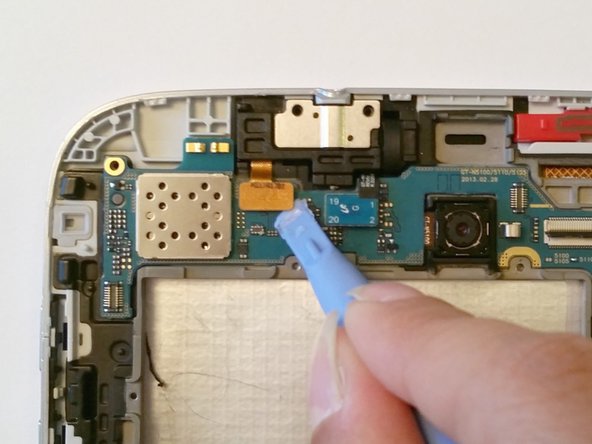
      • Gently pry up the gold connector.

      • Do not yank the connector. If it does not disconnect easily use a plastic opening tool between the connector and the board to lift the connector away from the board.

      FixBot'a Sor

      Yorum Ekle

    4. Samsung Galaxy Note 8.0 Headphone Jack Replacement: adım 10, 1 resimden 1.
      • Remove the headphone jack from it's housing.

      • If difficult, use a plastic opening tool to pry up.

      FixBot'a Sor

      Yorum Ekle

Sonuç

To reassemble your device, follow these instructions in reverse order.

İptal et: Bu kılavuzu tamamlamadım.

6 farklı kişi bu kılavuzu tamamladı.

Yazar

ile

Joel

Üyelik tarihi: 09/23/14

1.878 İtibar

6 adet Kılavuz yazıldı

Ekip

USF Tampa, Team 12-2, Blackwell Fall 2014 USF Tampa, Team 12-2, Blackwell Fall 2014 üyesi

USFT-BLACKWELL-F14S12G2

4 Üyeler

84 adet Kılavuz yazıldı

3Kılavuz Yorumları

Lightning struck while my son was on his tablet... no more headset audio? Replaced recommend parts still no audio. Plays fine without earbuds??? Insurance claim? What else could be the issue? Motherboard?

Shasta - Yanıt Paylaş

what are these connectors on the left side of headphone jack which are connected to the backside plate?

sanco - Yanıt Paylaş

this did not help getting the broken headphone jack out of my Samsung note 8

joshua- collins - Yanıt Paylaş

Yorum Ekle

İstatistikleri Görüntüle:

Son 24 Saat: 2

Son 7 gün: 18

Son 30 gün: 84

Her zaman: 7,950