Bu çeviri bir makine tarafından oluşturulmuştur ve henüz bir kişi tarafından incelenmemiştir. Bu dili konuşuyor musunuz? İnceleme için.
Giriş
Telefonun klavyesini nasıl çıkarıp değiştireceğinizi öğrenin.
Neye ihtiyacın var
-
-
-
Telefonu ekranı aşağı bakacak şekilde konumlandırın.
-
Başparmağınızı kullanarak paneli kameradan uzaklaştıracak şekilde kaydırın. Bu işlem bataryayı ortaya çıkaracaktır.
 FixBot'a Sor
-
-
-
Plastik kanırtma aparatının ucunu bataryanın sol tarafına yerleştirin.
-
Bataryayı kaldırarak ayırın. Beyaz ok yönünde dönecektir.
-
-
-
-
-
Yıldız/Phillips #000 tornavida kullanarak 3,5 mm'lik altı vidayı çıkarın. Vidaları saat yönünün tersine çevirerek sökün.
-
-
-
Arka paneli çıkarmak için plastik kanırtma aparatıyla kenarlarından dikkatlice ayırın.
-
Yan düğmeler gevşeyip yerinden çıkacaktır, bu yüzden bunları güvenli bir yere koyun.
-
-
-
-
-
-
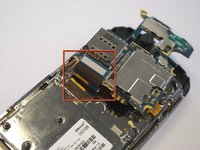
Devre kartını serbest bırakmak için siyah kabloyu nazikçe çıkarın.
-
Yeşil devre kartına takılı olan altın rengi sonlandırıcıyı dikkatlice kaldırarak kabloyu çıkarın.
-
-
-
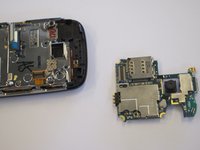
Devre kartını serbest bırakmak için siyah ve mavi şeridi nazikçe yukarı doğru çekin.
-
-
-
-
-
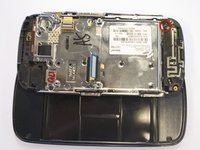
Altı adet 3,5 mm vidayı, bir yıldız tornavida kullanarak döndürerek çıkarın.
-
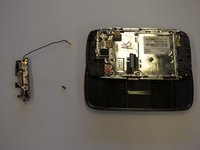
Anten düzeneği yerinden kurtulacaktır.
-
-
-
-
-
Az önce siyah uç parçasını çıkardığınız, gümüş parçanın kenarı boyunca uzanan iki taban vidasını çıkarın.
-
Vidalar 2,7 mm uzunluğundadır.
-
Alt kısımdaki siyah uç kapağı yerinden çıkacaktır.
-
-
-
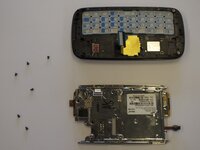
Gümüş plakayı tutan altı adet 2,7 mm vidayı sökün ve bir kenara koyun (şekil 1).
-
Gümüş plakayı ve telefon çerçevesini birbirinden ayırın (şekil 2).
-
-







Cihazınızı yeniden toplamak için bu talimatları ters sırayla uygulayın.

Ekip

Cal Poly, Team 8-10, Regan Spring 2011 Cal Poly, Team 8-10, Regan Spring 2011 üyesi
CPSU-REGAN-S11S8G10
4 Üyeler
132 adet Kılavuz yazıldı
