Giriş
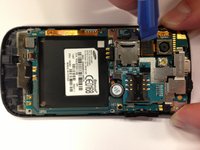
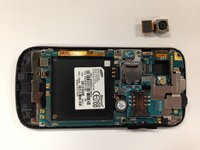
This guide will instruct you on removing the camera from the Samsung Mythic SGH-a897 motherboard. To successfully remove the camera from the motherboard, the iFixit Opening Tool should be used to pry the camera and camera cable from the motherboard.
Neye ihtiyacın var
-
-
-
To remove the phone's back cover, slide your fingernail into the slit at the bottom of your phone.
 FixBot'a Sor
-
-
-
Place your finger on either bottom corner of the battery slot and lift to remove the battery.
-
-
-
-
-
-
Using a Phillips #00 Screwdriver, remove the six 5 mm screws from the back casing of the phone.
-
-
-
Using the iFixit Opening Tool, insert the tool into the seam between the back case and the rest of the phone.
-
Working along the seam, pry the back casing from the phone.
-
-
-
-
-
Carefully remove the camera by using the iFixit Tool to pry the camera cable from the motherboard.
-
Carefully remove the camera from the phone's motherboard.
-
-


To reassemble your device, follow these instructions in reverse order.

Ekip

Cal Poly, Team 17-1, Regan Spring 2013 Cal Poly, Team 17-1, Regan Spring 2013 üyesi
CPSU-REGAN-S13S17G1
4 Üyeler
99 adet Kılavuz yazıldı
