Ana içeriğe geç
Onarım Topluluğuna Katılın - Hesap Oluşturun

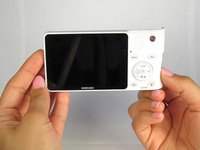
Samsung NX1000 Back Panel Replacement

Salt Önkoşul
Bu sadece bir ön koşul kılavuzudur! Bu kılavuz başka bir prosedürün parçasıdır ve tek başına kullanılması amaçlanmamıştır.

Neye ihtiyacın var

  1. Samsung NX1000 Back Panel Replacement, Removing the Back Panel: adım 1, 1 resimden 1.
    • Locate the bottom panel of the camera.

    • Unscrew the four 4.5mm Philips #000 (perpendicular cross) screws with the Philips #000 screwdriver.

    • Push the screwdriver firmly into the screw so that the driver will not strip the screw.

  2. Samsung NX1000 Back Panel Replacement: adım 2, 2 resimden 1. Samsung NX1000 Back Panel Replacement: adım 2, 2 resimden 2.
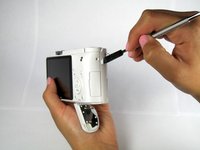
    • Unscrew the three 4.5mm #000 Philips screws on the sides of the camera using the Philips #000 screwdriver.

  3. Samsung NX1000 Back Panel Replacement: adım 3, 2 resimden 1. Samsung NX1000 Back Panel Replacement: adım 3, 2 resimden 2.
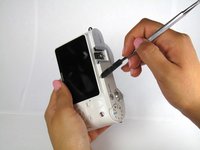
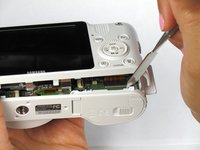
    • Pry open the back panel using the metal spudger.

    • Do not completely separate the back panel from the camera. There is a ribbon on bottom left back corner underneath the buttons. The ribbon will hold the back panel to the camera. Do not jam the tool in this part or the ribbon will rip.

  4. Samsung NX1000 Back Panel Replacement: adım 4, 2 resimden 1. Samsung NX1000 Back Panel Replacement: adım 4, 2 resimden 2.
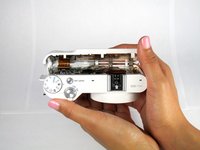
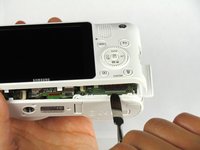
    • Open the two halves of the camera, taking care not to disturb the ribbon cable.

    • Do not completely separate the halves. The ribbon cable needs to be disconnected from the ZIF connection carefully as shown in the next step

  5. Samsung NX1000 Back Panel Replacement: adım 5, 3 resimden 1. Samsung NX1000 Back Panel Replacement: adım 5, 3 resimden 2. Samsung NX1000 Back Panel Replacement: adım 5, 3 resimden 3.
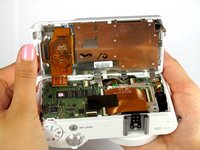
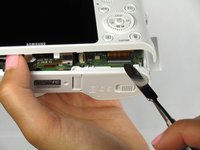
    • Remove the ribbon by lifting the grey tab on the ZIF connector with the metal spudger.

    • Push the ribbon out of its socket with the plastic opening tool.

  6. Samsung NX1000 Back Panel Replacement: adım 6, 2 resimden 1. Samsung NX1000 Back Panel Replacement: adım 6, 2 resimden 2.
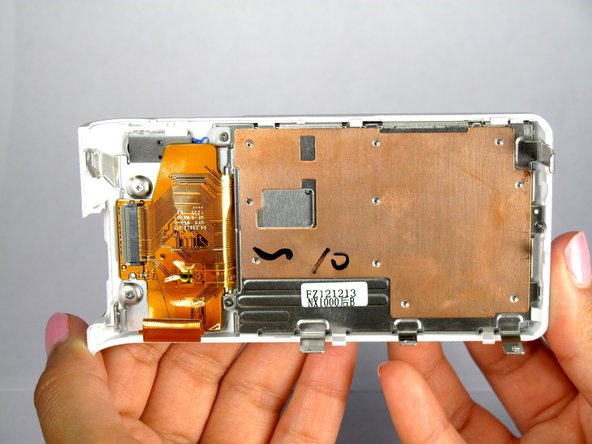
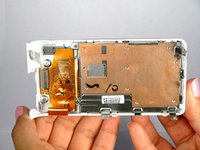
    • Completely separate the back panel from the camera.

Sonuç

To reassemble your device, follow these instructions in reverse order.

Bir başkası bu kılavuzu tamamladı.

Yesenia

Üyelik tarihi: 01/22/15

717 İtibar

6 adet Kılavuz yazıldı

Ekip

Cal Poly, Team 20-13, Maness Winter 2015 Cal Poly, Team 20-13, Maness Winter 2015 üyesi

CPSU-MANESS-W15S20G13

4 Üyeler

14 adet Kılavuz yazıldı

0Kılavuz Yorumları

Yorum Ekle

İstatistikleri Görüntüle:

Son 24 Saat: 1

Son 7 gün: 3

Son 30 gün: 17

Her zaman: 172