Ana içeriğe geç
Onarım Topluluğuna Katılın - Hesap Oluşturun

Samsung NX500 Screen Side Encasement Replacement

Neye ihtiyacın var

    1. Samsung NX500 Screen Side Encasement Replacement, Battery: adım 1, 2 resimden 1. Samsung NX500 Screen Side Encasement Replacement, Battery: adım 1, 2 resimden 2.
      • Pull the switch on the bottom of the camera back with your thumb.

      FixBot'a Sor

      Yorum Ekle

    2. Samsung NX500 Screen Side Encasement Replacement: adım 2, 2 resimden 1. Samsung NX500 Screen Side Encasement Replacement: adım 2, 2 resimden 2.
      • Push second switch(blue) forward with your thumb.

      FixBot'a Sor

      Yorum Ekle

    3. Samsung NX500 Screen Side Encasement Replacement: adım 3, 1 resimden 1.
      • Pull out battery.

      FixBot'a Sor

      Yorum Ekle

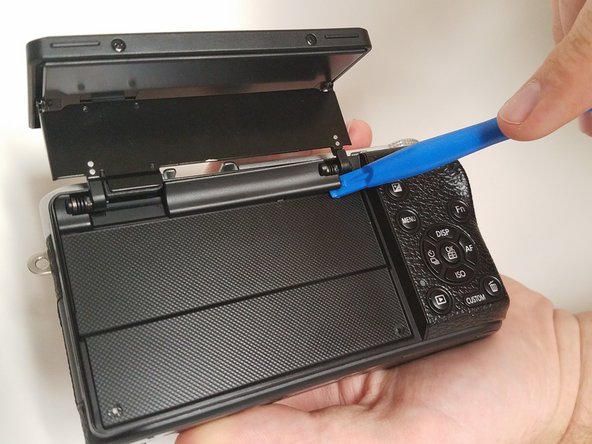
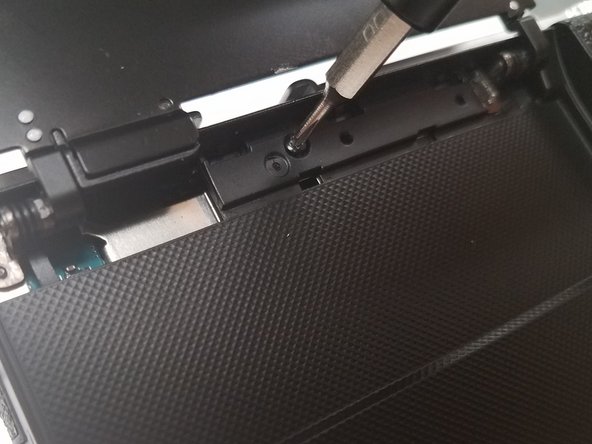
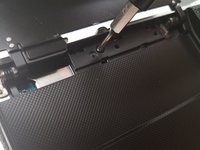
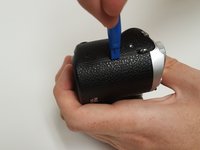
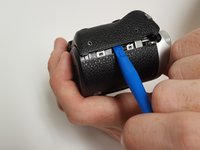
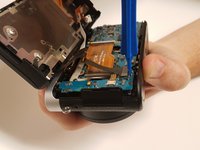
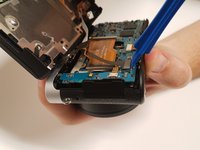
    1. Samsung NX500 Screen Side Encasement Replacement, Screen Side Encasement: adım 4, 3 resimden 1. Samsung NX500 Screen Side Encasement Replacement, Screen Side Encasement: adım 4, 3 resimden 2. Samsung NX500 Screen Side Encasement Replacement, Screen Side Encasement: adım 4, 3 resimden 3.
      • Open the screen exposing the hinge cover and place the plastic opening tool inside.

      • Pry the hinge cover up by moving the plastic opening tool in a downward motion.

      • Remove the black 4mm Phillips #000 screw that is revealed once the hinge cover is removed.

      FixBot'a Sor

      Yorum Ekle

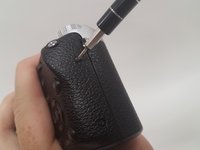
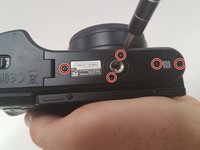
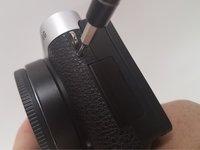
    2. Samsung NX500 Screen Side Encasement Replacement: adım 5, 3 resimden 1. Samsung NX500 Screen Side Encasement Replacement: adım 5, 3 resimden 2. Samsung NX500 Screen Side Encasement Replacement: adım 5, 3 resimden 3.
      • Unscrew the two 4 mm Phillips #000 screws on the right hand side of the camera using the screwdriver.

      • Unscrew five more 4 mm Phillips #000 screws that are located at the bottom of the camera with the screwdriver.

      • In the second step, do not the remove the two 4 mm Phillips #000 screen on the screen.

      • Remove the last exterior 4 mm Phillips #000 screws on the left hand side of the camera with the scredriver.

      FixBot'a Sor

      Yorum Ekle

    3. Samsung NX500 Screen Side Encasement Replacement: adım 6, 2 resimden 1. Samsung NX500 Screen Side Encasement Replacement: adım 6, 2 resimden 2.
      • Use the plastic opening tool in a downward motion around each side of the camera to pry the casing open.

      • The casing should be removed easily; you shouldn't have to use much force.

      FixBot'a Sor

      Yorum Ekle

    4. Samsung NX500 Screen Side Encasement Replacement: adım 7, 2 resimden 1. Samsung NX500 Screen Side Encasement Replacement: adım 7, 2 resimden 2.
      • Locate the black ribbon at the bottom left of the camera's interior.

      • Place the plastic opening tool under the black ribbon connector.

      • Remove the cable by moving your plastic opening tool in a downward motion.

      • There is zero to little force needed to remove this ribbon.

      FixBot'a Sor

      Yorum Ekle

Sonuç

To reassemble your device, follow these instructions in reverse order.

İptal et: Bu kılavuzu tamamlamadım.

carter grenewicz

Üyelik tarihi: 09/15/16

204 İtibar

2 adet Kılavuz yazıldı

Ekip

USF Tampa, Team 18-5, Blackwell Fall 2016 USF Tampa, Team 18-5, Blackwell Fall 2016 üyesi

USFT-BLACKWELL-F16S18G5

3 Üyeler

30 adet Kılavuz yazıldı

1Rehber Yorum

your dumb. idot

Nick Furio - Yanıt Paylaş

Yorum Ekle

İstatistikleri Görüntüle:

Son 24 Saat: 2

Son 7 gün: 12

Son 30 gün: 40

Her zaman: 1,446