Ana içeriğe geç
Onarım Topluluğuna Katılın - Hesap Oluşturun

Samsung SCV-VLUUST50 Flash Capacitor Replacement

Neye ihtiyacın var

    1. Samsung SCV-VLUUST50 Flash Capacitor Replacement, Cover: adım 1, 3 resimden 1. Samsung SCV-VLUUST50 Flash Capacitor Replacement, Cover: adım 1, 3 resimden 2. Samsung SCV-VLUUST50 Flash Capacitor Replacement, Cover: adım 1, 3 resimden 3.
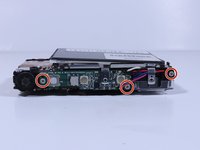
      • Unscrew all visible screws indicated by red circles with a #00 Phillips driver.

      • Slide memory card cover and unscrew hidden screw underneath with a #00 Phillips driver.

      FixBot'a Sor

      Yorum Ekle

    2. Samsung SCV-VLUUST50 Flash Capacitor Replacement: adım 2, 3 resimden 1. Samsung SCV-VLUUST50 Flash Capacitor Replacement: adım 2, 3 resimden 2. Samsung SCV-VLUUST50 Flash Capacitor Replacement: adım 2, 3 resimden 3.
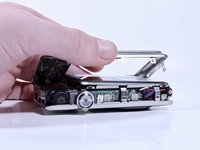
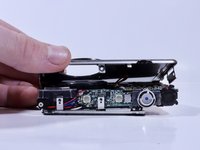
      • Remove the flat side panel by applying gentle pressure toward the bottom of the camera.

      • Remove the corner panel by applying pressure away from the shutter button.

      • The memory card cover will come off with the corner panel.

      • Remove the top panel by applying gentle pressure away from the shutter button.

      FixBot'a Sor

      Yorum Ekle

    3. Samsung SCV-VLUUST50 Flash Capacitor Replacement: adım 3, 1 resimden 1.
      • Remove screws beneath the top panel indicated by red circles with a #00 Phillips driver.

      FixBot'a Sor

      Yorum Ekle

    4. Samsung SCV-VLUUST50 Flash Capacitor Replacement: adım 4, 2 resimden 1. Samsung SCV-VLUUST50 Flash Capacitor Replacement: adım 4, 2 resimden 2.
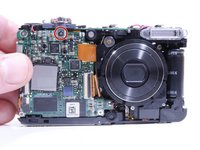
      • Remove the front and back covers by pulling them straight apart.

      FixBot'a Sor

      Yorum Ekle

    1. Samsung SCV-VLUUST50 Flash Capacitor Replacement, Flash Capacitor: adım 5, 2 resimden 1. Samsung SCV-VLUUST50 Flash Capacitor Replacement, Flash Capacitor: adım 5, 2 resimden 2.
      • Remove the screw securing the shutter button.

      • Lift the shutter button to remove it.

      FixBot'a Sor

      Yorum Ekle

    2. Samsung SCV-VLUUST50 Flash Capacitor Replacement: adım 6, 2 resimden 1. Samsung SCV-VLUUST50 Flash Capacitor Replacement: adım 6, 2 resimden 2.
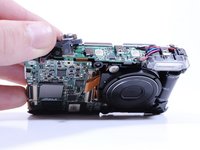
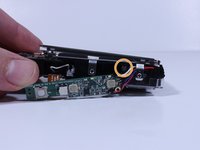
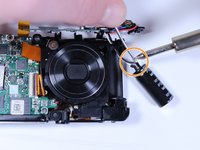
      • Remove the 3 visible screws with a Phillips #000 Driver

      • Move the circuitry and wires out of the way to expose another screw, and remove it with the same driver.

      FixBot'a Sor

      Yorum Ekle

    3. Samsung SCV-VLUUST50 Flash Capacitor Replacement: adım 7, 3 resimden 1. Samsung SCV-VLUUST50 Flash Capacitor Replacement: adım 7, 3 resimden 2. Samsung SCV-VLUUST50 Flash Capacitor Replacement: adım 7, 3 resimden 3.
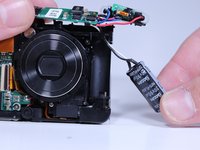
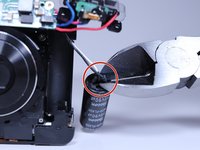
      • Pull the flash capacitor out of its compartment to expose the wires connected to it.

      • Cut the connecting wires with wire cutters.

      • Solder the wires to the new power source with a soldering iron and electrical solder.

      FixBot'a Sor

      Yorum Ekle

Sonuç

To reassemble your device, follow these instructions in reverse order.

İptal et: Bu kılavuzu tamamlamadım.

0Kılavuz Yorumları

Yorum Ekle

İstatistikleri Görüntüle:

Son 24 Saat: 3

Son 7 gün: 8

Son 30 gün: 19

Her zaman: 490