Ana içeriğe geç
Onarım Topluluğuna Katılın - Hesap Oluşturun

Samsung SGH-X495 Microphone Replacement

Neye ihtiyacın var

    1. Samsung SGH-X495 Microphone Replacement, Backplate: adım 1, 1 resimden 1.
      • Remove the 4 (4.7mm) philips head screws.

      FixBot'a Sor

      Yorum Ekle

    2. Samsung SGH-X495 Microphone Replacement: adım 2, 1 resimden 1.
      • Unplug the rubber charger outlet cover.

      FixBot'a Sor

      Yorum Ekle

    3. Samsung SGH-X495 Microphone Replacement: adım 3, 1 resimden 1.
      • Unplug the rubber headset jack cover.

      FixBot'a Sor

      Yorum Ekle

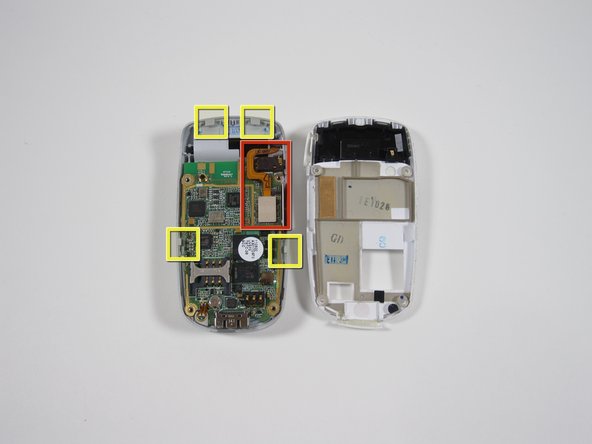
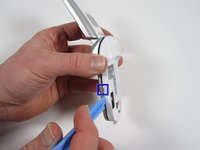
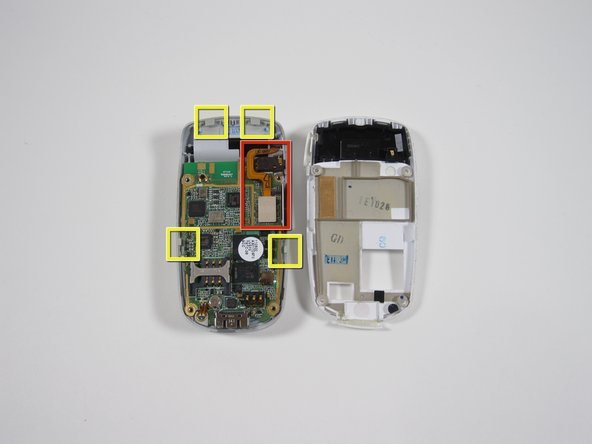
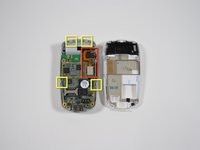
    4. Samsung SGH-X495 Microphone Replacement: adım 4, 2 resimden 1. Samsung SGH-X495 Microphone Replacement: adım 4, 2 resimden 2.
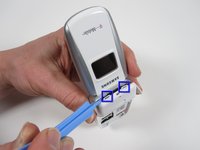
      • Begin by inserting the pry tool near the charger jack.

      • There are 4 tabs to release.

      • Start at the bottom and slide the tool up, lifting the silver front of the phone away from the white backing.

      • Loosen the 2 side tabs before moving on to the top two.

      • See the second photo to see location of the tabs.

      • Be careful of the ribbon wires shown in second photo.

      FixBot'a Sor

      Yorum Ekle

    5. Samsung SGH-X495 Microphone Replacement: adım 5, 2 resimden 1. Samsung SGH-X495 Microphone Replacement: adım 5, 2 resimden 2.
      • Once the two side tabs are free; gently pry the white backing down to release the top two tabs.

      • Hold the phone with the left hand as shown

      • Wiggle the white backplate from side to side while pulling down with the right hand.

      • Be careful of the ribbon wires shown in second photo.

      FixBot'a Sor

      Yorum Ekle

    1. Samsung SGH-X495 Microphone Replacement, Motherboard: adım 6, 1 resimden 1.
      • Remove the ribbon wires connecting to the screen using the pry tool.

      FixBot'a Sor

      Yorum Ekle

    2. Samsung SGH-X495 Microphone Replacement: adım 7, 1 resimden 1.
      • 2 tabs hold the motherboard in place.

      • Release the labeled tabs with the pry tool from the location shown.

      FixBot'a Sor

      Yorum Ekle

    3. Samsung SGH-X495 Microphone Replacement: adım 8, 1 resimden 1.
      • Separate the motherboard from the phone.

      FixBot'a Sor

      Yorum Ekle

    1. Samsung SGH-X495 Microphone Replacement, Microphone: adım 9, 1 resimden 1.
      • Solder joints are accessable to replace the microphone.

      FixBot'a Sor

      Yorum Ekle

Sonuç

To reassemble your device, follow these instructions in reverse order.

İptal et: Bu kılavuzu tamamlamadım.

Matthew Hove

Üyelik tarihi: 01/05/11

1.031 İtibar

10 adet Kılavuz yazıldı

Ekip

Cal Poly, Team 3-40, Regan Winter 2011 Cal Poly, Team 3-40, Regan Winter 2011 üyesi

CPSU-REGAN-W11S3G40

4 Üyeler

100 adet Kılavuz yazıldı

0Kılavuz Yorumları

Yorum Ekle

İstatistikleri Görüntüle:

Son 24 Saat: 1

Son 7 gün: 10

Son 30 gün: 49

Her zaman: 2,241