Ana içeriğe geç
Onarım Topluluğuna Katılın - Hesap Oluşturun

Samsung ST76 Motherboard Replacement

Neye ihtiyacın var

  1. Samsung ST76 Motherboard Replacement, Back Panel: adım 1, 3 resimden 1. Samsung ST76 Motherboard Replacement, Back Panel: adım 1, 3 resimden 2. Samsung ST76 Motherboard Replacement, Back Panel: adım 1, 3 resimden 3.
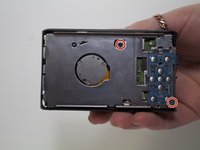
    • Use a Phillips head screwdriver to remove 5 screws from the camera. There are 2 4mm screws on the left side, 2 2mm screws on the right side and 1 4mm screw on the bottom.

    • Do not mix the 5 screws; they are different sizes.

    FixBot'a Sor

    Yorum Ekle

  2. Samsung ST76 Motherboard Replacement: adım 2, 2 resimden 1. Samsung ST76 Motherboard Replacement: adım 2, 2 resimden 2.
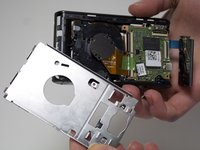
    • Use your fingers to pull the back cover off.

    FixBot'a Sor

    Yorum Ekle

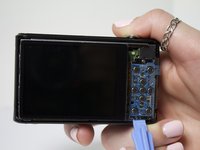
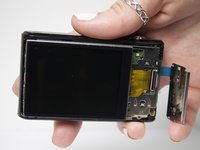
  3. Samsung ST76 Motherboard Replacement, Screen: adım 3, 2 resimden 1. Samsung ST76 Motherboard Replacement, Screen: adım 3, 2 resimden 2.
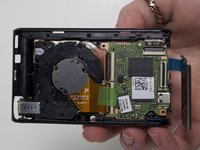
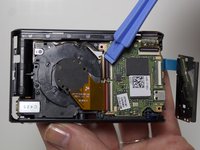
    • Separate the button panel to reveal the port holding the screen on.

    • Use a plastic opening tool to help with this task.

    FixBot'a Sor

    Yorum Ekle

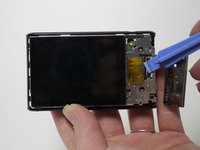
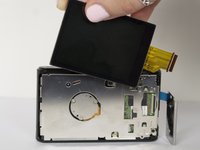
  4. Samsung ST76 Motherboard Replacement: adım 4, 2 resimden 1. Samsung ST76 Motherboard Replacement: adım 4, 2 resimden 2.
    • Remove the yellow cable by pulling gently upwards, away from the inside of the camera, until it separates from its port.

    FixBot'a Sor

    Yorum Ekle

  5. Samsung ST76 Motherboard Replacement, Motherboard: adım 5, 3 resimden 1. Samsung ST76 Motherboard Replacement, Motherboard: adım 5, 3 resimden 2. Samsung ST76 Motherboard Replacement, Motherboard: adım 5, 3 resimden 3.
    • Remove 2 3mm screws from the metal plate covering the motherboard and lens using a Phillips #00 screw driver.

    FixBot'a Sor

    Yorum Ekle

  6. Samsung ST76 Motherboard Replacement: adım 6, 3 resimden 1. Samsung ST76 Motherboard Replacement: adım 6, 3 resimden 2. Samsung ST76 Motherboard Replacement: adım 6, 3 resimden 3.
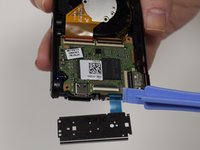
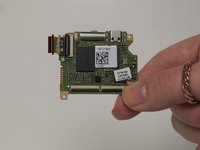
    • Remove the 4 cables connecting the motherboard to the camera body.

    • Use a plastic opening tool to help with this task.

    FixBot'a Sor

    Yorum Ekle

Sonuç

To reassemble your device, follow these instructions in reverse order.

İptal et: Bu kılavuzu tamamlamadım.

2 farklı kişi bu kılavuzu tamamladı.

Jessica Bain

Üyelik tarihi: 03/11/15

408 İtibar

2 adet Kılavuz yazıldı

Ekip

Marist, Team 1-6, Laflen Spring 2015 Marist, Team 1-6, Laflen Spring 2015 üyesi

MARS-LAFLEN-S15S1G6

2 Üyeler

8 adet Kılavuz yazıldı

3Kılavuz Yorumları

Thanks for great info. I should add that one can also clean the sensor. Sensor is circular plate with 3 screws at back of the lens. Now the camera is like new!

compand - Yanıt Paylaş

Where can you buy a replacement motherboard?

Demaree Wiitala - Yanıt Paylaş

ST76 and ST77 are very close relatives.

As it can be seen on the parts, some are marked: ”ST77”

Paul

Paul Cohen - Yanıt Paylaş

Yorum Ekle

İstatistikleri Görüntüle:

Son 24 Saat: 0

Son 7 gün: 14

Son 30 gün: 57

Her zaman: 1,767