Ana içeriğe geç
Onarım Topluluğuna Katılın - Hesap Oluşturun

Samsung Series 5 UltraTouch Battery Replacement

Neye ihtiyacın var

    1. Samsung Series 5 UltraTouch Battery Replacement, Remove the Screws on the Back Cover: adım 1, 2 resimden 1. Samsung Series 5 UltraTouch Battery Replacement, Remove the Screws on the Back Cover: adım 1, 2 resimden 2.
      • Power off the device. Remove the remaining screws holding the back cover in place:

      • Six 4.0 mm Phillips #00 screws.

      • Seven 6.7 mm Phillips #00 screws.

      FixBot'a Sor

      Yorum Ekle

    2. Samsung Series 5 UltraTouch Battery Replacement, Remove the Rubber Pads: adım 2, 2 resimden 1. Samsung Series 5 UltraTouch Battery Replacement, Remove the Rubber Pads: adım 2, 2 resimden 2.
      • Remove the two rubber pads concealing the final bottom case screws.

      • Remove the two 4 mm Phillips #00 screws found under these pads.

      FixBot'a Sor

      Yorum Ekle

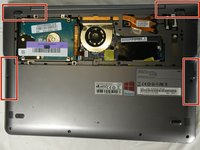
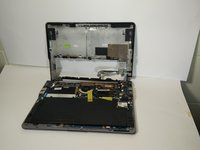
    3. Samsung Series 5 UltraTouch Battery Replacement, Remove the Back Cover: adım 3, 2 resimden 1. Samsung Series 5 UltraTouch Battery Replacement, Remove the Back Cover: adım 3, 2 resimden 2.
      • There are clips along the edges of the back cover that hold it in place. Be careful not to break these.

      • Remove the entire rest of the back cover.

      FixBot'a Sor

      Yorum Ekle

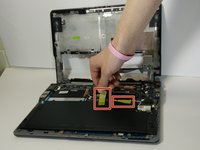
    4. Samsung Series 5 UltraTouch Battery Replacement: adım 4, 2 resimden 1. Samsung Series 5 UltraTouch Battery Replacement: adım 4, 2 resimden 2.
      • Remove the tape holding the wires in place.

      FixBot'a Sor

      Yorum Ekle

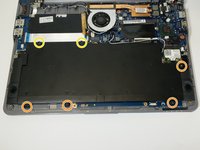
    5. Samsung Series 5 UltraTouch Battery Replacement: adım 5, 1 resimden 1.
      • Remove the following Phillips 00 screws securing the battery:

      • Four 4.5 mm screws

      • Two 6.7 mm Phillips screws

      FixBot'a Sor

      Yorum Ekle

    6. Samsung Series 5 UltraTouch Battery Replacement, Remove the Battery: adım 6, 1 resimden 1.
      • Pull the battery connector towards the battery to disconnect it.

      FixBot'a Sor

      Yorum Ekle

    7. Samsung Series 5 UltraTouch Battery Replacement: adım 7, 1 resimden 1.
      • Remove the battery from the laptop.

      FixBot'a Sor

      Yorum Ekle

Sonuç

To reassemble your device, follow these instructions in reverse order.

İptal et: Bu kılavuzu tamamlamadım.

14 farklı kişi bu kılavuzu tamamladı.

Timothy

Üyelik tarihi: 01/30/15

1.603 İtibar

5 adet Kılavuz yazıldı

Ekip

USF Tampa, Team 16-3, Watkins Winter 2015 USF Tampa, Team 16-3, Watkins Winter 2015 üyesi

USFT-WATKINS-W15S16G3

4 Üyeler

45 adet Kılavuz yazıldı

2Kılavuz Yorumları

I have one question.. does the laptop operate without the battery? I want to take it out and not replace it.. thanks for your time..Chris

Chris - Yanıt Paylaş

If you have a computer connected to a power supply that will still allow it to work.

Ruben Guardado - Yanıt Paylaş

Yorum Ekle

İstatistikleri Görüntüle:

Son 24 Saat: 1

Son 7 gün: 13

Son 30 gün: 66

Her zaman: 27,926