Ana içeriğe geç
Onarım Topluluğuna Katılın - Hesap Oluşturun

Samsung WB2200F Flash Option Button Replacement

Neye ihtiyacın var

    1. Samsung WB2200F Flash Option Button Replacement, Battery: adım 1, 1 resimden 1.
      • Place the camera upside down on a hard surface such as a table. Make sure that the battery compartment is visible.

      FixBot'a Sor

      Yorum Ekle

    2. Samsung WB2200F Flash Option Button Replacement: adım 2, 1 resimden 1.
      • Twist the nob counter-clockwise while pushing cover to the left. Then pull the cover up to reveal the battery.

      FixBot'a Sor

      Yorum Ekle

    3. Samsung WB2200F Flash Option Button Replacement: adım 3, 1 resimden 1.
      • Slide the blue tab to the right to release the battery.

      FixBot'a Sor

      Yorum Ekle

    4. Samsung WB2200F Flash Option Button Replacement: adım 4, 1 resimden 1.
      • Carefully slide the battery out of the camera. It can then be replaced with a new battery.

      FixBot'a Sor

      Yorum Ekle

    1. Samsung WB2200F Flash Option Button Replacement, Face-plate: adım 5, 3 resimden 1. Samsung WB2200F Flash Option Button Replacement, Face-plate: adım 5, 3 resimden 2. Samsung WB2200F Flash Option Button Replacement, Face-plate: adım 5, 3 resimden 3.
      • Remove the 6mm screws located on the bottom and sides of the camera using the using the screw driver with the JIS size 000 head.

      FixBot'a Sor

      Yorum Ekle

    2. Samsung WB2200F Flash Option Button Replacement: adım 6, 1 resimden 1.
      • Remove the two 6mm screws located underneath the battery cover using the same screw driver with the JIS size 000 head.

      FixBot'a Sor

      Yorum Ekle

    3. Samsung WB2200F Flash Option Button Replacement: adım 7, 1 resimden 1.
      • Carefully pry the face-plate away from the body of the camera, starting from the battery compartment. It should come off without too much trouble, although it may require force.

      • Make sure to not damage any of the electronic components of the camera

      FixBot'a Sor

      Yorum Ekle

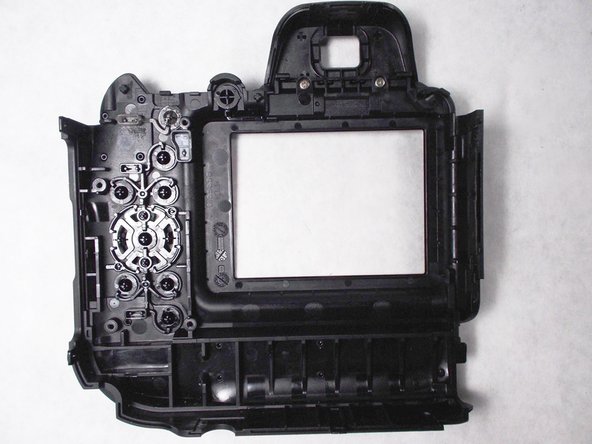
    1. Samsung WB2200F Flash Option Button Replacement, Flash Option Button: adım 8, 1 resimden 1.
      • Looking at the back of the exposed face plate, remove the four 5mm screws, that hold down the metal cover, using the screw driver with the JIS size 000 head.

      FixBot'a Sor

      Yorum Ekle

    2. Samsung WB2200F Flash Option Button Replacement: adım 9, 1 resimden 1.
      • Gently lift off the metal cover.

      FixBot'a Sor

      Yorum Ekle

    3. Samsung WB2200F Flash Option Button Replacement: adım 10, 1 resimden 1.
      • Clean out any dust or debris from the button interface.

      • Replace faulty button.

      FixBot'a Sor

      Yorum Ekle

Sonuç

To reassemble your device, follow these instructions in reverse order.

İptal et: Bu kılavuzu tamamlamadım.

Rachelle

Üyelik tarihi: 03/08/16

213 İtibar

2 adet Kılavuz yazıldı

Ekip

UMass Dartmouth, Team 5-4, Landers Spring 2016 UMass Dartmouth, Team 5-4, Landers Spring 2016 üyesi

UMASSD-LANDERS-S16S5G4

3 Üyeler

12 adet Kılavuz yazıldı

0Kılavuz Yorumları

Yorum Ekle

İstatistikleri Görüntüle:

Son 24 Saat: 2

Son 7 gün: 15

Son 30 gün: 38

Her zaman: 590