Ana içeriğe geç
Onarım Topluluğuna Katılın - Hesap Oluşturun

Sansa e260R Memory Board Replacement

Neye ihtiyacın var

  1. Sansa e260R Memory Board Replacement, Rear Case: adım 1, 1 resimden 1.
    • Before disassembling the device, make sure it is powered off.

    • Remove the four 1.5mm screws on the back of the device.

    FixBot'a Sor

    Yorum Ekle

  2. Sansa e260R Memory Board Replacement: adım 2, 1 resimden 1.
    • Using a plastic opening tool, lift the metal backing from the front of the device.

    FixBot'a Sor

    Yorum Ekle

  3. Sansa e260R Memory Board Replacement: adım 3, 1 resimden 1.
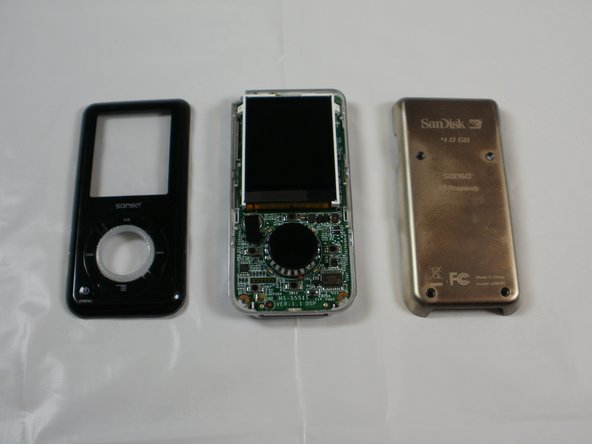
    • Pull the rear panel off of the Sansa e260R.

    FixBot'a Sor

    Yorum Ekle

  4. Sansa e260R Memory Board Replacement, Battery: adım 4, 1 resimden 1.
    • Grip the bottom of the battery with your thumb and forefinger and pull it away from the device.

    FixBot'a Sor

    Yorum Ekle

  5. Sansa e260R Memory Board Replacement, Front Panel: adım 5, 1 resimden 1.
    • Remove the four 1.5mm screws on the inner casing of the device.

    • These screws are very small and hard to extract from the casing. It may be helpful to use a magnetic screwdriver.

    FixBot'a Sor

    Yorum Ekle

  6. Sansa e260R Memory Board Replacement: adım 6, 1 resimden 1.
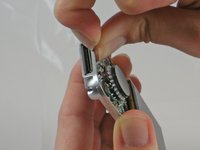
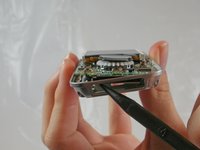
    • Flip the device so that the front is facing you.

    • Slide a plastic opening tool between the plastic front cover and the metal back cover of the device.

    FixBot'a Sor

    Yorum Ekle

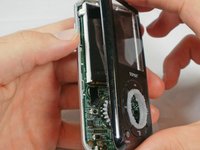
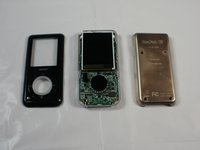
  7. Sansa e260R Memory Board Replacement: adım 7, 2 resimden 1. Sansa e260R Memory Board Replacement: adım 7, 2 resimden 2.
    • Pull the front cover away from the rest of the device.

    FixBot'a Sor

    Yorum Ekle

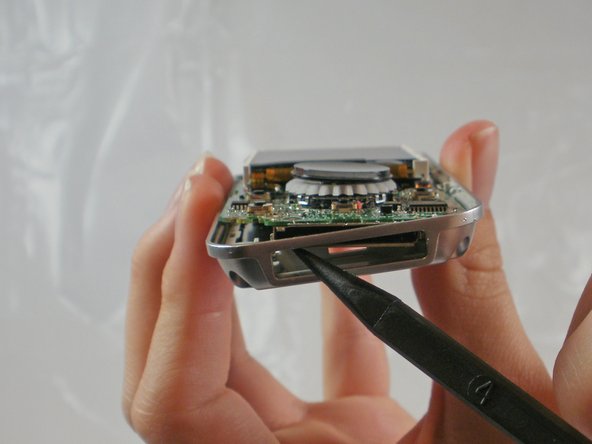
  8. Sansa e260R Memory Board Replacement, Memory Board: adım 8, 2 resimden 1. Sansa e260R Memory Board Replacement, Memory Board: adım 8, 2 resimden 2.
    • Near the charging port, pull the case away from the motherboard to create clearance to remove the motherboard.

    • Use the spudger to push the motherboard in and pop the metal edge of the charging port up and inside the plastic case.

    FixBot'a Sor

    Yorum Ekle

  9. Sansa e260R Memory Board Replacement: adım 9, 1 resimden 1.
    • Pull the bottom of the motherboard up and then out.

    FixBot'a Sor

    Yorum Ekle

  10. Sansa e260R Memory Board Replacement: adım 10, 1 resimden 1.
    • On the back of the motherboard, there is a rectangle of rubber.

    • Peel the rectangle off slowly.

    FixBot'a Sor

    Yorum Ekle

  11. Sansa e260R Memory Board Replacement: adım 11, 1 resimden 1.
    • Under the rubber rectangle, there is a strip of black tape.

    • Peel the tape off about halfway so that it is no longer attached to the memory board.

    FixBot'a Sor

    Yorum Ekle

  12. Sansa e260R Memory Board Replacement: adım 12, 1 resimden 1.
    • Carefully peel the memory board away from the rest of the motherboard

    FixBot'a Sor

    Yorum Ekle

Sonuç

To reassemble your device, follow these instructions in reverse order.

İptal et: Bu kılavuzu tamamlamadım.

6 farklı kişi bu kılavuzu tamamladı.

JenniferW

Üyelik tarihi: 01/31/12

194 İtibar

2 adet Kılavuz yazıldı

Ekip

Cal Poly, Team 8-15, Maness Winter 2012 Cal Poly, Team 8-15, Maness Winter 2012 üyesi

CPSU-MANESS-W12S8G15

5 Üyeler

5 adet Kılavuz yazıldı

1Rehber Yorum

thanks a million for this. i accidentally erased the boot partition, bought another one on eBay with a defective audio channel and switched the memory board: eureka! i’m happy listening to my tunes again!

Admin User - Yanıt Paylaş

Yorum Ekle

İstatistikleri Görüntüle:

Son 24 Saat: 1

Son 7 gün: 7

Son 30 gün: 61

Her zaman: 3,031