Ana içeriğe geç
Onarım Topluluğuna Katılın - Hesap Oluşturun

Sega Game Gear Headphone Jack/Volume Wheel Replacement

Neye ihtiyacın var

    1. Sega Game Gear Headphone Jack/Volume Wheel Replacement, Battery: adım 1, 1 resimden 1.
      • Place your device upside down and locate the two battery compartments.

      FixBot'a Sor

      Yorum Ekle

    2. Sega Game Gear Headphone Jack/Volume Wheel Replacement: adım 2, 1 resimden 1.
      • Press on the tabs at the bottom of the battery covers then lift up to remove.

      • Remove batteries if they are present.

      FixBot'a Sor

      Yorum Ekle

    1. Sega Game Gear Headphone Jack/Volume Wheel Replacement, Case: adım 3, 1 resimden 1.
      • Remove the following screws:

      • Six Phillips screws

      • One 4.5 mm Gamebit screw

      FixBot'a Sor

      Yorum Ekle

    2. Sega Game Gear Headphone Jack/Volume Wheel Replacement: adım 4, 1 resimden 1.
      Bu adımda kullanılan alet:
      Tweezers
      $4.99
      • Use tweezers to take all other screws out.

      FixBot'a Sor

      Yorum Ekle

    3. Sega Game Gear Headphone Jack/Volume Wheel Replacement: adım 5, 2 resimden 1. Sega Game Gear Headphone Jack/Volume Wheel Replacement: adım 5, 2 resimden 2.
      • Gently open the case by unfolding it over the top of the Sega Game Gear.

      • Do not pull the back of the case away, as cables are connected between both sides.

      FixBot'a Sor

      Yorum Ekle

    4. Sega Game Gear Headphone Jack/Volume Wheel Replacement: adım 6, 3 resimden 1. Sega Game Gear Headphone Jack/Volume Wheel Replacement: adım 6, 3 resimden 2. Sega Game Gear Headphone Jack/Volume Wheel Replacement: adım 6, 3 resimden 3.
      • Carefully unplug the 2 white-tipped connectors on the top cover.

      FixBot'a Sor

      Yorum Ekle

    1. Sega Game Gear Headphone Jack/Volume Wheel Replacement, Headphone Jack/Volume Wheel: adım 7, 2 resimden 1. Sega Game Gear Headphone Jack/Volume Wheel Replacement, Headphone Jack/Volume Wheel: adım 7, 2 resimden 2.
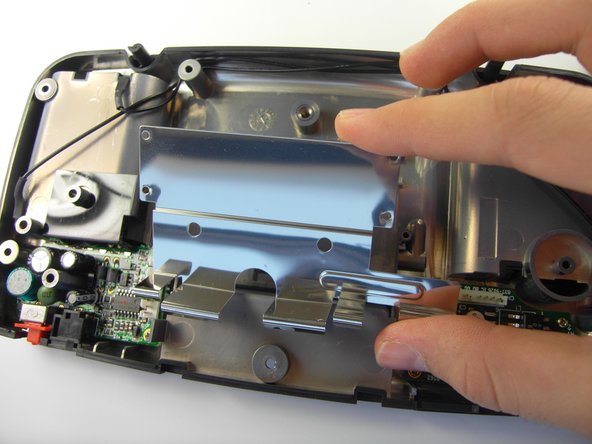
      • Unscrew the screws to remove the metal covering.

      FixBot'a Sor

      Yorum Ekle

    2. Sega Game Gear Headphone Jack/Volume Wheel Replacement: adım 8, 1 resimden 1.
      • The screws that need to be removed are missing from this picture.

      • Remove the two screws from the highlighted locations.

      FixBot'a Sor

      Yorum Ekle

Sonuç

To reassemble your device, follow these instructions in reverse order.

İptal et: Bu kılavuzu tamamlamadım.

Brandon Page

Üyelik tarihi: 04/15/10

217 İtibar

2 adet Kılavuz yazıldı

Ekip

Cal Poly, Team 28-33, Regan Spring 2010 Cal Poly, Team 28-33, Regan Spring 2010 üyesi

CPSU-REGAN-S10S28G33

5 Üyeler

66 adet Kılavuz yazıldı

0Kılavuz Yorumları

Yorum Ekle

İstatistikleri Görüntüle:

Son 24 Saat: 0

Son 7 gün: 11

Son 30 gün: 53

Her zaman: 8,149