Ana içeriğe geç
Onarım Topluluğuna Katılın - Hesap Oluşturun

Sidekick II Keyboard Replacement

Neye ihtiyacın var

    1. Sidekick II Keyboard Replacement, Outer Casing: adım 1, 1 resimden 1.
      • Use the plastic opening tool to remove the 4 buttons on each corner of the Sidekick.

      • Gently pry open button and remove button.

      • Do this for each of the 3 buttons remaining.

      FixBot'a Sor

      Yorum Ekle

    2. Sidekick II Keyboard Replacement: adım 2, 2 resimden 1. Sidekick II Keyboard Replacement: adım 2, 2 resimden 2.
      • The bumpers on the top and bottom of the phone can be removed by simply "peeling" them off.

      FixBot'a Sor

      Yorum Ekle

    3. Sidekick II Keyboard Replacement: adım 3, 1 resimden 1.
      • Use the T6 Torx Screwdriver to remove the 4 screws that are underneath the 4 buttons you removed in step one.

      FixBot'a Sor

      Yorum Ekle

    4. Sidekick II Keyboard Replacement: adım 4, 1 resimden 1.
      • Flip the screen up halfway (90 degrees), to reveal the 2 screws above the right side of the keyboard.

      • Use the Torx 6 screwdriver to remove these 2 screws.

      • Be careful in handling the phone after removing the screws, because the two main bodies of the phone are no longer attached.

      FixBot'a Sor

      Yorum Ekle

    5. Sidekick II Keyboard Replacement: adım 5, 1 resimden 1.
      • After removing the 6 screws and both bumpers, the phone will be easy to separate into the two main bodies.

      • You can use your hands to simply pull apart the top casing from the bottom casing.

      FixBot'a Sor

      Yorum Ekle

    1. Sidekick II Keyboard Replacement, Keyboard: adım 6, 2 resimden 1. Sidekick II Keyboard Replacement, Keyboard: adım 6, 2 resimden 2.
      • Remove screen from case

      FixBot'a Sor

      Yorum Ekle

    2. Sidekick II Keyboard Replacement: adım 7, 1 resimden 1.
      • Remove both black "rivets" from the back of the case with the plastic opening tool.

      FixBot'a Sor

      Yorum Ekle

    3. Sidekick II Keyboard Replacement: adım 8, 1 resimden 1.
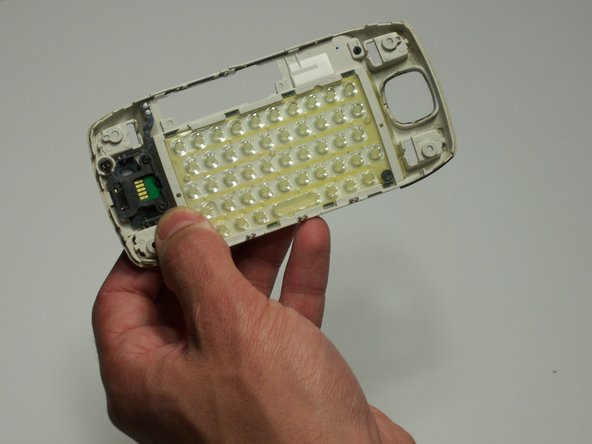
      • Push keyboard out of the front of the casing with your thumbs.

      • Make sure not to press too hard; you may break the board.

      FixBot'a Sor

      Yorum Ekle

Bitiş Çizgisi

İptal et: Bu kılavuzu tamamlamadım.

michael albaum

Üyelik tarihi: 01/20/10

108 İtibar

6 adet Kılavuz yazıldı

Ekip

Cal Poly, Team 3-19, Maness Winter 2010 Cal Poly, Team 3-19, Maness Winter 2010 üyesi

CPSU-MANESS-W10S3G19

4 Üyeler

30 adet Kılavuz yazıldı

0Kılavuz Yorumları

Yorum Ekle

İstatistikleri Görüntüle:

Son 24 Saat: 0

Son 7 gün: 6

Son 30 gün: 31

Her zaman: 2,455