Bu çeviri bir makine tarafından oluşturulmuştur ve henüz bir kişi tarafından incelenmemiştir. Bu dili konuşuyor musunuz? İnceleme için.
Giriş
Arka kasanın değişimi, kameranın çevresinde ve batarya yuvasının içinde bulunan çok sayıda vidanın sökülmesini gerektirir. Bağlayıcılar çıkarıldıktan sonra arka kasayı dikkatlice ayırabilirsiniz.
Neye ihtiyacın var
-
-
-
Sürgüyü "OPEN" konumuna getirerek batarya paketi kapağını açın.
-
Batarya paketinin içindeki 3,25 mm gümüş vidayı bir yıldız tornavida ile çıkarın.
 FixBot'a Sor
-
-
-
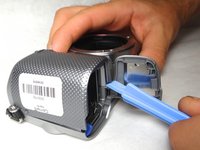
Plastik kanırtma aparatını kullanarak kasanın köşesini kameradan ayırın.
-
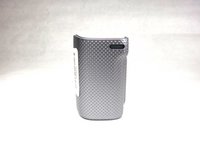
Ön kasanın bir parçası artık kameradan ayrılmış olmalıdır.
-
-
-
-
-
-
Kameranın altındaki üç adet (3,5 mm) vidayı yıldız tornavida ile çıkarın.
-
-
-
HDMI bağlantı noktasını açın ve o tarafta ortaya çıkan iki adet 3,5 mm'lik yıldız vidayı çıkarın.
-
-
-
Batarya grubunun iç kısmındaki iki adet 4 mm vidayı ve hemen yanındaki bir adet 3,5 mm vidayı çıkarın.
-
-
-
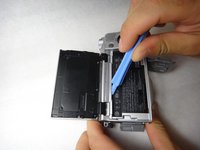
Kameranın alt kısmına bakarak, plastik kanırtma aparatını kullanarak arka kasayı kamera gövdesinden ayırıp kaldırın.
-
-
-
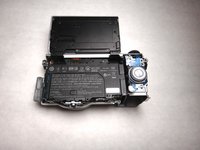
Plastik kanırtma aparatını tekrar kullanarak arka çerçeveyi çıkarmak için kameranın üst kısmından dikkatlice ayırın.
-
Arka çerçeve kırılgandır, bu yüzden plastik kanırtma aparatını nazikçe kullanın.
-
-





Cihazınızı tekrar monte etmek için bu talimatları ters sırayla uygulayın.
İptal et: Bu kılavuzu tamamlamadım.
Bir başkası bu kılavuzu tamamladı.

Ekip

Cal Poly, Team 8-9, Regan Spring 2014 Cal Poly, Team 8-9, Regan Spring 2014 üyesi
CPSU-REGAN-S14S8G9
4 Üyeler
84 adet Kılavuz yazıldı
