Ana içeriğe geç
Onarım Topluluğuna Katılın - Hesap Oluşturun

Sony PlayStation 3D Display Power Port Replacement

Neye ihtiyacın var

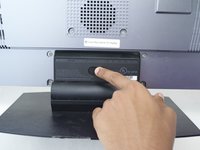
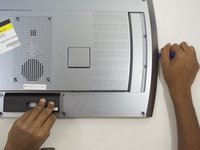
  1. Sony PlayStation 3D Display Power Port Replacement, Rear Case: adım 1, 2 resimden 1. Sony PlayStation 3D Display Power Port Replacement, Rear Case: adım 1, 2 resimden 2.
    • Remove the base by pushing in the button and sliding out the unit.

    FixBot'a Sor

    Yorum Ekle

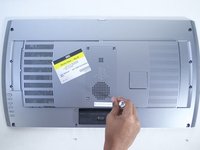
  2. Sony PlayStation 3D Display Power Port Replacement: adım 2, 3 resimden 1. Sony PlayStation 3D Display Power Port Replacement: adım 2, 3 resimden 2. Sony PlayStation 3D Display Power Port Replacement: adım 2, 3 resimden 3.
    • Remove USB port cover from back plate with a metal spudger.

    • This will prevent the cover from falling under the back plate once it is removed.

    FixBot'a Sor

    Yorum Ekle

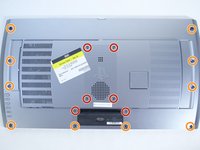
  3. Sony PlayStation 3D Display Power Port Replacement: adım 3, 2 resimden 1. Sony PlayStation 3D Display Power Port Replacement: adım 3, 2 resimden 2.
    • With the Phillips #02 screwdriver, remove the six 6 mm length x 6 mm head screws from the back plate.

    • With the Phillips #02 screwdriver, remove the ten 6 mm length x 8 mm head screws from the back plate.

    • These screws have different threads and need to be kept separate.

    FixBot'a Sor

    Yorum Ekle

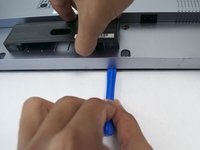
  4. Sony PlayStation 3D Display Power Port Replacement: adım 4, 3 resimden 1. Sony PlayStation 3D Display Power Port Replacement: adım 4, 3 resimden 2. Sony PlayStation 3D Display Power Port Replacement: adım 4, 3 resimden 3.
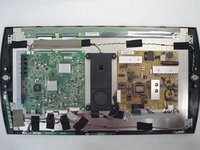
    • Remove back plate with a plastic opening tool by slowing prying around the entire plate.

    • Be gentle to avoid breaking the plastic clips which hold the plate.

    • Once separated the plate easily lifts off.

    FixBot'a Sor

    Yorum Ekle

  5. Sony PlayStation 3D Display Power Port Replacement, Power Port: adım 5, 3 resimden 1. Sony PlayStation 3D Display Power Port Replacement, Power Port: adım 5, 3 resimden 2. Sony PlayStation 3D Display Power Port Replacement, Power Port: adım 5, 3 resimden 3.
    • With the Phillips #02 screwdriver, remove the two 5mm length x 7mm head screws from the left and right side of the power port plate.

    FixBot'a Sor

    Yorum Ekle

  6. Sony PlayStation 3D Display Power Port Replacement: adım 6, 3 resimden 1. Sony PlayStation 3D Display Power Port Replacement: adım 6, 3 resimden 2. Sony PlayStation 3D Display Power Port Replacement: adım 6, 3 resimden 3.
    • Remove the power port by depressing the white tab attached to the wires.

    FixBot'a Sor

    Yorum Ekle

Sonuç

To reassemble your device, follow these instructions in reverse order.

İptal et: Bu kılavuzu tamamlamadım.

Bir başkası bu kılavuzu tamamladı.

Logan Simon

Üyelik tarihi: 10/08/15

234 İtibar

1 Kılavuz yazıldı

Ekip

Cal Poly, Team 12-16, Maness Fall 2015 Cal Poly, Team 12-16, Maness Fall 2015 üyesi

CPSU-MANESS-F15S12G16

4 Üyeler

8 adet Kılavuz yazıldı

0Kılavuz Yorumları

Yorum Ekle

İstatistikleri Görüntüle:

Son 24 Saat: 0

Son 7 gün: 7

Son 30 gün: 38

Her zaman: 2,075