Ana içeriğe geç
Onarım Topluluğuna Katılın - Hesap Oluşturun

Sony Reader Touch Edition PRS-600 Power Button Replacement

Neye ihtiyacın var

  1. Sony Reader Touch Edition PRS-600 Power Button Replacement, Back Panel: adım 1, 1 resimden 1.
    • Using the Phillips head screwdriver PH000, remove the two 1.4 mm screws that are located on the backside of the device.

    FixBot'a Sor

    Yorum Ekle

  2. Sony Reader Touch Edition PRS-600 Power Button Replacement: adım 2, 1 resimden 1.
    • Slide the back cover off by pushing it to the left, away from the side that held the screws.

    • Remove the cover.

    FixBot'a Sor

    Yorum Ekle

  3. Sony Reader Touch Edition PRS-600 Power Button Replacement: adım 3, 1 resimden 1.
    • This is what the device should look like once the back cover panel has been removed.

    FixBot'a Sor

    Yorum Ekle

  4. Sony Reader Touch Edition PRS-600 Power Button Replacement, Battery: adım 4, 1 resimden 1.
    • Once the back cover has been removed locate the battery in the bottom right corner of the device.

    • Using the pointed end of the spudger, push out the white plug that is connected to the battery from its beige base.

    FixBot'a Sor

    Yorum Ekle

  5. Sony Reader Touch Edition PRS-600 Power Button Replacement: adım 5, 1 resimden 1.
    • Use the flat end of the spudger to pry the battery out of its holder. There may be glue holding it in place.

    FixBot'a Sor

    Yorum Ekle

  6. Sony Reader Touch Edition PRS-600 Power Button Replacement, Power Button: adım 6, 1 resimden 1.
    • Remove the stylus from the device.

    FixBot'a Sor

    Yorum Ekle

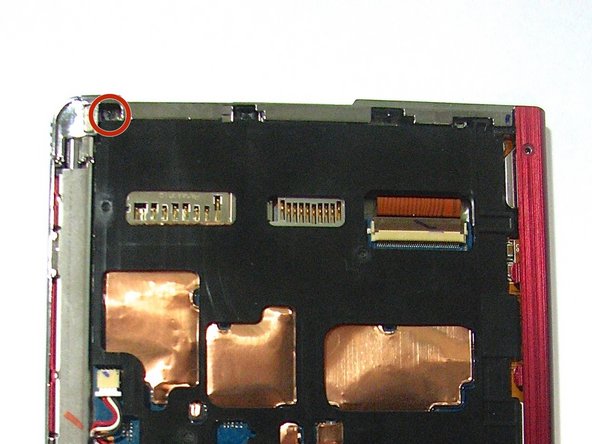
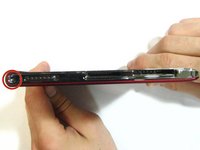
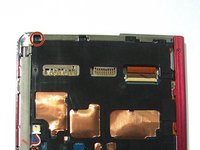
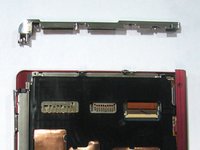
  7. Sony Reader Touch Edition PRS-600 Power Button Replacement: adım 7, 3 resimden 1. Sony Reader Touch Edition PRS-600 Power Button Replacement: adım 7, 3 resimden 2. Sony Reader Touch Edition PRS-600 Power Button Replacement: adım 7, 3 resimden 3.
    • Using the Phillips screwdriver remove the 1.4 mm screw from the top panel.

    • Using the same screwdriver, remove the 1.4 mm screw from the back of the device.

    • Pry apart off the top panel of the device.

    FixBot'a Sor

    Yorum Ekle

Sonuç

To reassemble your device, follow these instructions in reverse order.

İptal et: Bu kılavuzu tamamlamadım.

Zachary Jeffers

Üyelik tarihi: 10/13/14

412 İtibar

4 adet Kılavuz yazıldı

Ekip

Clemson, Team 1-4, Benson Fall 2014 Clemson, Team 1-4, Benson Fall 2014 üyesi

CLEM-BENSON-F14S1G4

4 Üyeler

22 adet Kılavuz yazıldı

0Kılavuz Yorumları

Yorum Ekle

İstatistikleri Görüntüle:

Son 24 Saat: 5

Son 7 gün: 13

Son 30 gün: 58

Her zaman: 963