Ana içeriğe geç
Onarım Topluluğuna Katılın - Hesap Oluşturun

Sony SRS-XB30 Wires Replacement

Neye ihtiyacın var

  1. Sony SRS-XB30 Wires Replacement, Battery: adım 1, 1 resimden 1.
    • To remove the speaker grill, insert the big spudger underneath it in each corner.

    • Work around the edges to pry the grill up and off.

    FixBot'a Sor

    Yorum Ekle

  2. Sony SRS-XB30 Wires Replacement: adım 2, 2 resimden 1. Sony SRS-XB30 Wires Replacement: adım 2, 2 resimden 2.
    • With the Sony logo facing towards you, use the medium spudger to lift the side plates from the internal frame.

    • This will need to be done on all four sides of the speaker to remove all four panels

    • This requires some effort because the adhesive is sticky.

    FixBot'a Sor

    Yorum Ekle

  3. Sony SRS-XB30 Wires Replacement: adım 3, 2 resimden 1. Sony SRS-XB30 Wires Replacement: adım 3, 2 resimden 2.
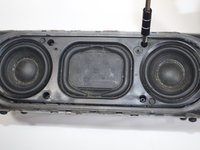
    • Locate the four screws on the now exposed front panel.

    • Using the screwdriver with bit T7, unscrew each screw (15.0 mm long).

    FixBot'a Sor

    Yorum Ekle

  4. Sony SRS-XB30 Wires Replacement: adım 4, 1 resimden 1.
    • Next, remove the four outer edge screws, located on each corner of the speaker. The outer edge of the speaker is a clear plastic.

    • Use the same T7 screwdriver head here.

    • Remove each of the four corner screws (15.0 mm long).

    FixBot'a Sor

    Yorum Ekle

  5. Sony SRS-XB30 Wires Replacement: adım 5, 1 resimden 1.
    • With a little force, carefully lift the lid of the speaker.

    • Make sure that you do not pull on the wires.

    FixBot'a Sor

    Yorum Ekle

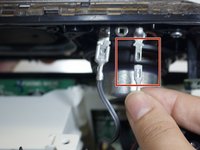
  6. Sony SRS-XB30 Wires Replacement: adım 6, 3 resimden 1. Sony SRS-XB30 Wires Replacement: adım 6, 3 resimden 2. Sony SRS-XB30 Wires Replacement: adım 6, 3 resimden 3.
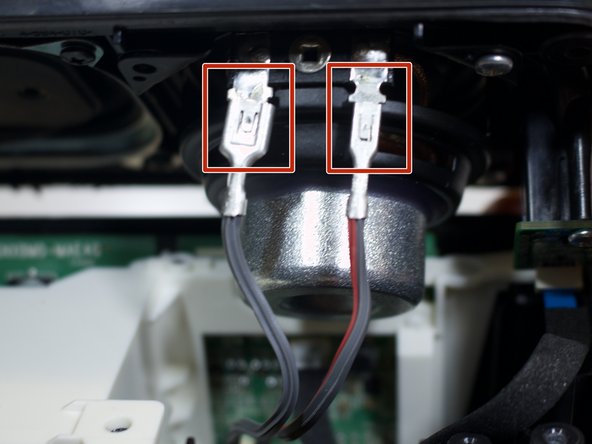
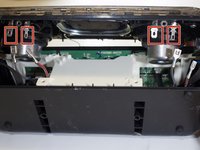
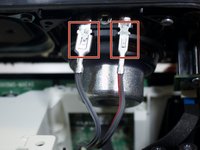
    • Unclip the four wire connectors (that are attached to the speaker lid).

    • Disconnect the thin yellow wire (attached to the speaker lid) from its port.

    FixBot'a Sor

    Yorum Ekle

  7. Sony SRS-XB30 Wires Replacement: adım 7, 1 resimden 1.
    • Separate the speaker lid from the bottom frame.

    • To prepare the speaker for the next step place the lid parallel to the frame.

    FixBot'a Sor

    Yorum Ekle

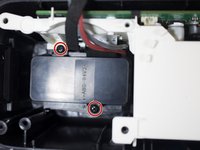
  8. Sony SRS-XB30 Wires Replacement: adım 8, 1 resimden 1.
    • Locate the two silver screws (9 mm) attached to the two LED-light-chips on the speaker lid.

    • Using the screwdriver with bit PH1, unscrew each screw.

    FixBot'a Sor

    Yorum Ekle

  9. Sony SRS-XB30 Wires Replacement: adım 9, 1 resimden 1.
    • Separate the speaker lid entirely from the bottom frame.

    FixBot'a Sor

    Yorum Ekle

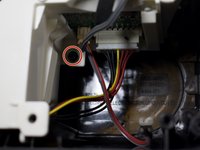
  10. Sony SRS-XB30 Wires Replacement: adım 10, 1 resimden 1.
    • Remove the top screw (10 mm).

    • Use the screwdriver with bit T7.

    FixBot'a Sor

    Yorum Ekle

  11. Sony SRS-XB30 Wires Replacement: adım 11, 2 resimden 1. Sony SRS-XB30 Wires Replacement: adım 11, 2 resimden 2.
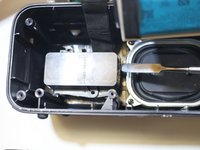
    • Locate and remove the three black screws (10.0 mm) within the internal frame. Use bit T7.

    • There are two screws on the left side of the white box and one to its right.

    FixBot'a Sor

    Yorum Ekle

  12. Sony SRS-XB30 Wires Replacement: adım 12, 1 resimden 1.
    • Slightly lift the white box with all the wires still attached.

    FixBot'a Sor

    Yorum Ekle

  13. Sony SRS-XB30 Wires Replacement: adım 13, 2 resimden 1. Sony SRS-XB30 Wires Replacement: adım 13, 2 resimden 2.
    • Take the big spudger and pry the black casing up from the circuit box.

    FixBot'a Sor

    Yorum Ekle

  14. Sony SRS-XB30 Wires Replacement: adım 14, 1 resimden 1.
    • Locate the blue film attached to the circuit box containing the charging port.

    • Detach the blue film from the box.

    FixBot'a Sor

    Yorum Ekle

  15. Sony SRS-XB30 Wires Replacement: adım 15, 1 resimden 1.
    • Detach the yellow, black and red wires by pulling them directly up.

    FixBot'a Sor

    Yorum Ekle

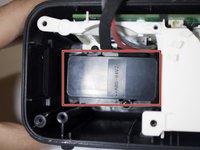
  16. Sony SRS-XB30 Wires Replacement: adım 16, 2 resimden 1. Sony SRS-XB30 Wires Replacement: adım 16, 2 resimden 2.
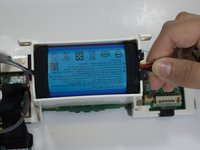
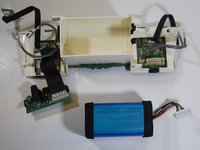
    • Insert the spudger along the battery edge and firmly hold the wires. Lift both sides up. The battery will pop out from its encasement.

    FixBot'a Sor

    Yorum Ekle

  17. Sony SRS-XB30 Wires Replacement, Wires: adım 17, 1 resimden 1.
    • Locate the black, yellow, and red wires and steadily pull them smooth if they are tangled.

    FixBot'a Sor

    Yorum Ekle

  18. Sony SRS-XB30 Wires Replacement: adım 18, 1 resimden 1.
    • Unravel any tangled wires or replace any damaged wires.

    • The wires should all run parallel to one another.

    FixBot'a Sor

    Yorum Ekle

Sonuç

To reassemble your device, follow these instructions in reverse order.

İptal et: Bu kılavuzu tamamlamadım.

0Kılavuz Yorumları

Yorum Ekle

İstatistikleri Görüntüle:

Son 24 Saat: 3

Son 7 gün: 9

Son 30 gün: 40

Her zaman: 1,884