Giriş
If your Sony Walkman D-E356CK has issues within the device, then the back panel will have to be removed from the front panel, use this guide to remove the back panel of the Sony Walkman D-E356CK. The only tools you will need for this guide are a prying tool and a Philips head screwdriver.
Neye ihtiyacın var
-
-
Open the battery compartment.
-
Remove the AA batteries from within the compartment.
 FixBot'a Sor
-
-
-
Press the button located in the bottom left corner of the device labeled "open."
-
Remove the three 11 mm-long Phillips screws.
-
-
-
-
Open the battery compartment.
-
Remove the two 11 mm-long Phillips screws on the back side of the Walkman.
-
-
-
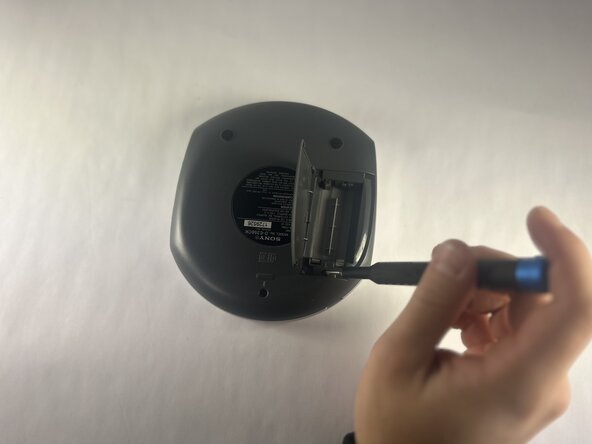
Insert an opening tool into the seam between the back panel and chassis.
-
Pry around the perimeter until the back panel releases.
-
Remove the back panel.
-




To reassemble your device, follow the above steps in reverse order.
Repair didn’t go as planned? Try some basic troubleshooting or ask our Answers community for help.
İptal et: Bu kılavuzu tamamlamadım.
Bir başkası bu kılavuzu tamamladı.

Ekip

UMass Dartmouth, Team 1-1, Botvin Fall 2025 UMass Dartmouth, Team 1-1, Botvin Fall 2025 üyesi
UMASSD-BOTVIN-F25S1G1
4 Üyeler
5 adet Kılavuz yazıldı
