Ana içeriğe geç
Onarım Topluluğuna Katılın - Hesap Oluşturun

Sony Xperia XZ2 Battery Replacement

Neye ihtiyacın var

  1. Sony Xperia XZ2 Battery Replacement, LCD Screen: adım 1, 3 resimden 1. Sony Xperia XZ2 Battery Replacement, LCD Screen: adım 1, 3 resimden 2. Sony Xperia XZ2 Battery Replacement, LCD Screen: adım 1, 3 resimden 3.
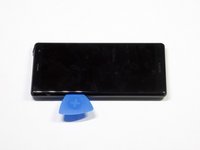
    • Weaken the glue that is keeping the screen in place by heating up the edges of the phone with a hair dryer or heat gun.

    • The phone gets very hot and can hurt the user handling it.

    FixBot'a Sor

    Yorum Ekle

  2. Sony Xperia XZ2 Battery Replacement: adım 2, 3 resimden 1. Sony Xperia XZ2 Battery Replacement: adım 2, 3 resimden 2. Sony Xperia XZ2 Battery Replacement: adım 2, 3 resimden 3.
    • Scrape all the glue from the inside edges by inserting opening picks into the bottom edge of the phone and working your way around the edges.

    • If the glue hardens and becomes difficult to move the plastic around the edges, reheat the phone.

    FixBot'a Sor

    Yorum Ekle

  3. Sony Xperia XZ2 Battery Replacement: adım 3, 2 resimden 1. Sony Xperia XZ2 Battery Replacement: adım 3, 2 resimden 2.
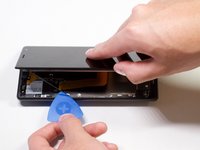
    • Pry open the phone by inserting an opening pick under one of the edges and removing the screen.

    • The screen is still attached by a connector, so do not pull the pieces apart.

    FixBot'a Sor

    Yorum Ekle

  4. Sony Xperia XZ2 Battery Replacement: adım 4, 1 resimden 1.
    Bu adımda kullanılan alet:
    Tweezers
    $3.99
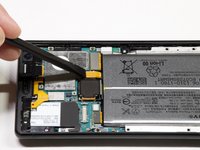
    • Remove the bracket covering the connector by grabbing one side of the bracket with angled tweezers and gently pulling it off.

    FixBot'a Sor

    Yorum Ekle

  5. Sony Xperia XZ2 Battery Replacement: adım 5, 1 resimden 1.
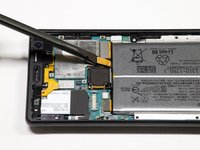
    • Gently remove the connector by using a spudger to pop it off.

    FixBot'a Sor

    Yorum Ekle

  6. Sony Xperia XZ2 Battery Replacement, Battery: adım 6, 1 resimden 1.
    • Take out the twelve 3.5mm screws using the Phillips #00 screwdriver.

    • Remove the one 3 mm Phillips #00 screws.

    • Remove the two 1mm Phillips #00 screws.

    • Fifteen screws should be removed in total in this step. (Not all the screws are visible in the picture.)

    FixBot'a Sor

    Yorum Ekle

  7. Sony Xperia XZ2 Battery Replacement: adım 7, 1 resimden 1.
    • Lift the metal screen shield out of the phone.

    FixBot'a Sor

    Yorum Ekle

  8. Sony Xperia XZ2 Battery Replacement: adım 8, 3 resimden 1. Sony Xperia XZ2 Battery Replacement: adım 8, 3 resimden 2. Sony Xperia XZ2 Battery Replacement: adım 8, 3 resimden 3.
    • Use the spudger to pry up the battery flex connector to pop the battery out.

    FixBot'a Sor

    Yorum Ekle

  9. Sony Xperia XZ2 Battery Replacement: adım 9, 1 resimden 1.
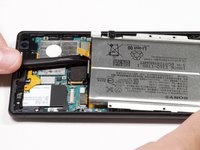
    • Lift the battery out of the phone.

    FixBot'a Sor

    Yorum Ekle

Sonuç

To reassemble your device, follow these instructions in reverse order.

İptal et: Bu kılavuzu tamamlamadım.

6 farklı kişi bu kılavuzu tamamladı.

Arti Jain

Üyelik tarihi: 01/24/19

261 İtibar

1 Kılavuz yazıldı

Ekip

Cal Poly, Team S19-G5, White Winter 2019 Cal Poly, Team S19-G5, White Winter 2019 üyesi

CPSU-WHITE-W19S19G5

4 Üyeler

12 adet Kılavuz yazıldı

1Rehber Yorum

لقد كان العمل على هذا الهاتف مريحا جدا و جميل

Mouad Driouch - Yanıt Paylaş

Yorum Ekle

İstatistikleri Görüntüle:

Son 24 Saat: 10

Son 7 gün: 81

Son 30 gün: 314

Her zaman: 32,724