Giriş
Your device is equipped with a single battery that is capable of providing several hours of normal usage. Deterioration over time or using while on the charger can cause the battery life to decrease or even cause the device to be unusable without being on the charger. To fix this, you must replace the battery.
Neye ihtiyacın var
-
-
-
Remove the two 4 mm Phillips head screws at the top of the device.
 FixBot'a Sor
-
-
-
Carefully remove the back cover by using a plastic opening tool, moving all the way around the perimeter of the tablet.
-
Set the back cover aside.
-
-
-
-
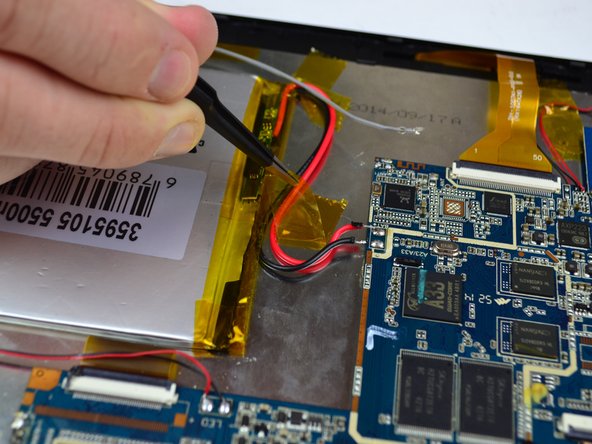
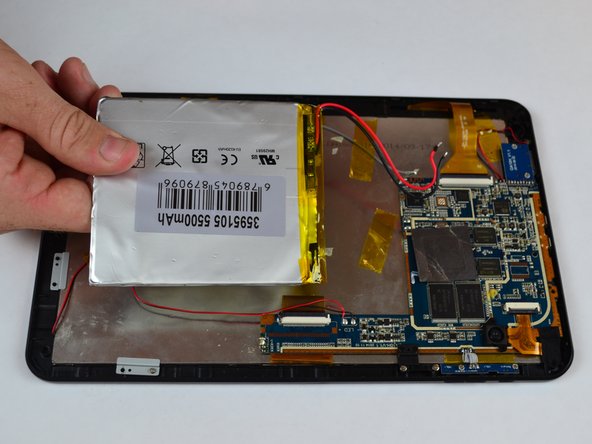
Locate the red and black wires that connect the battery to the motherboard.
-
Carefully peel away the tape that keeps the wires secured to the back of the display screen.
-
-
Bu adımda kullanılan alet:Tweezers$4.99
-
Soften the old solder by heating it with the soldering tool, so that the wires can be removed with tweezers.
-
-
-
Heat up the battery with the iOpener Heat tool in order to soften the adhesive that keeps the battery in place.
-
-






To reassemble your device, follow these instructions in reverse order.
İptal et: Bu kılavuzu tamamlamadım.
2 farklı kişi bu kılavuzu tamamladı.

Ekip

USF Tampa, Team 14-5, Eyestone Fall 2016 USF Tampa, Team 14-5, Eyestone Fall 2016 üyesi
USFT-EYESTONE-F16S14G5
4 Üyeler
15 adet Kılavuz yazıldı
