Giriş
This replacement guide will walk you through the steps needed to replace the battery on your Toshiba Encore Mini and will serve as the first step for any other replacements you may need to perform. Prior to removing any parts on your device, backing-up all data and photos to an external storage device is recommended. In this guide, you will be removing the following:
- Back Cover
- Battery
Neye ihtiyacın var
-
-
-
Using the flat end of the spudger, gently pry open the back case from the rest of the device.
 FixBot'a Sor
-
-
-
Bu adımda kullanılan alet:Tweezers$4.99
-
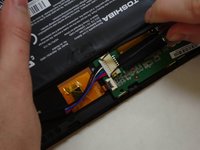
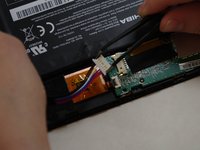
Using needle-nose tweezers, gently push the large white wire connector (connected to the black, red and blue wires) out of its housing.
-
-



To reassemble your device, follow these instructions in reverse order.
İptal et: Bu kılavuzu tamamlamadım.
5 farklı kişi bu kılavuzu tamamladı.

Ekip

UW Tacoma, Team 1-3, Liner SU 2015 UW Tacoma, Team 1-3, Liner SU 2015 üyesi
UWT-LINER-SU15S1G3
4 Üyeler
15 adet Kılavuz yazıldı
