Ana içeriğe geç
Onarım Topluluğuna Katılın - Hesap Oluşturun

Toshiba Satellite A105-S4284 Speakers Replacement

Neye ihtiyacın var

    1. Toshiba Satellite A105-S4284 Speakers Replacement, Battery: adım 1, 2 resimden 1. Toshiba Satellite A105-S4284 Speakers Replacement, Battery: adım 1, 2 resimden 2.
      • Make sure your computer is turned off and the computer is not plugged in.

      • Turn your laptop upside down, and slide the right release tab outward.

      • Using you left hand, hold the left release tab towards the left side and then pull the battery out.

      FixBot'a Sor

      Yorum Ekle

    1. Toshiba Satellite A105-S4284 Speakers Replacement, Keyboard: adım 2, 1 resimden 1.
      • Flip the laptop over so it is rightside up, and open the laptop all the way so that the screen is horizontal.

      FixBot'a Sor

      Yorum Ekle

    2. Toshiba Satellite A105-S4284 Speakers Replacement: adım 3, 3 resimden 1. Toshiba Satellite A105-S4284 Speakers Replacement: adım 3, 3 resimden 2. Toshiba Satellite A105-S4284 Speakers Replacement: adım 3, 3 resimden 3.
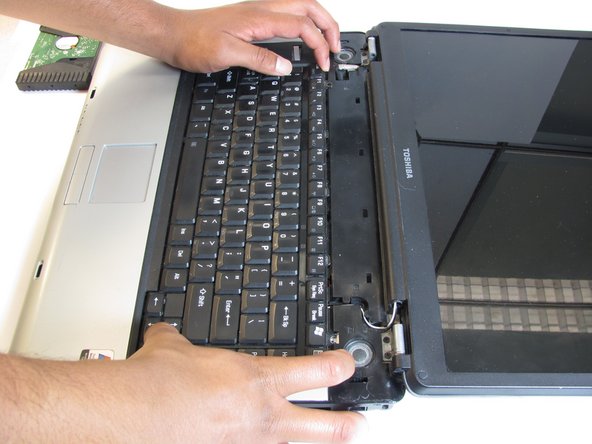
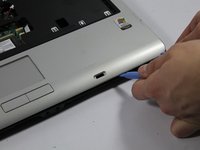
      • Using the plastic opening tool, pry off the panel above the keyboard, starting near the right front speaker.

      • Use the plastic opening tool to pop off tabs along the length of this panel.

      • This may feel like you're about to break something, but as long as you work your way down the panel and don't yank it out, the laptop will be fine.

      FixBot'a Sor

      Yorum Ekle

    3. Toshiba Satellite A105-S4284 Speakers Replacement: adım 4, 2 resimden 1. Toshiba Satellite A105-S4284 Speakers Replacement: adım 4, 2 resimden 2.
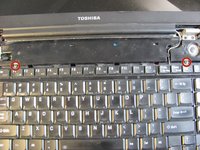
      • Unscrew the two 4.5 mm screws holding the keyboard on with the Phillips #1 screwdriver.

      FixBot'a Sor

      Yorum Ekle

    4. Toshiba Satellite A105-S4284 Speakers Replacement: adım 5, 3 resimden 1. Toshiba Satellite A105-S4284 Speakers Replacement: adım 5, 3 resimden 2. Toshiba Satellite A105-S4284 Speakers Replacement: adım 5, 3 resimden 3.
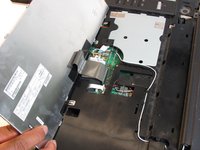
      • Lift the keyboard gently from the side closest the screen.

      • Pull out the ribbon connecting the keyboard to the laptop.

      FixBot'a Sor

      Yorum Ekle

    1. Toshiba Satellite A105-S4284 Speakers Replacement, Casing: adım 6, 3 resimden 1. Toshiba Satellite A105-S4284 Speakers Replacement, Casing: adım 6, 3 resimden 2. Toshiba Satellite A105-S4284 Speakers Replacement, Casing: adım 6, 3 resimden 3.
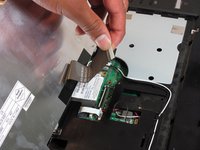
      • Disconnect wire attaching LCD to motherboard

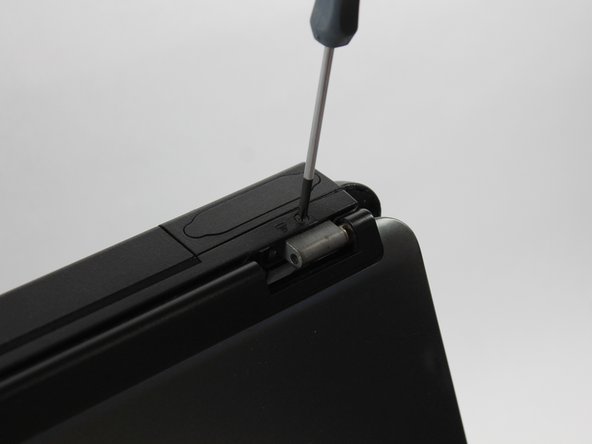
      • Using the Phillips screwdriver remove the two 4.0mm screws from each hinge above speakers

      • Partially close the lid and remove the last two 4.0mm screws from the back of the laptop.

      FixBot'a Sor

      Yorum Ekle

    2. Toshiba Satellite A105-S4284 Speakers Replacement: adım 7, 2 resimden 1. Toshiba Satellite A105-S4284 Speakers Replacement: adım 7, 2 resimden 2.
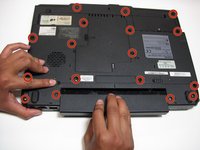
      • Remove the seventeen 4.5mm phillips screws on the bottom of the laptop.

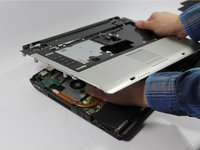
      • Using the pry tool separate the two halves of the laptop base.

      • Use caution when separating the laptop halves as they are still connected by two ribbon cables.

      FixBot'a Sor

      Yorum Ekle

    3. Toshiba Satellite A105-S4284 Speakers Replacement: adım 8, 2 resimden 1. Toshiba Satellite A105-S4284 Speakers Replacement: adım 8, 2 resimden 2.
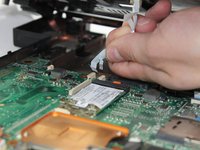
      • Lift the top half of the case enough to get your hand beneath it, and then remove the two ribbon cables that connect it to the motherboard.

      FixBot'a Sor

      Yorum Ekle

    1. Toshiba Satellite A105-S4284 Speakers Replacement, Speakers: adım 9, 1 resimden 1.
      • Remove the lower half of the laptop and lay upper half on its top.

      FixBot'a Sor

      Yorum Ekle

    2. Toshiba Satellite A105-S4284 Speakers Replacement: adım 10, 2 resimden 1. Toshiba Satellite A105-S4284 Speakers Replacement: adım 10, 2 resimden 2.
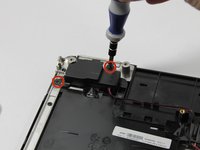
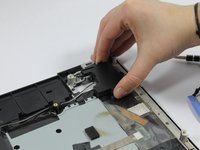
      • Using the Phillips screwdriver remove the two 4.0mm screws holding each of the speakers housings to the case.

      • Remove the speakers from the case being careful of the wires.

      FixBot'a Sor

      Yorum Ekle

    3. Toshiba Satellite A105-S4284 Speakers Replacement: adım 11, 1 resimden 1.
      • The wires for the speakers are color coded.The red and black wires are for the right speaker, and the black and white wires are for the left speaker.

      FixBot'a Sor

      Yorum Ekle

Sonuç

To reassemble your device, follow these instructions in reverse order.

İptal et: Bu kılavuzu tamamlamadım.

2 farklı kişi bu kılavuzu tamamladı.

Josh

Üyelik tarihi: 03/12/14

685 İtibar

5 adet Kılavuz yazıldı

Ekip

UMass Dartmouth, Team 1-6, Cichon Spring 2014 UMass Dartmouth, Team 1-6, Cichon Spring 2014 üyesi

UMASSD-CICHON-S14S1G6

3 Üyeler

72 adet Kılavuz yazıldı

0Kılavuz Yorumları

Yorum Ekle

İstatistikleri Görüntüle:

Son 24 Saat: 1

Son 7 gün: 5

Son 30 gün: 38

Her zaman: 2,278