Ana içeriğe geç
Onarım Topluluğuna Katılın - Hesap Oluşturun
Toshiba Satellite A205-S4577 Monitor Replacement

Neye ihtiyacın var

    1. Toshiba Satellite A205-S4577 Monitor Replacement, Battery: adım 1, 1 resimden 1.
      • Locate the two sliding locks indicated in the photo.

      • Slide the right lock (labeled "1") to the right. It will remain in the unlocked position.

      • Slide the left lock (labeled "2") to the left and hold it in place.

      FixBot'a Sor

      Yorum Ekle

    2. Toshiba Satellite A205-S4577 Monitor Replacement: adım 2, 1 resimden 1.
      • While holding the left lock, place your finger in the indentation next to the battery and lift the battery out.

      FixBot'a Sor

      Yorum Ekle

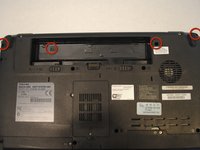
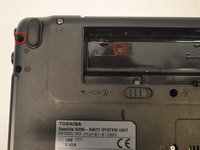
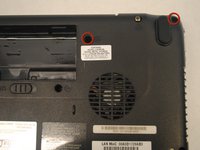
    1. Toshiba Satellite A205-S4577 Monitor Replacement, Speaker Cover: adım 3, 3 resimden 1. Toshiba Satellite A205-S4577 Monitor Replacement, Speaker Cover: adım 3, 3 resimden 2. Toshiba Satellite A205-S4577 Monitor Replacement, Speaker Cover: adım 3, 3 resimden 3.
      • Remove the four screws indicated in the photos using a Phillips 00 Screwdriver. Left to right: 6mm button-head, 3mm flat-head, 6mm button-head, 6mm button-head.

      FixBot'a Sor

      Yorum Ekle

    2. Toshiba Satellite A205-S4577 Monitor Replacement: adım 4, 1 resimden 1.
      • With your hands, grasp the speaker cover on the edge nearest to the screen.

      • Pry the speaker cover upward.

      FixBot'a Sor

      Yorum Ekle

    3. Toshiba Satellite A205-S4577 Monitor Replacement: adım 5, 1 resimden 1.
      • Remove the speaker cover. Your laptop will look like this photo when the speaker cover has been removed.

      FixBot'a Sor

      Yorum Ekle

    1. Toshiba Satellite A205-S4577 Monitor Replacement, Keyboard: adım 6, 1 resimden 1.
      • Remove the two 4mm flat-head screws indicated in the photo.

      FixBot'a Sor

      Yorum Ekle

    2. Toshiba Satellite A205-S4577 Monitor Replacement: adım 7, 1 resimden 1.
      • Slightly lift and ease the keyboard forward, toward the screen, until the tabs clear the case.

      • When all the tabs are free, slowly lift the bottom of the keyboard while keeping the top of the keyboard angled down. Continue to carefully rotate the keyboard over until you can access the ribbon cable that is still connecting it to the computer.

      FixBot'a Sor

      Yorum Ekle

    3. Toshiba Satellite A205-S4577 Monitor Replacement: adım 8, 1 resimden 1.
      • The Ribbon Cable must be disconnected here to release the keyboard.

      • Using a plastic splunger or the tip of your screwdriver gently push upward on the two black tabs securing the connection.

      • When the black plastic bar running across the cable is unseated you can slowly and carefully pull the ribbon cable free.

      • You can now lift and remove the keyboard.

      FixBot'a Sor

      Yorum Ekle

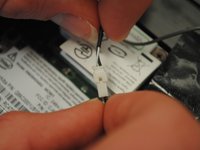
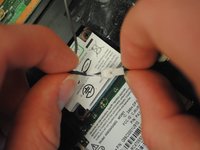
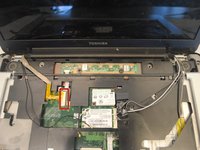
    1. Toshiba Satellite A205-S4577 Monitor Replacement, Monitor: adım 9, 3 resimden 1. Toshiba Satellite A205-S4577 Monitor Replacement, Monitor: adım 9, 3 resimden 2. Toshiba Satellite A205-S4577 Monitor Replacement, Monitor: adım 9, 3 resimden 3.
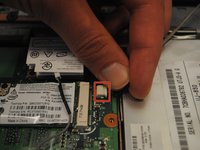
      • Locate the gray wire on the right.

      • Detach the white end by gently pulling each socket away from the other.

      FixBot'a Sor

      Yorum Ekle

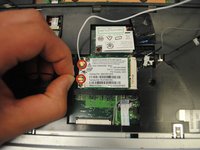
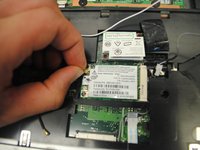
    2. Toshiba Satellite A205-S4577 Monitor Replacement: adım 10, 2 resimden 1. Toshiba Satellite A205-S4577 Monitor Replacement: adım 10, 2 resimden 2.
      • On the left, locate the black and white wires with gold tips on the end.

      • Pull up on the wires to detach them.

      FixBot'a Sor

      Yorum Ekle

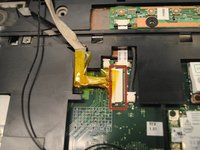
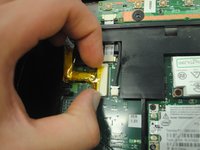
    3. Toshiba Satellite A205-S4577 Monitor Replacement: adım 11, 3 resimden 1. Toshiba Satellite A205-S4577 Monitor Replacement: adım 11, 3 resimden 2. Toshiba Satellite A205-S4577 Monitor Replacement: adım 11, 3 resimden 3.
      • Locate the thick tan cord on the left.

      • Slide the tan cord as shown to detach it.

      FixBot'a Sor

      Yorum Ekle

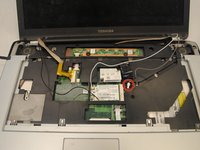
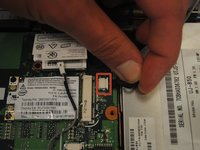
    4. Toshiba Satellite A205-S4577 Monitor Replacement: adım 12, 2 resimden 1. Toshiba Satellite A205-S4577 Monitor Replacement: adım 12, 2 resimden 2.
      • On the right, locate the thick black wire with the white rectangular end.

      • Pull up on it to detach it.

      FixBot'a Sor

      Yorum Ekle

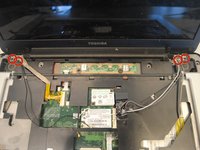
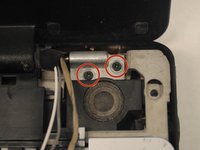
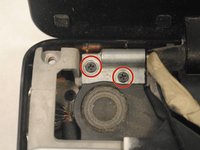
    5. Toshiba Satellite A205-S4577 Monitor Replacement: adım 13, 3 resimden 1. Toshiba Satellite A205-S4577 Monitor Replacement: adım 13, 3 resimden 2. Toshiba Satellite A205-S4577 Monitor Replacement: adım 13, 3 resimden 3.
      • Remove the four 8mm button-head screws that are located in the top right (2) and top left corners (2) of the front cover. Use a Phillips 00 Screwdriver.

      FixBot'a Sor

      Yorum Ekle

    6. Toshiba Satellite A205-S4577 Monitor Replacement: adım 14, 1 resimden 1.
      • Once all the wires are detached and screws are removed, pull up on the monitor to remove it.

      FixBot'a Sor

      Yorum Ekle

Sonuç

To reassemble your device, follow these instructions in reverse order.

İptal et: Bu kılavuzu tamamlamadım.

Delaney Giacalone

Üyelik tarihi: 04/18/13

40 İtibar

2 adet Kılavuz yazıldı

Ekip

Cal Poly, Team 17-6, Regan Spring 2013 Cal Poly, Team 17-6, Regan Spring 2013 üyesi

CPSU-REGAN-S13S17G6

5 Üyeler

123 adet Kılavuz yazıldı

0Kılavuz Yorumları

Yorum Ekle

İstatistikleri Görüntüle:

Son 24 Saat: 0

Son 7 gün: 6

Son 30 gün: 39

Her zaman: 2,200