Ana içeriğe geç
Onarım Topluluğuna Katılın - Hesap Oluşturun

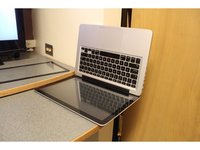
Unibody MacBook Pro 15" Glass Replacement

Neye ihtiyacın var

  1. Unibody MacBook Pro 15" Glass Replacement, Prepare a Workspace: adım 1, 1 resimden 1.
    • Set up a clean workspace and gather all supplies. You will need your Macbook Pro, a new screen, a hair dryer, a screen cleaning cloth, and a suction cup.

    FixBot'a Sor

    Yorum Ekle

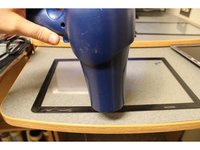
  2. Unibody MacBook Pro 15" Glass Replacement, Heat the Edges of the Screen: adım 2, 2 resimden 1. Unibody MacBook Pro 15" Glass Replacement, Heat the Edges of the Screen: adım 2, 2 resimden 2.
    • Use a hair dryer to heat the adhesive around the edges of the screen you are removing.

    FixBot'a Sor

    Yorum Ekle

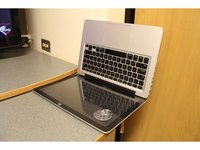
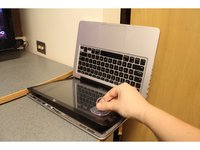
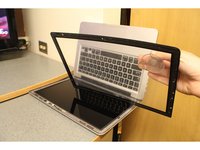
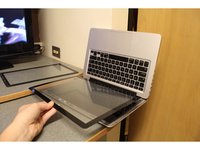
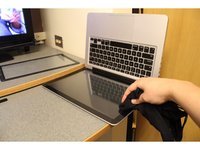
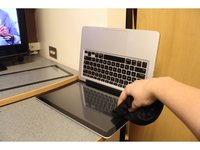
  3. Unibody MacBook Pro 15" Glass Replacement, Use suction to remove the Screen: adım 3, 3 resimden 1. Unibody MacBook Pro 15" Glass Replacement, Use suction to remove the Screen: adım 3, 3 resimden 2. Unibody MacBook Pro 15" Glass Replacement, Use suction to remove the Screen: adım 3, 3 resimden 3.
    • Attach the suction cup found in the iFixit repair kit to the corner of your screen, by gently pressing down until it seals. Lift screen away by pulling up on the suction cup key ring.

    FixBot'a Sor

    Yorum Ekle

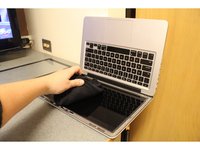
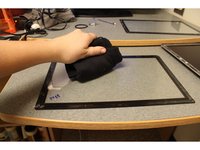
  4. Unibody MacBook Pro 15" Glass Replacement, Preparing for the New Screen: adım 4, 2 resimden 1. Unibody MacBook Pro 15" Glass Replacement, Preparing for the New Screen: adım 4, 2 resimden 2.
    • Use a screen cleaning cloth to buff out any marks on your Macbook Pros screen surface.

    • Use a screen cleaning cloth to buff out any marks on the inside of new glass that will be applied.

    FixBot'a Sor

    Yorum Ekle

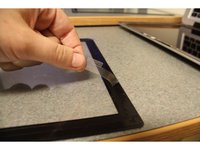
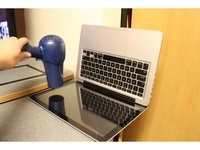
  5. Unibody MacBook Pro 15" Glass Replacement, Preparing Screen Adhesive: adım 5, 2 resimden 1. Unibody MacBook Pro 15" Glass Replacement, Preparing Screen Adhesive: adım 5, 2 resimden 2.
    • Remove the strips covering the adhesive on the new screen.

    • Heat the new adhesive strips evenly using the hair dryer.

    FixBot'a Sor
    Yorum Ekle

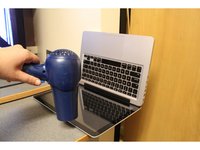
  6. Unibody MacBook Pro 15" Glass Replacement, Applying the New Screen: adım 6, 2 resimden 1. Unibody MacBook Pro 15" Glass Replacement, Applying the New Screen: adım 6, 2 resimden 2.
    • Place the new screen in position. Confirm that the new screen is properly aligned with the edges of the Macbook Pro.

    FixBot'a Sor
    Yorum Ekle

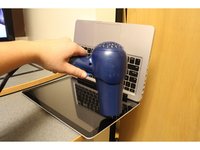
  7. Unibody MacBook Pro 15" Glass Replacement, Attaching the New Screen: adım 7, 2 resimden 1. Unibody MacBook Pro 15" Glass Replacement, Attaching the New Screen: adım 7, 2 resimden 2.
    • Using the screen cleaning cloth carefully press the edges of the screen to seal the adhesive.

    FixBot'a Sor
    Yorum Ekle

  8. Unibody MacBook Pro 15" Glass Replacement, Remove Cover: adım 8, 1 resimden 1.
    • Peel the protective covering off the new screen.

    FixBot'a Sor

    Yorum Ekle

  9. Unibody MacBook Pro 15" Glass Replacement, Reheat the Adhesive: adım 9, 3 resimden 1. Unibody MacBook Pro 15" Glass Replacement, Reheat the Adhesive: adım 9, 3 resimden 2. Unibody MacBook Pro 15" Glass Replacement, Reheat the Adhesive: adım 9, 3 resimden 3.
    • To insure the seal of the adhesive, reheat it again with the hair drying.

    FixBot'a Sor

    Yorum Ekle

  10. Unibody MacBook Pro 15" Glass Replacement, Final Press: adım 10, 1 resimden 1.
    • Finally, use the screen cleaning cloth and carefully press the edges of the screen one more time.

    FixBot'a Sor

    Yorum Ekle

  11. Unibody MacBook Pro 15" Glass Replacement, You did it!: adım 11, 1 resimden 1.
    • Enjoy your laptop with it's brand new Glass!

    FixBot'a Sor

    Yorum Ekle

Sonuç

This guide provides all instructions necessary to dismantle and replace a Macbook Pro Screen.

İptal et: Bu kılavuzu tamamlamadım.

44 farklı kişi bu kılavuzu tamamladı.

Akh1913

Üyelik tarihi: 10/16/15

1.345 İtibar

1 Kılavuz yazıldı

Ekip

PIRL Gadget Garage PIRL Gadget Garage üyesi

Community

9 Üyeler

10 adet Kılavuz yazıldı

20Kılavuz Yorumları

How did you know the correct part number for your specific MacBook? Where did you source the glass?

frightanic.com - Yanıt Paylaş

I sourced my glass this eBay seller: http://www.ebay.com/usr/beetstech?_trksi...

To find the correct part, I followed iFixit's "ID your Mac" prompts in the parts store, then selected the glass panel from the list of compatible parts.

Hope this helps!

Noah Smith - Yanıt Paylaş

Is it useful for internal crack

tiffanyts - Yanıt Paylaş

FYI, OWC (Other World Computing, aka macsales.com) has the 15-inch glass for $25, and the 13-inch for $24:

https://eshop.macsales.com/item/Apple/MB... (15-inch)

https://eshop.macsales.com/item/Apple/MB... (13-inch)

…and I just discovered they even have the 17-inch:

https://eshop.macsales.com/item/Apple/MB...

One last comment: get the glass as hot as you can!

jiclark - Yanıt Paylaş

Does this work for the Late-2013 Retina MacBook Pro (15-inch)?

Brian Shiau - Yanıt Paylaş

Yorum Ekle

İstatistikleri Görüntüle:

Son 24 Saat: 18

Son 7 gün: 55

Son 30 gün: 196

Her zaman: 137,990