Ana içeriğe geç
Onarım Topluluğuna Katılın - Hesap Oluşturun

VTech MobiGo Touch Learning System Buttons Replacement

Neye ihtiyacın var

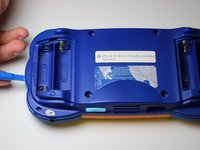
  1. VTech MobiGo Touch Learning System Buttons Replacement, Case: adım 1, 1 resimden 1.
    • Remove the battery covers and the four batteries.

    FixBot'a Sor

    Yorum Ekle

  2. VTech MobiGo Touch Learning System Buttons Replacement: adım 2, 2 resimden 1. VTech MobiGo Touch Learning System Buttons Replacement: adım 2, 2 resimden 2.
    • Remove the four plastic caps with a metal spudger to expose the 6.0 mm Philips JIS #0 case screws.

    • Remove the eight 6.0 mm JIS #0 case screws.

    FixBot'a Sor

    Yorum Ekle

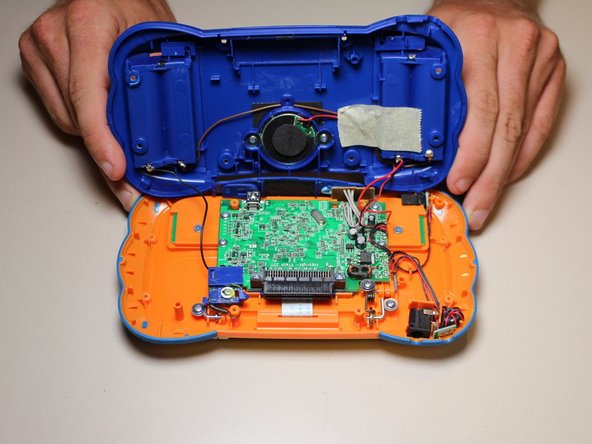
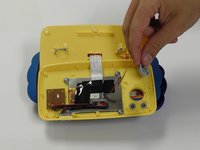
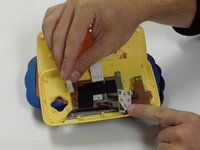
  3. VTech MobiGo Touch Learning System Buttons Replacement: adım 3, 2 resimden 1. VTech MobiGo Touch Learning System Buttons Replacement: adım 3, 2 resimden 2.
    • Using a plastic opening tool, separate the two pieces of the case carefully.

    FixBot'a Sor

    Yorum Ekle

  4. VTech MobiGo Touch Learning System Buttons Replacement, Disassembling VTech MobiGo Touch Learning System Screen Enclosure: adım 4, 1 resimden 1.
    • Remove the three 4.0 mm Philips J0 screws holding the "L" shaped brackets in place.

    FixBot'a Sor

    Yorum Ekle

  5. VTech MobiGo Touch Learning System Buttons Replacement: adım 5, 1 resimden 1.
    • Remove the three "L" shaped brackets and the spring.

    FixBot'a Sor

    Yorum Ekle

  6. VTech MobiGo Touch Learning System Buttons Replacement: adım 6, 1 resimden 1.
    • Flip the device over and remove the three 4.0 mm Philips J0 case screws.

    FixBot'a Sor

    Yorum Ekle

  7. VTech MobiGo Touch Learning System Buttons Replacement: adım 7, 1 resimden 1.
    • Separate the front and back of the case.

    • Use a plastic opening tool if necessary.

    FixBot'a Sor

    Yorum Ekle

  8. VTech MobiGo Touch Learning System Buttons Replacement, Buttons: adım 8, 1 resimden 1.
    • Remove 6 (3.8 mm Philips J0) screws holding the buttons in.

    FixBot'a Sor

    Yorum Ekle

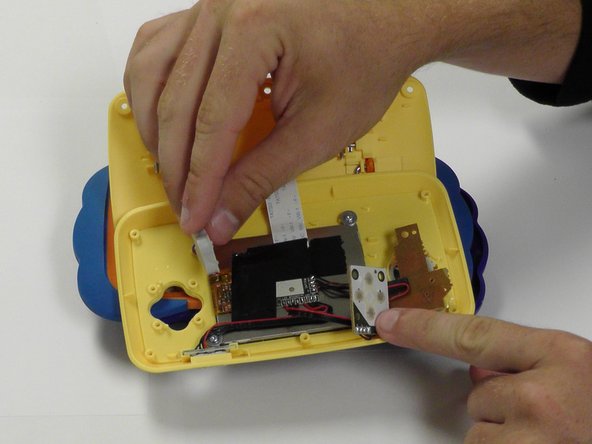
  9. VTech MobiGo Touch Learning System Buttons Replacement: adım 9, 2 resimden 1. VTech MobiGo Touch Learning System Buttons Replacement: adım 9, 2 resimden 2.
    • From here you can remove and replace the buttons.

    FixBot'a Sor

    Yorum Ekle

Sonuç

To reassemble your device, follow these instructions in reverse order.

İptal et: Bu kılavuzu tamamlamadım.

Bir başkası bu kılavuzu tamamladı.

Daniel Kresge

Üyelik tarihi: 09/01/15

385 İtibar

4 adet Kılavuz yazıldı

Ekip

USF Tampa, Team 8-3, Eyestone Fall 2015 USF Tampa, Team 8-3, Eyestone Fall 2015 üyesi

USFT-EYESTONE-F15S8G3

3 Üyeler

17 adet Kılavuz yazıldı

0Kılavuz Yorumları

Yorum Ekle

İstatistikleri Görüntüle:

Son 24 Saat: 0

Son 7 gün: 6

Son 30 gün: 35

Her zaman: 1,567