Ana içeriğe geç
Onarım Topluluğuna Katılın - Hesap Oluşturun

Wen 2307 Power Switch Replacement

Neye ihtiyacın var

  1. Wen 2307 Power Switch Replacement, Front Panel: adım 1, 1 resimden 1.
    • Unscrew the locking sleeve.

    FixBot'a Sor

    Yorum Ekle

  2. Wen 2307 Power Switch Replacement: adım 2, 1 resimden 1.
    • Remove the hanging clip.

    FixBot'a Sor

    Yorum Ekle

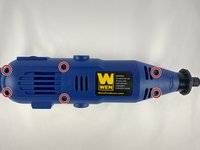
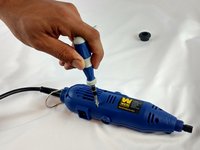
  3. Wen 2307 Power Switch Replacement: adım 3, 2 resimden 1. Wen 2307 Power Switch Replacement: adım 3, 2 resimden 2.
    • Unscrew the six 8mm PH2 screws.

    FixBot'a Sor

    Yorum Ekle

  4. Wen 2307 Power Switch Replacement: adım 4, 1 resimden 1.
    • While pressing the spindle lock button, unscrew the collet nut and remove it along with the brass collet.

    FixBot'a Sor

    Yorum Ekle

  5. Wen 2307 Power Switch Replacement: adım 5, 1 resimden 1.
    • To remove the front panel, pry the device apart while holding the device with the other hand.

    • The front panel should come out easily.

    FixBot'a Sor

    Yorum Ekle

  6. Wen 2307 Power Switch Replacement, Power Switch: adım 6, 1 resimden 1.
    • Firmly grasp and lift out power switch.

    FixBot'a Sor

    Yorum Ekle

  7. Wen 2307 Power Switch Replacement: adım 7, 1 resimden 1.
    • Firmly grasp and disconnect cables.

    • Make sure to mark your cable positions so you do not reverse them when putting back together.

    FixBot'a Sor

    Yorum Ekle

Sonuç

To reassemble your device, follow these instructions in reverse order.

İptal et: Bu kılavuzu tamamlamadım.

2 farklı kişi bu kılavuzu tamamladı.

Joshua Bowery

Üyelik tarihi: 02/08/16

570 İtibar

3 adet Kılavuz yazıldı

Ekip

USF Tampa, Team 12-1, Eyestone Spring 2016 USF Tampa, Team 12-1, Eyestone Spring 2016 üyesi

USFT-EYESTONE-S16S12G1

4 Üyeler

6 adet Kılavuz yazıldı

0Kılavuz Yorumları

Yorum Ekle

İstatistikleri Görüntüle:

Son 24 Saat: 0

Son 7 gün: 7

Son 30 gün: 36

Her zaman: 1,364