Ana içeriğe geç

Bu çeviri, kaynak kılavuzdaki en son güncellemeleri yansıtmayabilir. Çeviriyi güncellemeye yardımcı olun veya kaynak kılavuzunu görüntüleyin.

Why! NH57ADS Keyboard Disassembly

Neye ihtiyacın var

  1. Why! NH57ADS Keyboard Disassembly, Battery: adım 1, 3 resimden 1. Why! NH57ADS Keyboard Disassembly, Battery: adım 1, 3 resimden 2. Why! NH57ADS Keyboard Disassembly, Battery: adım 1, 3 resimden 3.
    • Remove the two screws holding the battery in place.

    • Slip your finger into the finger hole provided at the top of the battery.

    • ...and lift to remove it

  2. Why! NH57ADS Keyboard Disassembly, Bottom Cover: adım 2, 3 resimden 1. Why! NH57ADS Keyboard Disassembly, Bottom Cover: adım 2, 3 resimden 2. Why! NH57ADS Keyboard Disassembly, Bottom Cover: adım 2, 3 resimden 3.
    • Remove the five Phillips screws securing the bottom to the case.

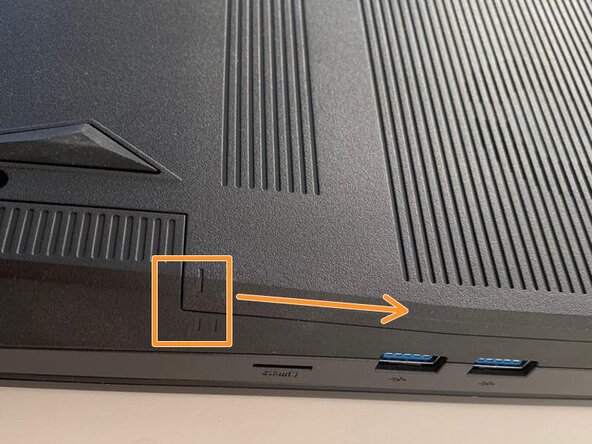
    • Slide the cover up slightly to release the clips holding it in place. This is the view on the right. The mark on the cover should now line up with the second mark on the case of the computer.

  3. Why! NH57ADS Keyboard Disassembly, Removing the Bottom Cover: adım 3, 3 resimden 1. Why! NH57ADS Keyboard Disassembly, Removing the Bottom Cover: adım 3, 3 resimden 2. Why! NH57ADS Keyboard Disassembly, Removing the Bottom Cover: adım 3, 3 resimden 3.
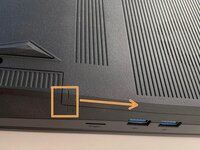
    • This is the view on the left before and after sliding the cover. The mark on the cover should now line up with the second mark on the case of the computer.

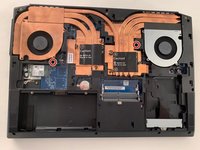
    • Slide the bottom cover to remove it.

  4. Why! NH57ADS Keyboard Disassembly, Keyboard: adım 4, 3 resimden 1. Why! NH57ADS Keyboard Disassembly, Keyboard: adım 4, 3 resimden 2. Why! NH57ADS Keyboard Disassembly, Keyboard: adım 4, 3 resimden 3.
    • Remove the two Phillips screws with the keypad symbol next to them.

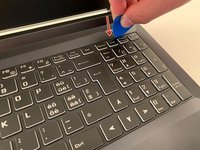
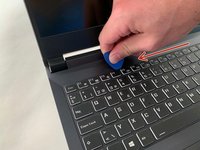
    • Insert an iFixit opening pick into the upper slot of the keyboard and slide it to the end.

  5. Why! NH57ADS Keyboard Disassembly, Remove the Keyboard: adım 5, 3 resimden 1. Why! NH57ADS Keyboard Disassembly, Remove the Keyboard: adım 5, 3 resimden 2. Why! NH57ADS Keyboard Disassembly, Remove the Keyboard: adım 5, 3 resimden 3.
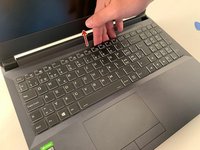
    • Carefully lift the keyboard.

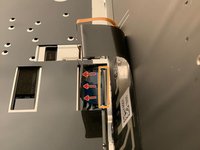
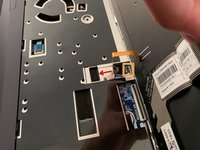
    • Gently flip up the retaining latch on the black keyboard cable and slide it out of the connector.

    • Repeat with the (orange) backlight cable.

Sonuç

To reassemble your device, follow the instructions in reverse order.

Bu çevirmenlere özel teşekkürler:

fr en

71%

Bu çevirmenler dünyayı onarmamıza yardım ediyor! Katkıda bulunmak ister misiniz?
Çeviriye Başlayın ›

Felice Suglia

Üyelik tarihi: 06/15/13

33.538 İtibar

283 adet Kılavuz yazıldı

0Kılavuz Yorumları

Yorum Ekle

İstatistikleri Görüntüle:

Son 24 Saat: 1

Son 7 gün: 6

Son 30 gün: 20

Her zaman: 270