Ana içeriğe geç
Onarım Topluluğuna Katılın - Hesap Oluşturun

Xbox 360 S Hard Drive Replacement

Neye ihtiyacın var

  1. Xbox 360 S Hard Drive Replacement, Hard Drive: adım 1, 3 resimden 1. Xbox 360 S Hard Drive Replacement, Hard Drive: adım 1, 3 resimden 2. Xbox 360 S Hard Drive Replacement, Hard Drive: adım 1, 3 resimden 3.
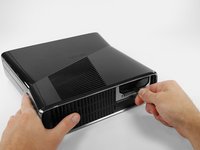
    • Orient the Xbox 360 S so that the bottom of the console is facing toward you.

    • Push the latch holding down the hard drive cover to the left.

    • Pull the hard drive cover away from the console.

  2. Xbox 360 S Hard Drive Replacement: adım 2, 3 resimden 1. Xbox 360 S Hard Drive Replacement: adım 2, 3 resimden 2. Xbox 360 S Hard Drive Replacement: adım 2, 3 resimden 3.
    • Firmly grasp the fabric tab labeled with the size of the hard drive (e.g. "250 GB") attached to the hard drive.

    • Pull the hard drive straight out of the console.

    • The fabric tab is attached to a catch further inside the hard drive housing. It will take some force to pull the hard drive out.

Sonuç

To reassemble your device, follow these instructions in reverse order.

112 farklı kişi bu kılavuzu tamamladı.

Brett Hartt

Üyelik tarihi: 04/12/10

132.012 İtibar

144 adet Kılavuz yazıldı

Ekip

iFixit iFixit üyesi

Staff

123 Üyeler

25.561 adet Kılavuz yazıldı

5Kılavuz Yorumları

do you have to transfer the OS? or data? if so what utility is used? do you need a data transfer cable?

Can I just add an external drive to supplement the existing HDD?

David Johnson - Yanıt Paylaş

no the os is on the internal drive all the hard drive is doing is adding more storge space

Nightwolf Gamer - Paylaş

My hardrive says its unformated but its not and i dont want to loose content

Javier Eduardo Pacheco Hazim - Yanıt Paylaş

Can I take the external out of the little black cover?

Lallie Cooney - Yanıt Paylaş

Will it play backwards compatible games

justin rzonca - Yanıt Paylaş

Yorum Ekle

İstatistikleri Görüntüle:

Son 24 Saat: 36

Son 7 gün: 171

Son 30 gün: 668

Her zaman: 162,249