Ana içeriğe geç
Onarım Topluluğuna Katılın - Hesap Oluşturun

Xiaomi Air 12 SSD Replacement

Neye ihtiyacın var

    1. Xiaomi Air 12 SSD Replacement, Rear Casing: adım 1, 1 resimden 1.
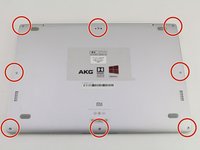
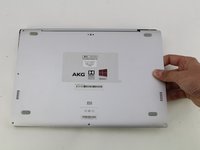
      • Orient the computer so the Xiaomi logo is at the bottom of the device.

      FixBot'a Sor

      Yorum Ekle

    2. Xiaomi Air 12 SSD Replacement: adım 2, 3 resimden 1. Xiaomi Air 12 SSD Replacement: adım 2, 3 resimden 2. Xiaomi Air 12 SSD Replacement: adım 2, 3 resimden 3.
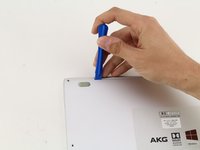
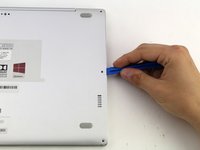
      • Insert the plastic opening tool underneath the top-middle rubber covering and lift upwards to reveal the hidden screw.

      FixBot'a Sor

      Yorum Ekle

    3. Xiaomi Air 12 SSD Replacement: adım 3, 2 resimden 1. Xiaomi Air 12 SSD Replacement: adım 3, 2 resimden 2.
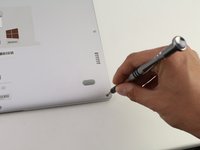
      • Remove the eight 3 mm screws using the Torx T5 driver by inserting the screwdriver into each screw and rotating counterclockwise.

      FixBot'a Sor

      Yorum Ekle

    4. Xiaomi Air 12 SSD Replacement: adım 4, 3 resimden 1. Xiaomi Air 12 SSD Replacement: adım 4, 3 resimden 2. Xiaomi Air 12 SSD Replacement: adım 4, 3 resimden 3.
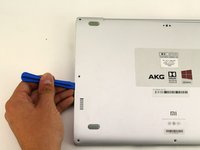
      • Insert the plastic opening tool into each side of the computer and push the tool downwards to pop open the back cover.

      • You will hear popping noises as you remove the cover.

      FixBot'a Sor

      Yorum Ekle

    5. Xiaomi Air 12 SSD Replacement: adım 5, 2 resimden 1. Xiaomi Air 12 SSD Replacement: adım 5, 2 resimden 2.
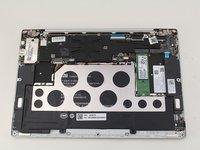
      • Remove the back of the laptop by gently lifting the casing upwards.

      FixBot'a Sor

      Yorum Ekle

    1. Xiaomi Air 12 SSD Replacement, SSD: adım 6, 2 resimden 1. Xiaomi Air 12 SSD Replacement, SSD: adım 6, 2 resimden 2.
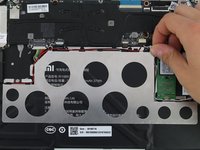
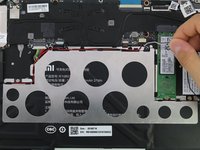
      • Detach the white and black speaker wires by pulling them from the small black tabs along the perimeter of the metal bracket.

      FixBot'a Sor

      Yorum Ekle

    2. Xiaomi Air 12 SSD Replacement: adım 7, 2 resimden 1. Xiaomi Air 12 SSD Replacement: adım 7, 2 resimden 2.
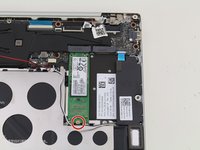
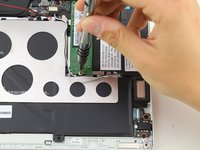
      • Remove the 1.5mm screw using the JIS #00 screwdriver.

      FixBot'a Sor

      Yorum Ekle

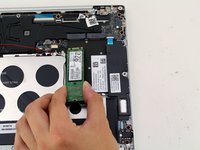
    3. Xiaomi Air 12 SSD Replacement: adım 8, 2 resimden 1. Xiaomi Air 12 SSD Replacement: adım 8, 2 resimden 2.
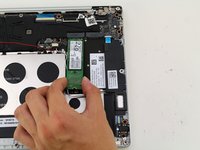
      • Lift the SSD up from the device and gently pull the SSD from the laptop.

      FixBot'a Sor

      Yorum Ekle

Sonuç

To reassemble your device, follow these instructions in reverse order.

İptal et: Bu kılavuzu tamamlamadım.

4 farklı kişi bu kılavuzu tamamladı.

Hannah Kwan

Üyelik tarihi: 04/18/18

928 İtibar

5 adet Kılavuz yazıldı

Ekip

Cal Poly, Team S18-G4, Livingston Spring 2018 Cal Poly, Team S18-G4, Livingston Spring 2018 üyesi

CPSU-LIVINGSTON-S18S18G4

4 Üyeler

46 adet Kılavuz yazıldı

1Rehber Yorum

Excelente!!!!

hugolfreitas1 - Yanıt Paylaş

Yorum Ekle

İstatistikleri Görüntüle:

Son 24 Saat: 8

Son 7 gün: 30

Son 30 gün: 122

Her zaman: 7,818