Ana içeriğe geç
Onarım Topluluğuna Katılın - Hesap Oluşturun

Xiaomi Redmi Note 3 Disassembly Guide

Neye ihtiyacın var

    1. Xiaomi Redmi Note 3 Disassembly Guide, Eject the Sim Card Tray: adım 1, 2 resimden 1. Xiaomi Redmi Note 3 Disassembly Guide, Eject the Sim Card Tray: adım 1, 2 resimden 2.
      • Locate the sim card tray at the right side of the phone

      • Insert the metal needle sim tool into the tray hole to eject the tray and pull it out

      FixBot'a Sor

      Yorum Ekle

    2. Xiaomi Redmi Note 3 Disassembly Guide, Remove Phone Panel: adım 2, 1 resimden 1.
      • Insert your thumb in between the back panel and the front of phone and slowly follow along the edges to separate the two pieces

      FixBot'a Sor

      Yorum Ekle

    3. Xiaomi Redmi Note 3 Disassembly Guide, Disconnect the Connector: adım 3, 1 resimden 1.
      • Remove the plastic connector that links the battery with the motherboard by gently prying the ends of the connector from each side of the phone

      FixBot'a Sor

      Yorum Ekle

    4. Xiaomi Redmi Note 3 Disassembly Guide, Begin Battery Removal: adım 4, 1 resimden 1.
      • Pull the black tab at the top left of the battery to disconnect the battery from the system

      FixBot'a Sor

      Yorum Ekle

    5. Xiaomi Redmi Note 3 Disassembly Guide, Remove Battery: adım 5, 1 resimden 1.
      Bu adımda kullanılan alet:
      Tweezers
      $4.99
      • Wedge the tweezers under the battery to lift it up

      • Remove as much as adhesive as needed to lift the battery from phone using tweezers or fingers

      • Adhesive that binds the battery to the phone can be strong and this may require a little bit of effort to remove the battery

      FixBot'a Sor

      Yorum Ekle

    6. Xiaomi Redmi Note 3 Disassembly Guide, Unscrew Speaker: adım 6, 1 resimden 1.
      • Use the screwdriver to unscrew the speaker at the bottom back of the phone. There are five screws around the edges of the speaker

      FixBot'a Sor

      Yorum Ekle

    7. Xiaomi Redmi Note 3 Disassembly Guide, Detach Speaker: adım 7, 1 resimden 1.
      • Remove the loud speaker cover using the tweezers to expose the daughterboard

      FixBot'a Sor

      Yorum Ekle

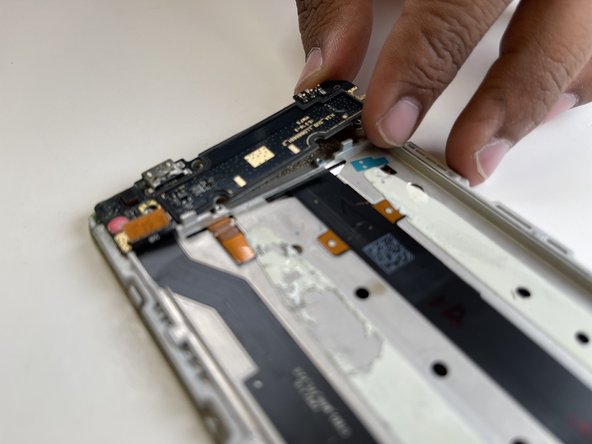
    8. Xiaomi Redmi Note 3 Disassembly Guide, Remove Daughterboard: adım 8, 2 resimden 1. Xiaomi Redmi Note 3 Disassembly Guide, Remove Daughterboard: adım 8, 2 resimden 2.
      • Remove the two gold tabs on the two top corners of the daughterboard

      • Pry the daughterboard open with the tweezers or pull it out using your fingers

      • There is a heat shield underneath the daughter board and it can get hot from charging the phone so make sure you don’t touch it

      FixBot'a Sor

      Yorum Ekle

    9. Xiaomi Redmi Note 3 Disassembly Guide, Begin to Remove Camera: adım 9, 1 resimden 1.
      • Unscrew the four screws at the top of the motherboard and pop up the top cover

      • One screw might by disguised by a sticker so locate that and remove the sticker as well

      • Pulling the top cover without removing all the screws might damage the motherboard

      FixBot'a Sor

      Yorum Ekle

    10. Xiaomi Redmi Note 3 Disassembly Guide, Remove Camera Cushion: adım 10, 1 resimden 1.
      • Remove the rubber cover that’s containing the camera

      FixBot'a Sor

      Yorum Ekle

    11. Xiaomi Redmi Note 3 Disassembly Guide, Remove Front Camera Protector: adım 11, 1 resimden 1.
      • Pull the tab that’s holding the front camera to remove the camera protector

      • To keep the camera from damage hold the camera from the corner and not from the middle of it

      FixBot'a Sor

      Yorum Ekle

    12. Xiaomi Redmi Note 3 Disassembly Guide, Remove Camera: adım 12, 1 resimden 1.
      • Pull out the front camera using tweezers or your fingers

      FixBot'a Sor

      Yorum Ekle

    13. Xiaomi Redmi Note 3 Disassembly Guide, Remove Motherboard Connectors: adım 13, 1 resimden 1.
      • Remove the five connectors of the motherboard using tweezers or your fingers

      FixBot'a Sor

      Yorum Ekle

    14. Xiaomi Redmi Note 3 Disassembly Guide, Remove Motherboard: adım 14, 1 resimden 1.
      • Remove the remaining four screws as your work down to the bottom to loosen the motherboard

      FixBot'a Sor

      Yorum Ekle

    15. Xiaomi Redmi Note 3 Disassembly Guide, Admire Disassembled Phone: adım 15, 1 resimden 1.
      • Congrats -- You disassembled the Xiaomi Redmi Note 3!

      FixBot'a Sor

      Yorum Ekle

Sonuç

To reassemble your device, follow these instructions in reverse order.

İptal et: Bu kılavuzu tamamlamadım.

Meaghan Owens

Üyelik tarihi: 06/23/23

241 İtibar

1 Kılavuz yazıldı

1Rehber Yorum

Memory ic problem

Sure - Yanıt Paylaş

Yorum Ekle

İstatistikleri Görüntüle:

Son 24 Saat: 2

Son 7 gün: 11

Son 30 gün: 52

Her zaman: 1,995