Giriş
This guide will show you how to replace the battery in your phone if it is old, damaged, or losing its charge too quickly. The replacement process is simple and only requires three steps.
Neye ihtiyacın var
-
-
-
Insert the plastic opening tool between the charging port and the rear case.
-
Pry the end of the rear case up from the charging port.
 FixBot'a Sor
-
-
-
-
Run the plastic opening tool along the seam on the side of the phone to remove the rear casing.
-
-
-
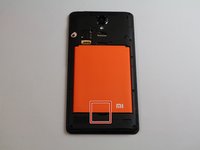
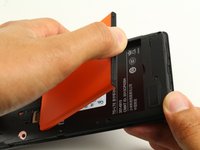
Locate the indentation at the bottom of the battery.
-
Place a finger in the indentation and lift up to remove the battery.
-
-


To reassemble your device, follow these instructions in reverse order.
İptal et: Bu kılavuzu tamamlamadım.
6 farklı kişi bu kılavuzu tamamladı.

Ekip

Cal Poly, Team S22-G4, Livingston Spring 2017 Cal Poly, Team S22-G4, Livingston Spring 2017 üyesi
CPSU-LIVINGSTON-S17S22G4
4 Üyeler
32 adet Kılavuz yazıldı
3Kılavuz Yorumları
Wie sieht es beim Redmi Note 11 S aus?
