Ana içeriğe geç
Onarım Topluluğuna Katılın - Hesap Oluşturun

Xiaomi Redmi Note Rear Camera Replacement

Neye ihtiyacın var

    1. Xiaomi Redmi Note Rear Camera Replacement, Battery: adım 1, 1 resimden 1.
      • Make sure the Xiaomi Redmi Note is powered off before removing the battery.

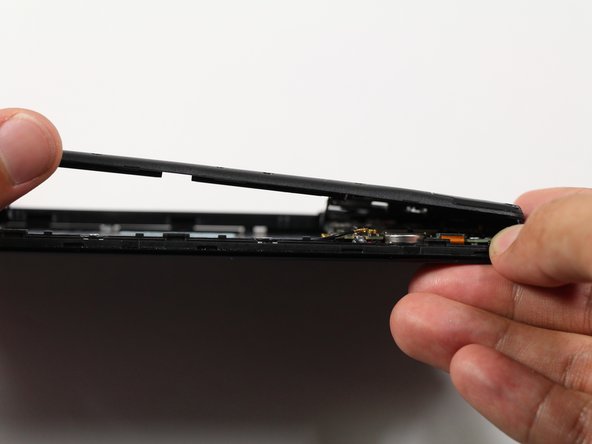
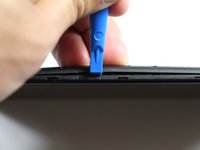
      • Insert the plastic opening tool between the charging port and the rear case.

      • Pry the end of the rear case up from the charging port.

      FixBot'a Sor

      Yorum Ekle

    2. Xiaomi Redmi Note Rear Camera Replacement: adım 2, 2 resimden 1. Xiaomi Redmi Note Rear Camera Replacement: adım 2, 2 resimden 2.
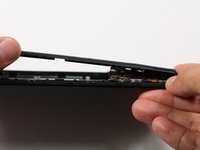
      • Run the plastic opening tool along the seam on the side of the phone to remove the rear casing.

      FixBot'a Sor

      Yorum Ekle

    3. Xiaomi Redmi Note Rear Camera Replacement: adım 3, 2 resimden 1. Xiaomi Redmi Note Rear Camera Replacement: adım 3, 2 resimden 2.
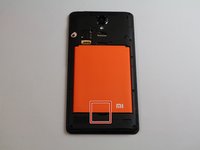
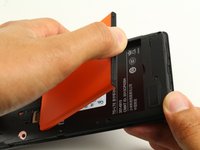
      • Locate the indentation at the bottom of the battery.

      • Place a finger in the indentation and lift up to remove the battery.

      FixBot'a Sor

      Yorum Ekle

    1. Xiaomi Redmi Note Rear Camera Replacement, Midframe: adım 4, 2 resimden 1. Xiaomi Redmi Note Rear Camera Replacement, Midframe: adım 4, 2 resimden 2.
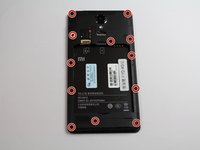
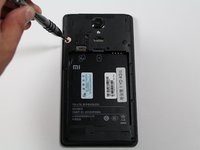
      • Remove twelve 3.5mm Phillips #00 screws from the midframe.

      FixBot'a Sor

      Yorum Ekle

    2. Xiaomi Redmi Note Rear Camera Replacement: adım 5, 2 resimden 1. Xiaomi Redmi Note Rear Camera Replacement: adım 5, 2 resimden 2.
      • Insert a plastic opening into the seam between the midframe and the bottom frame of the phone.

      • Run the plastic opening tool along the seam.

      • Pry up the midframe with the plastic opening tool.

      • Once the midframe has been sufficiently lifted with the tool, place a hand underneath the edge to lift the entire component out of the frame.

      • There will be snapping sounds as the clips on the midframe disconnect from the phone.

      FixBot'a Sor

      Yorum Ekle

    1. Xiaomi Redmi Note Rear Camera Replacement, Rear Camera: adım 6, 2 resimden 1. Xiaomi Redmi Note Rear Camera Replacement, Rear Camera: adım 6, 2 resimden 2.
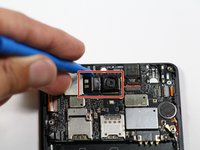
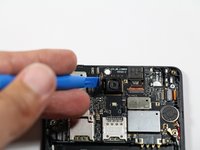
      • Disconnect the rear-facing camera from the motherboard by pulling out the press-fit connector to its left.

      FixBot'a Sor

      Yorum Ekle

Sonuç

To reassemble your device, follow these instructions in reverse order.

İptal et: Bu kılavuzu tamamlamadım.

4 farklı kişi bu kılavuzu tamamladı.

AJ Beers

Üyelik tarihi: 04/26/17

213 İtibar

2 adet Kılavuz yazıldı

Ekip

Cal Poly, Team S22-G4, Livingston Spring 2017 Cal Poly, Team S22-G4, Livingston Spring 2017 üyesi

CPSU-LIVINGSTON-S17S22G4

4 Üyeler

32 adet Kılavuz yazıldı

0Kılavuz Yorumları

Yorum Ekle

İstatistikleri Görüntüle:

Son 24 Saat: 1

Son 7 gün: 10

Son 30 gün: 35

Her zaman: 4,286