Ana içeriğe geç
Onarım Topluluğuna Katılın - Hesap Oluşturun

Xiaomi Yi Back Panel Replacement

Neye ihtiyacın var

  1. Xiaomi Yi Back Panel Replacement, Battery: adım 1, 2 resimden 1. Xiaomi Yi Back Panel Replacement, Battery: adım 1, 2 resimden 2.
    • Push the battery door switch to the left.

    • Lift the battery door up.

    FixBot'a Sor

    Yorum Ekle

  2. Xiaomi Yi Back Panel Replacement: adım 2, 3 resimden 1. Xiaomi Yi Back Panel Replacement: adım 2, 3 resimden 2. Xiaomi Yi Back Panel Replacement: adım 2, 3 resimden 3.
    • Lift the battery tab up.

    • Remove the battery by pulling the removal tab.

    FixBot'a Sor

    Yorum Ekle

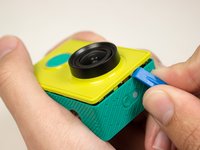
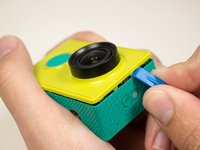
  3. Xiaomi Yi Back Panel Replacement, Front Panel: adım 3, 2 resimden 1. Xiaomi Yi Back Panel Replacement, Front Panel: adım 3, 2 resimden 2.
    • Introduce the plastic opening tool into any of the sides of the camera.

    • Pry with the plastic opening tool at the seam between the front and the back panel.

    FixBot'a Sor

    Yorum Ekle

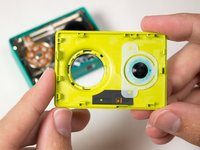
  4. Xiaomi Yi Back Panel Replacement: adım 4, 3 resimden 1. Xiaomi Yi Back Panel Replacement: adım 4, 3 resimden 2. Xiaomi Yi Back Panel Replacement: adım 4, 3 resimden 3.
    • Slide prying tool along the seam until front panel is fully separated from the back panel.

    FixBot'a Sor

    Yorum Ekle

  5. Xiaomi Yi Back Panel Replacement, Back Panel: adım 5, 2 resimden 1. Xiaomi Yi Back Panel Replacement, Back Panel: adım 5, 2 resimden 2.
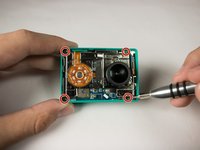
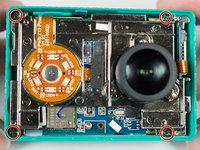
    • Remove the four 3.8 mm Phillips #000 screws located in the outer corners of the motherboard.

    FixBot'a Sor

    Yorum Ekle

  6. Xiaomi Yi Back Panel Replacement: adım 6, 3 resimden 1. Xiaomi Yi Back Panel Replacement: adım 6, 3 resimden 2. Xiaomi Yi Back Panel Replacement: adım 6, 3 resimden 3.
    Bu adımda kullanılan alet:
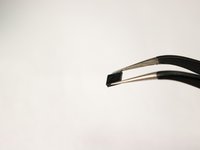
    Tweezers
    $4.99
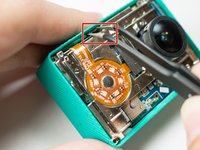
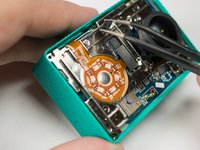
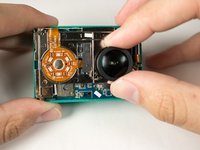
    • Pull on and remove the black spacer located at the top inside of the camera body using the tweezers and set the part aside.

    FixBot'a Sor

    Yorum Ekle

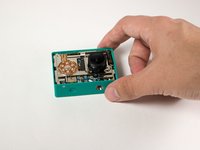
  7. Xiaomi Yi Back Panel Replacement: adım 7, 2 resimden 1. Xiaomi Yi Back Panel Replacement: adım 7, 2 resimden 2.
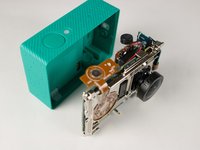
    • Remove the motherboard from from the back case by gently pulling on the lens housing.

    • Back panel remains.

    FixBot'a Sor

    Yorum Ekle

Sonuç

To reassemble your device, follow these instructions in reverse order.

İptal et: Bu kılavuzu tamamlamadım.

10 farklı kişi bu kılavuzu tamamladı.

Karol Gonzalez

Üyelik tarihi: 09/03/15

379 İtibar

1 Kılavuz yazıldı

Ekip

USF Tampa, Team 15-5, Blackwell Fall 2015 USF Tampa, Team 15-5, Blackwell Fall 2015 üyesi

USFT-BLACKWELL-F15S15G5

3 Üyeler

10 adet Kılavuz yazıldı

2Kılavuz Yorumları

Where can I buy back panel for Xiaomi Yi?

matulek - Yanıt Paylaş

Where can i buy the back panel replacement ?

Roland Meilleur - Yanıt Paylaş

Yorum Ekle

İstatistikleri Görüntüle:

Son 24 Saat: 2

Son 7 gün: 9

Son 30 gün: 86

Her zaman: 4,399