Ana içeriğe geç
Onarım Topluluğuna Katılın - Hesap Oluşturun

Zeki Droid Tablet Camera Replacement

Neye ihtiyacın var

  1. Zeki Droid Tablet Camera Replacement, Back Casing: adım 1, 1 resimden 1.
    • Remove the back casing by slowly popping each tab out with a plastic opening tool.

    FixBot'a Sor

    Yorum Ekle

  2. Zeki Droid Tablet Camera Replacement: adım 2, 1 resimden 1.
    Bu adımda kullanılan alet:
    Tweezers
    $4.99
    • Remove the tapes one by one from the connecting wires with tweezers.

    FixBot'a Sor

    Yorum Ekle

  3. Zeki Droid Tablet Camera Replacement: adım 3, 1 resimden 1.
    • Remove the black clips from both sides of the casing with a plastic opening tool.

    • The clips should pop off separate from the speakers.

    FixBot'a Sor

    Yorum Ekle

  4. Zeki Droid Tablet Camera Replacement: adım 4, 1 resimden 1.
    • Remove the speakers from the back casing.

    • Do not tug on the speakers because they are connected to fragile wires.

    FixBot'a Sor

    Yorum Ekle

  5. Zeki Droid Tablet Camera Replacement: adım 5, 1 resimden 1.
    • Pull the speakers away from the back casing carefullly.

    FixBot'a Sor

    Yorum Ekle

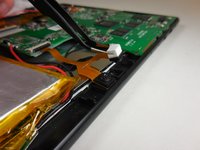
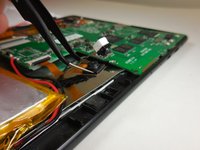
  6. Zeki Droid Tablet Camera Replacement, Camera: adım 6, 2 resimden 1. Zeki Droid Tablet Camera Replacement, Camera: adım 6, 2 resimden 2.
    Bu adımda kullanılan alet:
    Tweezers
    $4.99
    • Grip the camera on both sides using tweezers or your fingers, and carefully lift it off the board.

    • The adhesive may make it difficult to remove the cameras from the tablet.

    FixBot'a Sor

    Yorum Ekle

  7. Zeki Droid Tablet Camera Replacement: adım 7, 1 resimden 1.
    • Undo the ZIF connector that is connecting the cameras to the motherboard using a plastic spudger or fingernail.

    • This guide has more information on how to undo the ZIF connector

    • Do not yank the ZIF connector. It should come apart very easily with little force needed.

    FixBot'a Sor

    Yorum Ekle

  8. Zeki Droid Tablet Camera Replacement: adım 8, 1 resimden 1.
    • Pull the copper connection carefully away from the motherboard of the tablet to completely remove the camera.

    FixBot'a Sor

    Yorum Ekle

Sonuç

To reassemble your device, follow these instructions in reverse order.

İptal et: Bu kılavuzu tamamlamadım.

Bir başkası bu kılavuzu tamamladı.

Colleen McFadden

Üyelik tarihi: 03/11/15

268 İtibar

2 adet Kılavuz yazıldı

Ekip

Colorado Springs, Team 2-6, Panko Spring 2015 Colorado Springs, Team 2-6, Panko Spring 2015 üyesi

UCCS-PANKO-S15S2G6

3 Üyeler

10 adet Kılavuz yazıldı

0Kılavuz Yorumları

Yorum Ekle

İstatistikleri Görüntüle:

Son 24 Saat: 1

Son 7 gün: 7

Son 30 gün: 30

Her zaman: 609