Ana içeriğe geç
Onarım Topluluğuna Katılın - Hesap Oluşturun

iMac Intel 27" EMC 2309 and 2374 RAM Replacement

Görüntüleme: 174 B

İstatistikleri görüntüle:

Son 24 Saat:
4
Son 7 Gün:
40
Son 30 Gün:
191
Her zaman:
173.545
Yorumlar: 21

13 comments on steps, 8 guide comments.

Go to guide comments
Tamamlandı: 169

169 kişi bu kılavuzu "tamamlandı" olarak işaretledi. Sıradaki sen olacak mısın?

Sık Kullanılanlar: 39

39 kişi bu kılavuzu favorilerine ekledi (ve abone oldu). Sıradaki sen olacak mısın?

Gerekli Süre: 5 - 10 dakika
Zorluk: Kolay
Öne Çıkan Kılavuzlar

Bu kılavuz, iFixit kadrosu tarafından acayip havalı bulundu.

iMac Intel 27" EMC 2309 and 2374 RAM Replacement

Upgrade RAM modules for an instant boost in speed.

Neye ihtiyacın var

Tamir Setleri

Bu kitler, bu kılavuzu tamamlamak için gereken tüm parçaları ve araçları içerir.

Parçalar

Aletler

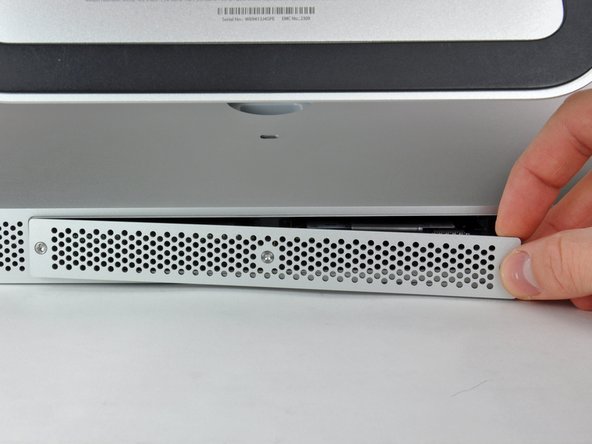
    1. iMac Intel 27" EMC 2309 and 2374 RAM Replacement, Access Door: adım 1, 2 resimden 1. iMac Intel 27" EMC 2309 and 2374 RAM Replacement, Access Door: adım 1, 2 resimden 2.
      • Loosen the three Phillips screws securing the access door to the bottom edge of your iMac.

      • These screws will remain captive in the access door.

      • Remove the access door from your iMac.

      • During reassembly, fasten the access door loosely and align it with the pocket cut into the outer case of the iMac before fully tightening the screws.

      FixBot'a Sor

      Yorum Ekle

    1. iMac Intel 27" EMC 2309 and 2374 RAM Replacement, RAM: adım 2, 1 resimden 1.
      • Use your fingers or the tip of a spudger to slide the black plastic RAM tray pull tab out of the RAM slot.

      FixBot'a Sor

      Yorum Ekle

    2. iMac Intel 27" EMC 2309 and 2374 RAM Replacement: adım 3, 2 resimden 1. iMac Intel 27" EMC 2309 and 2374 RAM Replacement: adım 3, 2 resimden 2.
      • Pull the black plastic tab away from the iMac to eject the RAM chip from its socket.

      • The RAM modules are firmly seated and may require a fair amount of force to remove.

      • Use your fingers to slide the RAM chip out of its socket.

      • If necessary, repeat this process for the other RAM module(s).

      FixBot'a Sor

      Yorum Ekle

Sonuç

To reassemble your device, follow these instructions in reverse order.

İptal et: Bu kılavuzu tamamlamadım.

169 farklı kişi bu kılavuzu tamamladı.

8Kılavuz Yorumları

Interestingly, the mid 2011 iMac 27 inch also goes to 12GB!

I originally thought I'd be upgrading to 8GB today but found 4 slots instead of 2 :-)

As long as the two front (close to the screen) slots are paired with the exact same RAM config.

For example:

Two front slots Apple 2GB chips = 4GB.

Two rear slots, Crucial Lexar 4GB chips = 8GB

Total 12GB

Hoorah no waste and more RAM, come on Lion... I'm Ready!

spaceshipdev - Yanıt Paylaş

Need a#0 screwdriver, not #1

vince Greco - Yanıt Paylaş

Be sure to really push the RAM all the way into the socket. I had a "no RAM" error beep when I first booted up my iMac after doing this. Just an extra two millimetres was all it needed to be properly installed. It can be quite tough to get in.

Magda Stremeski - Yanıt Paylaş

Hi,

I've got a 2309 and just received my two additional 4GB RAM Cards. Put them in and I can say that the speed improved (now with 16GB). Not dramatically, however, some applications did always show the little rainbow disc when my Mac was "thinking". This is now gone.

I am on OS X 10.9.5 still and the whole Mac feels as if it can "breathe" more lightly with the additional RAM.

Thanks!

peterschiemann - Yanıt Paylaş

My 11,1 27” 2.66Ghz iMac happy eats up all the 4x8GB I put in there.

Brad Anderson - Yanıt Paylaş

Yorum Ekle

İstatistikleri Görüntüle:

Son 24 Saat: 4

Son 7 gün: 40

Son 30 gün: 191

Her zaman: 173,545