Ana içeriğe geç
Onarım Topluluğuna Katılın - Hesap Oluşturun

iPad Pro 9.7" Opening Display Assembly

Salt Önkoşul
Bu sadece bir ön koşul kılavuzudur! Bu kılavuz başka bir prosedürün parçasıdır ve tek başına kullanılması amaçlanmamıştır.

Neye ihtiyacın var

  1. iPad Pro 9.7" Opening Display Assembly, Slice through the remaining adhesive: adım 1, 3 resimden 1. iPad Pro 9.7" Opening Display Assembly, Slice through the remaining adhesive: adım 1, 3 resimden 2. iPad Pro 9.7" Opening Display Assembly, Slice through the remaining adhesive: adım 1, 3 resimden 3.
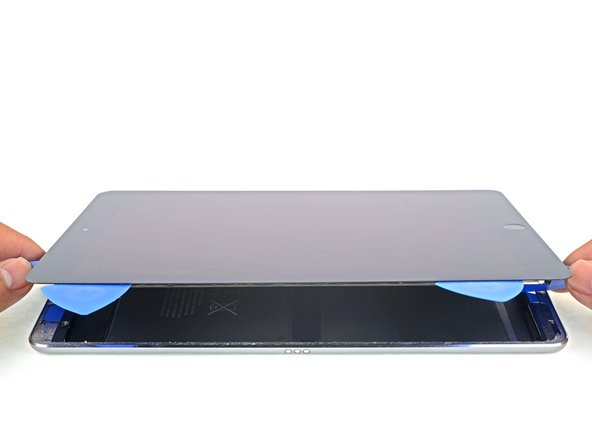
    • Use picks to ensure most of the adhesive has been cut through on the top, left, and bottom sides.

    • Twist the top and bottom picks to separate the display assembly from the rear case.

    • Do not attempt to remove the display—it is still attached to the rear case.

  2. iPad Pro 9.7" Opening Display Assembly: adım 2, 3 resimden 1. iPad Pro 9.7" Opening Display Assembly: adım 2, 3 resimden 2. iPad Pro 9.7" Opening Display Assembly: adım 2, 3 resimden 3.
    • Swing the display assembly towards the right of the case, using the right edge as a hinge.

    • As you move the display assembly, make sure that the display ribbon cable is not being stressed.

    • Continue swinging the display assembly until it lays flat next to the rear case.

Sonuç

To reassemble your device, follow these instructions in reverse order.

Arthur Shi

Üyelik tarihi: 01/03/18

315.551 İtibar

730 adet Kılavuz yazıldı

Ekip

iFixit iFixit üyesi

Staff

123 Üyeler

23.891 adet Kılavuz yazıldı

0Kılavuz Yorumları

Yorum Ekle

İstatistikleri Görüntüle:

Son 24 Saat: 0

Son 7 gün: 3

Son 30 gün: 7

Her zaman: 144