Bu çeviri bir makine tarafından oluşturulmuştur ve henüz bir kişi tarafından incelenmemiştir. Bu dili konuşuyor musunuz? İnceleme için.

iPod 3. Nesil Pil Değişimi

iRobot ve 7 diğer katkıda bulunanlar
En son 30 Tem 2026 tarihinde güncellendi
Görüntüleme: 190 B
İstatistikleri görüntüle:
- Son 24 Saat:
- 13
- Son 7 Gün:
- 175
- Son 30 Gün:
- 843
- Her zaman:
- 189.665
Yorumlar: 73
53 comments on steps, 20 guide comments.
Go to guide commentsTamamlandı: 333 334
333 kişi bu kılavuzu "tamamlandı" olarak işaretledi. Sıradaki sen olacak mısın?
334 kişi bu kılavuzu "tamamlandı" olarak işaretledi. Siz de dahil - harika iş!
Sık Kullanılanlar: 70 71
70 kişi bu kılavuzu favorilerine ekledi (ve abone oldu). Sıradaki sen olacak mısın?
Siz de dahil olmak üzere 71 kişi bu kılavuzu favorilerine ekledi (ve abone oldu)!
Öne Çıkan Kılavuzlar
Bu kılavuz, iFixit kadrosu tarafından acayip havalı bulundu.
Giriş
1. adıma git ↓Piliniz artık uzun süre dayanmıyor mu? Değiştirin.
Neye ihtiyacın var
Tamir Setleri
Bu kitler, bu kılavuzu tamamlamak için gereken tüm parçaları ve araçları içerir.

Parçalar

Aletler
-
Spudger4.9
-


-
-
-
iPod cihazınızı açmadan önce, tuş kilidinin kilitli konumda olduğundan emin olun. Turuncu çubuk görünür olmalı; bu, tuş kilidinin aktif olduğunu gösterir.
 FixBot'a Sor
-
-
-
Açma penasini, iPod'un sağ kenarındaki plastik ön panel ile metal arka panel arasındaki boşluğa mümkün olduğunca derine sokun.
-
Plastik ön paneli yukarı doğru ayırmak ve beş tutucu tırnağı (üçüncü fotoğrafta görülen) serbest bırakmak için açma penasini kullanın.
-
Diğer tutucu tırnakları da serbest bırakmak için penayı iPod'un kenarı boyunca kaydırın ve ayırma işlemine devam edin.
-
Sağ taraftaki beş tırnağın tamamı serbest kaldığında, kasa kolayca açılmalıdır.
-
-
-
Kasayı dock konnektör üst tarafta olacak şekilde bir kitap gibi açın ve arka paneli iPod'un ön kısmının yanına yatırın.
-
-
-
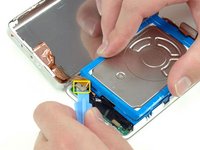
Turuncu kulaklık ucu kablosunu dikkatlice ayırmak için plastik bir alet veya tırnaklarınızı kullanın. Kablonun kendisinden değil, konnektörden doğrudan yukarıya doğru çektiğinizden emin olun.
-
-
-
-
-
Sabit sürücüyü bir elinizle kaldırın ve sabit sürücü şerit kablosunu anakarttan dikkatlice ayırın.
-
Sabit sürücüyü iPod'un içinden çıkarın.
-
-
-
Beyaz batarya konnektörünü anakarttan dikkatlice ayırın. Kablolardan değil, yalnızca konnektörün kendisinden tutarak çektiğinizden emin olun.
-
-
-
-
Anakart üzerindeki batarya konnektörünün yakınında bulunan siyah T6 Torx vidayı çıkarın.
-
-
-
Batarya kablosunu anakartın ucunun etrafından dikkatlice geçirin. Batarya kablosunu kurtarırken anakartı çok fazla yukarı çekmemeye dikkat edin.
-
-


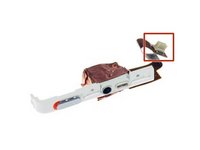


Cihazınızı yeniden toplamak için bu talimatları ters sırayla uygulayın.
İptal et: Bu kılavuzu tamamlamadım.
333 farklı kişi bu kılavuzu tamamladı.

20Kılavuz Yorumları
If you are real careful you don't have to remove the Torx screw to get the battery out.
I found this quite easy. The tools worked great. I agree with Andy, if you push the tool into the groove, then lift or pry it up so the tip of the tool is down inside the back cover, you should be able to slide it across to pop the clips quite easily. Once you get the first two sides open, it goes quick.
I also did this without having to remove the Torx screw. It helped to lift the battery up a bit to give the wires a little slack, and then just feed them around the corner of the motherboard. Putting the new battery in, I just fed the wires around the corner, and used the opening tool to push them the final bit of the way around the corner.
My old iPod is like new now! Hours and hours of battery life, when it would previously die after 5 minutes.
Very simple and clear guide. I managed to replace the battery in the first try and it worked!
I was able to do it without disconnecting the headphone jack and without removing the Torx screw.
I found the replacement battery to be a little thicker than the original battery but there was no issue resealing the case.
