
Ana içeriğe geç
Onarım Topluluğuna Katılın - Hesap Oluşturun

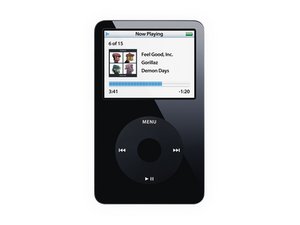
Model A1136 / 30, 60, or 80 GB hard drive / black or white plastic front

Hard Drive replacement failure

I dropped my iPod a month or 2 ago and broke the hard drive. I ordered a replacement, but I accidently put the replacement in upside down and tried to turn the iPod on. I realized my mistake and flipped the hard drive but not the iPod gets stuck at the Apple logo on startup. My computers (both mac and pc) will not recognize the iPod. It displays a sad face and goes into diagnostic mode without the hard drive in but with it in will not do anything. It went into disk mode with or without the hard drive before I put the hard drive in upside down but now will not go into disk mode at all.

Did I break the hard drive but putting it in upside down or what happened? Any ideas on how I can fix this?

Yanıtlandı! Cevabı görüntüle Ben de bu sorunu yaşıyorum

Bu iyi bir soru mu?

Puan -1
2 Yorum

Which iPod is this exactly? Picture has an original & tag has a 5th gen. What size hard drive are you trying to put in?

tarafından

It is a 5th gen 80 gb video. sorry

tarafından

Yorum Ekle

4 Cevap

Filtre ölçütü:
Seçilen Çözüm

So I took my iPod to an expert and his conclusion was that it was the logic board that was bad, not the hard drive at all. Thanks for all your responses!

Bu yanıt yardımcı oldu mu?

Puan 0
Yorum Ekle

Hi,

as the connectors are only on one side of the cable, you shouldn't have damaged anything.

A second thing is, how did you put it back together? With the hard drive connected upside down it shouldn't fit in.

Check the hard drive cable, it needs to befitted well into the connector on the logic board as well as into the connector on the hard drive.

Use these button combinations to set your iPod into disk mode:

http://www.command-tab.com/2006/03/30/hi...

You might need a couple of tries to set the iPod into "disk mode"!

When in "disk mode" connect the iPod to iTunes and restore the iPod. After its restored you should be able to use your iPod as usual.

If the cable is seated well on both sides and you can't get it to work, you might have broken the hard drive cable.

Bu yanıt yardımcı oldu mu?

Puan 0

1 Yorum:

Ok I am glad I didn't break the hard drive. I didn't actually snap the iPod together with the hard drive in upside down, just reconnected all the ribbon cables and turned it on.

I have tried more than a few times to put the iPod into disk mode. It is definitely frozen when the new hard drive is in.

I have tried using both the hard drive cable that was originally in the iPod and the new one that came with the drive. Neither work, and it is unlikely that both are broken. I may have a dysfunctional hard drive because I ordered it from a shady website based in china.

I will try all these ideas again in hope of a better turnout!

Thanks for your response!

tarafından

Yorum Ekle

What model of replacement hard drive did you get? Not all hard drives are compatible with all models of iPods.

http://www.rapidrepair.com/phpbb/viewtop...

Bu yanıt yardımcı oldu mu?

Puan 0

3 Yorum:

I got a Toshiba MK8010GAH, which is the same as what was in the iPod originally but is not compatible according to the chart.. Am I wrong or is the chart?

tarafından

Alex: if the iPod originally had a Toshiba MK8010GAH, then it must have been an iPod video 5.5g 80GB , which according to the chart is compatible

iPod Video has two revisions: "5th Generation" (first version of the logic board, sold with 30GB and 60GB capacity ONLY) and "5.5th Generation" (second version of the logic board, sold as 30GB and 80GB ONLY). 5.5 is also known as "iPod Video 5th Generation Late 2006"

The MK8010GAH should be compatible with 5.5th Generation, and will not be compatible with 5th Generation.

Also, from apple website: http://support.apple.com/kb/ht1353

"You can distinguish the iPod (5th generation Late 2006) from the original iPod (5th generation) by the last three digits of the serial number. The iPod (5th generation Late 2006) serial number's last three digits will be one of the following: V9K, V9P, V9M, V9R, V9L, V9N, V9Q, V9S, WU9, WUA, WUB, WUC, and X3N. The Fifth Generation U2 Special Edition iPod (30 GB Late 2006) serial number's last three digits are W9G."

tarafından

It's possible that you might have the cable not seated correctly (I've also experience this). It needs a bit of downward pressure to ensure good contact (that's what all the foam is about, including the small piece covering the cable at the dock end). If you go to iPod DIAGNOSTIC MODE, does it recognise the disk and spin it up? In particular, does it show the driev model number and capacity correctly in the IO->HardDrive tests?

http://www.digitalmania-online.com/iPod-...

tarafından

Yorum Ekle

I have a 5.5 30GB and despite all diagnostics unit's hard drive is "clicking" and the Apple sad face appears. I think it is the hardrive. Any agree? Do you have a 30GB Hard Drive: Toshiba MK8010GAH for sael and how much?

FedCURE

Update

Ps. on that!

Command Enter + Play results in: Plug in to I-tunes to restore. Does this mean that the hard drive is working?

Thanks

Bu yanıt yardımcı oldu mu?

Puan 0

1 Yorum:

Please start your own question as very few will look at a 3 month old question.

tarafından

Yorum Ekle

Yanıtını ekle

Alex sonsuza kadar minnettar olacak.
İstatistikleri Görüntüle:

Son 24 Saat: 0

Son 7 gün: 4

Son 30 gün: 6

Her zaman: 5,795

