Converting Internal MacBook Trackpad to External USB Trackpad
Hi there,
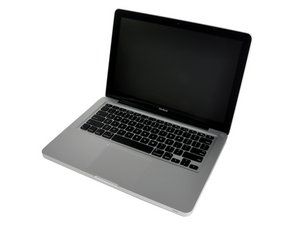
I have a "Apple MacBook Genuine A1278 MB466LL/A MB466 Silver Touchpad & Cable 821-1254-A."
It's the internal trackpad from a modern MacBook Pro. It has some kind of 22-pin connector on the end of the cable. Does anyone know if it would be possible to convert this trackpad into a standalone USB mouse that could be used on another computer?
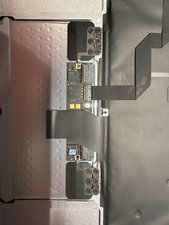
I am also looking to achieve this mod. In my research I have found others used the test points on the older macbook pro touchpads as solder points for the data and power cables in USB. I cant see these at all on the newer A1278 models so will be sacrificing a known bad part to attempt to find them. Unfortunately this could be the only feasible option as the cables I the flex connector and cable are so %#*@ small. If I am successful will put it up for others to see.
Yes you can! Mac trackpads and keyboards are just USB (1?) devices!
If you have a dead MacBook (Pro/ Air) you’ll still be able to convert its KYBD and trackpad to a genuine and original (although a bit steampunk) Mac KYBD & trackpad array. Apple itself, nor other brands IMHO have no KYBDs combined with trackpads on the market, So, get original!
Excellent addition for an iMac, for example.
You’ll need a soldering iron & some tools, as well as a simple USB A cable to spare.
USB 2 connections are very simple: Common, +5V, Data+ and Data -. Just 4 soldering connections to do.
The easiest Apple model to recuperate from I find is the 2007 MBP Core2 Duo with the defective NVIDIA 8600 M GT in it.
To be had for free, mostly.
Unrepairable, but the KYBD & trackpad may be salvaged. Internal flatcable may be defective (another generic defect with this model), but this in no way defeats our purposes.
If you want a more capable trackpad, a more recent Mac wreck will do. I hope some other iFixit members will chip in with the USB board pinout.
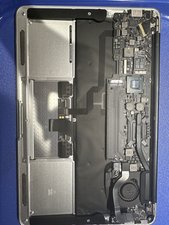
I was able to turn my old MBP keyboard/trackpad into a functioning USB device after seeing the YouTube linked above. I had a 2008 MBP with a different board layout. I looked carefully at the tiny traces and found DP, DN, 5VO, and poked around to find ground (it wasn't hard - you can see the ground-plane floods on the board).
Here's what mine looked like, and it works great - both trackpad and keyboard, including the special keys like brightness, play/pause, volume and mission control (on a Mac). [ edit - the trackpad does NOT work on linux incl RPi, but the keyboard does ]
FYI, the solderpoints are TINY and you need a steady hand to avoid hitting any components -- it was not easy and I definitely needed a magnifier and tweezers.
Bu yoruma uygun yeri bulmak için bu konuyu kaydırın. Ardından, taşımak için "Bu yazıya yorum ekle"ye tıklayın.
1 Yorum:
This worked great for me too, thanks! I used the trackpad from an early 2008 MacBook Pro and it was immediately functional as a pointing device once I connected it to my computer running macOS Sonoma.
However, multitouch didn't work! To fix this, I injected AppleUSBMultitouch.kext and AppleUSBTrackpad.kext from the OCLP project, and bam, multitouch, Trackpad control panel, everything just worked. Get the kexts here: https://github.com/dortania/OpenCore-Leg...
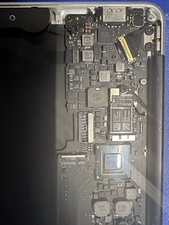
I got a hold on the new style of trackpad (started in 2016, I think) and the board schematic for a matching macbook pro. It looks like they moved to SPI for the trackpads, so I think you’d need to add another controller to convert it and at that point I don’t think you get the driver support.
Here’s some info for anyone that wants to pick up from here.
Interesting chips on the trackpad:
BCM5976C1 - There’s 2 and I think this is the digitizer and I think it’s i2c
STM32F103C8I6 - Arm Cortex-m3, capable of USB but IO is software controlled I think
Here’s the pin out for the trackpad connector on the logic board (I think you can ignore the KBD stuff since the keyboard uses a different connector):
SMC_LID
SMBUS_SMC_3_SCL
SMC_PME_S4_WAKE_L
SMBUS_SMC_3_SDA
SMC_ACTUATOR_DISABLE_L
KBD_INT_L
TPAD_SPI_INT_L_CONN
KBD_I2C_SDA
GND
GND
TPAD_SPI_MOSI
KBD_I2C_SCL
TPAD_SPI_CS_L_CONN
KBD_BLC_XBLANK
TPAD_SPI_MISO
KBD_BLC_XBLANK
TPAD_SPI_MISO
KBD_BLC_GSSOUT
TPAD_SPI_CLK_CONN
KBD_BLC_GSSCK
PP5V_S4_TPAD_CONN
KBD_BLC_GSLAT
SMC_VIBE_L
then everything else is power or ground (5v, 3v, 0v - active gnd, 12.6v on a fuse)
Bu yoruma uygun yeri bulmak için bu konuyu kaydırın. Ardından, taşımak için "Bu yazıya yorum ekle"ye tıklayın.
3 Yorum:
This is great! Have you managed to do something with it? It's a massive challenge but I'm looking to turn one of these 2016-2019 15 inch trackpads into a standalone usb or bluetooth trackpad
Bu yoruma uygun yeri bulmak için bu konuyu kaydırın. Ardından, taşımak için "Bu yazıya yorum ekle"ye tıklayın.
1 Yorum:
I got a broken 2011 MBP for cheap and did that "conversion". You need the original motherboard for this and the keyboard and trackpad work as follows for me:
Long story short: It works in Windows (as "mouse" only, no gestures on the trackpad). In MacOS and Linux (tried Ubuntu) all gestures work out of the box as well. On Android_x86 it works if you connect it BEFORE booting Android (including gestures), if you plug it in after booting, the trackpad will not work.
On Android phones/tablets I can't get the trackpad working AT ALL (if anyone could help me I would be super grateful!)
If you also get a 2012 MBP that could be enough, if you get a different year model it's probably better to get the schematics online (somewhat easy to find on Google) like I did. Hope this helps you.
The keyboard and trackpad on recent MacBook's (since 8,1) and
MacBookPro's (13,* and 14,*) are attached to an SPI controller instead
of USB, as previously. The higher level protocol is not publicly
documented and hence has been reverse engineered. As a consequence there
are still a number of unknown fields and commands. However, the known
parts have been working well and received extensive testing and use.
this may also be a good resource as it appears to be drivers for every trackpad version, but I believe assumes it is in an apple device
Converting a MacBook A1278 trackpad to a USB device is possible but highly complex. It uses a proprietary 22-pin SPI/I²C interface, not USB. You’d need a microcontroller (like Teensy or Arduino), firmware, and a breakout board. It’s not plug-and-play and requires reverse engineering. For most users, a Magic Trackpad or external USB trackpad is a simpler solution.

 2
2  2
2  1
1 









9 Yorum
Yeah I would Love to have a Tutorial or Guide for that, too.
So hoping for this to be possible.
Please, somebody help US....
Jack TecChecK tarafından
MacBook Unibody (A1278) Trackpad
mayer tarafından
@mayer, not to be too ignorant, but I fail to see how the link to that trackpad helps anything. Is it to verify the model?
George A. tarafından
I changed the icon to the correct machine. Then added the link so people would know exactly what was being talked about.
mayer tarafından
Hey,
I am also looking to achieve this mod. In my research I have found others used the test points on the older macbook pro touchpads as solder points for the data and power cables in USB. I cant see these at all on the newer A1278 models so will be sacrificing a known bad part to attempt to find them. Unfortunately this could be the only feasible option as the cables I the flex connector and cable are so %#*@ small. If I am successful will put it up for others to see.
Callum Cooper tarafından
4 tane daha yorum göster