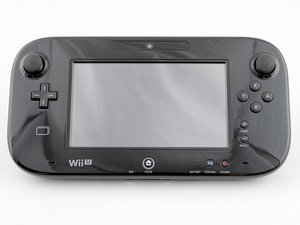
Bu, Wii U oyun konsolu ile birlikte kullanılan bir dokunmatik ekranlı oyun kumandasıdır. 18 Kasım 2012 tarihinde piyasaya sürülmüştür ve siyah veya beyaz renk seçenekleri mevcuttur. Model numarası: WUP-010(USA)
I had the GamePad in repair at Nintendo while I still had warranty on it. They could fix it but 8 weeks later, no warranty any more, the thing brakes again.
My issue with the GamePad is, that the screen is staying black. I can charge it, the batteries are full. I unscrewed it and all plugs are in the right places.
When I press the power button, the blue power light goes on, but fades away. It won't turn on again, unless I unplug the battery and plug it in again.
Bu yoruma uygun yeri bulmak için bu konuyu kaydırın. Ardından, taşımak için "Bu yazıya yorum ekle"ye tıklayın.
6 Yorum
I forgot to say that the charging light never turns off, even if unplugged again. I have to press the power button for a few seconds or have to unplug the battery again.
hey i think you might have the same probloum as me i turn on my wii u ready to play mk8 the blue light fades and never comes back i think ps i fully charged it so is that the issue? oh yeah the touch screen is fine as a matter of fact when i turn off display it turns back on but gose away when the display is turned back on
Same issue here. Press power button, blue light comes on then fades away and nothing on the screen. It started after one of my kids hit it really hard. Nothing obviously broken though, and all internal cables connected where they should be. I hear it may be a bad LCD assembly or motherboard. I just don't want to spend the money on either of the two parts unless I know with certainty which one will fix it.
it seems to me like it would be the motherboard, but since its nintendo its the screen. all of the ds's do the same thing when a screen is faulty or loosely connected
Update (03/05/2017)
!confirmed! it is the lcd screen that causes the fading blue light on the wii u game pad i just did a repair on one with the exact problems listed. i attempted a battery and motherboard swap, but i did thescreen swap and bam fixed it.
Well, the package came way earlier than I thought (fast shipping!) so I swapped the LCD and digitizer but rather disappointingly nothing changed. Blue light still comes on then fades and nothing on the screen. Such a bummer...
Hmm this is a tough one. When I fixed the one I repaired I swapped out the main board and the screen as well as the wifi chip. If it was not the screen I imagine it's a motherboard issue. Can you get a return on the screen you purchased?
I'm not sure if they would take it back. It was only $25, so no huge loss, but it did take a while to install. Looks like this is going to be a motherboard after all. I should've started there. Much easier fix than the LCD, lol
Hello, I'm on latest firmware. Everything was fine until I started getting the error code 165-2738 on the gamepad not allowing it to be used. The Console on the other hand works fine.
When I get the error code, I press and maintain the power button on the gamepad for a few seconds until it turns off (sometimes it turns off but the screen seems to be on, just black background) then I press the power button again for it to turn on, then one of the following happens to the gamepad:
1- Turns on and works normally.
2- Turns on but then same error code appears.
3- It won't turn on and the led light (next to power button) becomes blue then fades. In this case the only solution I have found is to charge it a bit (the led light change to orange and remains on even if I unplug the charger) then turn it on. And sometimes I have to remove the AC cable from the console for 15 seconds for it to turn on, or even remove the battery. Some other times none of the solutions work.
I am assuming that maybe it's due a mother board issue.
Any help is appreciated I tried looking for the codes on Nintendo website but nothing!! How come they don't have a list of all the error codes hopefully this won't require opening the gamepad or replacing parts.
First of all the following led colors are quite normal:
Gamepad off -> no led
plug in -> red led
push power to turn on -> blue led slowly fading, then red led again
push power 5 seconds to turn off-> red led goes off shortly and returns
plug off -> led is off
So there isn’t actually a “fading blue light” issue, as this is normal.
Problem is the screen staying black and no other notifications or input are working.
After removing *all* connectors to the motherboard and connecting them again, the screen on my Gamepad worked again. Regretfully I can’t say which one specifically did it. Maybe this could help with your Gamepad too.
I am facing same problem gamepad black screen/blue led fades. This is the third time : first two by playing discinnecting battery ac plug desyncing it recovered with no pattern but this time nothing seemed to work.
Yesterday i opened and nothing seemed loose : i discinnected lcd stripe, and wifi module … now …
I will dissassmble mother board and will try hair dryer
I am doubting to ask for chinese 13€ motherboard or getting for 50€ second hand.
#
If anybody has further info about what could be failing at startup seq and how to fix will be apreciated: quite strange since it seems to be a sw issue related to the modules startup.
Check that the Wii U GamePad screen is not currently turned off by pressing any button other than the POWER Button.
Press and hold the POWER Button down on the Wii U console until the Wii U console powers off. Power the Wii U console back on.
If the Wii U console will not restart, unplug the AC adapter from the back of the Wii U console and wait 15 seconds, then plug the Wii U console back in and turn it on.
Reset the Wii U GamePad:
If the Wii U GamePad is currently turned off, press the POWER Button once to turn it on.
Press and hold down the Wii U GamePad power button until the Wii U GamePad turns off.
Wait 15 seconds.
Press the POWER Button once to turn the Wii U GamePad on.
General system stability can be improved by applying the current System Update. If possible, try applying this System Update and see if the issue improves.
Situation not resolved
If the Wii U GamePad still goes blank, there is an issue with the Wii U GamePad and Wii U console.
Nintendo no longer offers factory repairs for the Wii U console, the Wii U GamePad, or Wii U accessories. You may find our information on replacement and upgrade options helpful.

 2
2  2
2 




 1
1 



6 Yorum
I forgot to say that the charging light never turns off, even if unplugged again. I have to press the power button for a few seconds or have to unplug the battery again.
Franz Miketta tarafından
Mine has the same problem
John Hernandez tarafından
Same here. Tried a new battery and the same thing happens. I opened it up and everything looks fine - no cables loose or anything.
camscampbell tarafından
hey i think you might have the same probloum as me i turn on my wii u ready to play mk8 the blue light fades and never comes back i think ps i fully charged it so is that the issue? oh yeah the touch screen is fine as a matter of fact when i turn off display it turns back on but gose away when the display is turned back on
caelansheehan tarafından
Same issue here. Press power button, blue light comes on then fades away and nothing on the screen. It started after one of my kids hit it really hard. Nothing obviously broken though, and all internal cables connected where they should be. I hear it may be a bad LCD assembly or motherboard. I just don't want to spend the money on either of the two parts unless I know with certainty which one will fix it.
Marco Salvatori tarafından
1 tane daha yorum göster