
Ana içeriğe geç

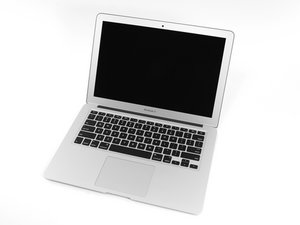
The March 2015 update of Apple's 13" MacBook Air features fifth generation Intel Core i5 and i7 processors, resulting in slightly increased performance and battery life.

sm0512f SSD compatibility in a MacBook Air 2015

Hi, I have MacBook Air (early 2015). I replaced it's SSD with a MacBook Air (2013) sm0512f SSD. Now I'm encountering some issues:

  1. My devices goes into waiting state after I open the lid.
  2. My device goes into waiting state after I wake it up from sleep
  3. Sometimes it does just go into a hang while browsing my drives files

I literally have to restart my system 3 times.

Is this because of El Captan? Will changing my OS work?? Or because of sm05112f isn't compatible with macbook air2015?

Really appreciate your help! Regards

Yanıtlandı! Cevabı görüntüle Ben de bu sorunu yaşıyorum

Bu iyi bir soru mu?

Puan 0
1 Yorum

tarafından

Yorum Ekle

2 Cevap

Filtre ölçütü:
Seçilen Çözüm

Sadly you can't use the older SSD in your system. The SSD's firmware on the older SSD is not compatible with your system. In addition you're limiting your systems performance. The newer SSD is a full PCIe implementation unlike your older SSD which is running in mSATA mode.

I would recommend you get the correct Apple SSD for your system or you could install this 3rd party SSD which just came out (Feb): OWC SSD upgrades for MacBook Air 11" & 13" Mid 2013, 2014, and 2015

Bu yanıt yardımcı oldu mu?

Puan 2

3 Yorum:

Thank you :D

regards

tarafından

Dan you are incorrect. The drive he replaced is compatible with his early 2015 MacBook Air however, its running its a PCIe 2.0 2x not a PCIe 3.0 4x. So he'll experience slower read/write speeds (about 700+MB slower). Mac's that use PCIe do not use SATA/SATA modes. If anything, he should find a the APN and get a PCIe 3.0 4x SSD so he can have the max performance. OWC SSD's are still PCIe 2.0 which are backwards compatible like SATA I/II/III so he'll experience the same (slower) performance issues. As far as his issues with the intermit freezing and sleep issues, I would install the OS (not clone it) and see if the problem persists.

tarafından

@apiktur - both drives are PCIe 2.0 the older MacBook Air is a two lane and the newer one is a four lane (review EveryMac specs for your self 2013 & 2015 . Now let's talk about the dialog these SSD's use the 2013 uses a SATA dialog whereas the 2015 uses AHCI. Here's a good write up and your head may still end up spinning in confusion: SATA Express.

Basically, they use different OS drivers. Don't get PCIe 3.0 into mix as that gets into NVMe support. The Air is still SATA/AHCI based. The MacBook Pro is a different kettle of fish.

tarafından

Yorum Ekle

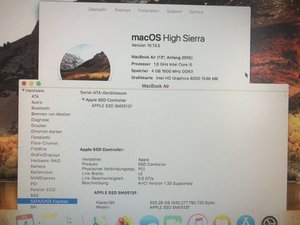
The SM0512F SSD works with a MacBook Air 13,3“ early 2015 and High Sierra 10.13.5

Block Image

Bu yanıt yardımcı oldu mu?

Puan 1
Yorum Ekle

Yanıtını ekle

Hakeem JanGLi sonsuza kadar minnettar olacak.
İstatistikleri Görüntüle:

Son 24 Saat: 0

Son 7 gün: 3

Son 30 gün: 15

Her zaman: 3,353