Ana içeriğe geç

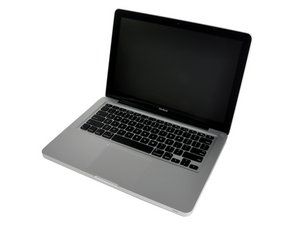
13" aluminum unibody, 2.0 or 2.4 GHz Core 2 Duo processor.

MacBook Pro not turning on

Have an old MacBook Pro 13-inch mid-2008/early-2009 (the one with the two-part bottom).

It’s not turning on, the charger turns orange, but trying to reset the SMC doesn’t appear to work, as I don’t get the confirmation blink turning to green.

What do: This is an ‘as is’ computer I bought, so don’t have a lot of history on it except the owner claimed it worked when he last used it. Was stripped of RAM and HDD, so I put them in.

No beeps when trying to start. Nothing! Not powering on at all, but charger indicator is Orange.

Edit: Could this be the problem?

Block Image
Bu soruyu yanıtla Ben de bu sorunu yaşıyorum

Bu iyi bir soru mu?

Puan 0
7 Yorum

one more detail, the three long screws at the back are missing, and instead are the small screws. Unsure if I can replace with 'newer' 14mm screws from the 2009+ models of the same make.

tarafından

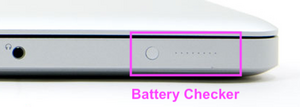
With the computer open and sitting on a table in from of you, look at the left hand side of the top case (the component which houses the keyboard and trackpad). You should see a small gray button with about 8 perforated holes next to it. Press that small gray button. Do the perforated holes light up? If so, how many lights does it show? (This indicates the charge of the battery and can help us determine whether or not the battery is completely drained).

tarafından

I'll try later, but it's been laying bare for several years, so I'm pretty sure the battery is drained. It should still turn on though, yes?

tarafından

There was no 13" model with a split bottom cover (able to replace the battery without taking the bottom off) I've corrected the model info to the 15" model which does.

tarafından

I'm sorry, but I'm actually looking at a 13-inch right in front of me that has the split bottom..

tarafından

2 tane daha yorum göster

Yorum Ekle

3 Cevap

Filtre ölçütü:
En Yararlı Yanıt

On the Left side is your systems battery checker

Block Image

With the charger disconnected what happens when you press the button? Do you see the small 10 LED’s? Are only a few lit? Are they blinking?

Bu yanıt yardımcı oldu mu?

Puan 2

7 Yorum:

I'll have to check later. Thanks!

tarafından

Nothing. No light light up when I push that button.

tarafından

Time to replace the battery! MacBook Unibody (A1278) Battery. You also may need a new MacBook Unibody (A1278) Battery Connector as the contacts often failed on them.

tarafından

Right. Could I get the machine to start if I completely took out the battery, you think?

tarafından

Ok, so, found the culprit with the battery. There was a slightly loose connector, (I think that was the DC one), I plugged it all in, and suddenly the battery blinks when pushing that side one.

However, the machine still does not start. That also goes for when not having battery in.

Starting to wonder if the keyboard and power button simply isn't properly attached. Which connector is that?

All other connectors seem to be fast. Gut feel definitely is that it's not registering my keyboard or power button push at all

tarafından

2 tane daha yorum göster

Yorum Ekle

To bypass the keyboard and attempt a spontaneous reboot, disconnect the battery and mag-safe. Press and hold the power button for 10 seconds. Reconnect the battery and then then mag-safe and if all is well and you have some charge in the battery, it should spontaneously reboot.

Bu yanıt yardımcı oldu mu?

Puan 2

2 Yorum:

Will try. Going to post a picture in edit of a cable I suspect may be the problem in a sec. Input would be appreciated.

tarafından

No on the spontaneous reboot. Is it possible the power-button is not connected?

tarafından

Yorum Ekle

get some isopropyl alcohol and make sure the board is clean - use a magnifying lense to check all over

Bu yanıt yardımcı oldu mu?

Puan 0

1 Yorum:

I doubt that will matter here. The first step is to see if the system spontaneously starts up after doing a hard reset as Mayer wrote. If that worked the battery needs to be charged more likely replaced.

If the system won't start that's a logic board issue which might be a simple blown capacitor but it will take some effort to trace out the power rails to discover what failed and then getting the part reviewing the schematics and board view drawings.

tarafından

Yorum Ekle

Yanıtını ekle

Opti sonsuza kadar minnettar olacak.
İstatistikleri Görüntüle:

Son 24 Saat: 0

Son 7 gün: 6

Son 30 gün: 12

Her zaman: 194