
Ana içeriğe geç
Onarım Topluluğuna Katılın - Hesap Oluşturun

Screen shift on original apple watch

I am trying to replace the battery on an apple watch original. When I follow the directions here:

Apple Watch Battery Replacement

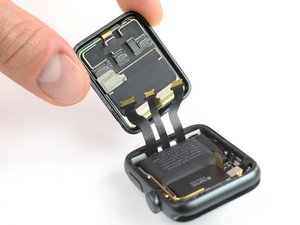
I have 2 extra cables on the side opposite the crown and power button. I do not see those in the guide. What are they for? How do I get around them.

Block Image
Yanıtlandı! Cevabı görüntüle Ben de bu sorunu yaşıyorum

Bu iyi bir soru mu?

Puan 0
Yorum Ekle

2 Cevap

Filtre ölçütü:
Seçilen Çözüm

I figured it out. It was the haptic touch connectors

It is an SP1

Bu yanıt yardımcı oldu mu?

Puan 1
Yorum Ekle

It looks like you have a Series 2 or newer

Block Image

Here's the Series 2 guide for the battery replacement Apple Watch Series 2 Battery Replacement which gets into the screen cables

Bu yanıt yardımcı oldu mu?

Puan 0
Yorum Ekle

Yanıtını ekle

Brian Dezarn sonsuza kadar minnettar olacak.
İstatistikleri Görüntüle:

Son 24 Saat: 0

Son 7 gün: 5

Son 30 gün: 27

Her zaman: 211