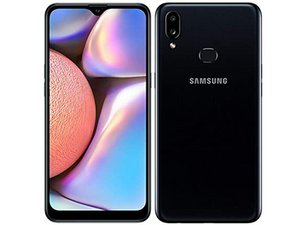
Why is my wifi and bluetooth not working
Why is my wifi and bluetooth not working Why is my wifi and bluetooth not working
Bu iyi bir soru mu?
Puan
102

İtibar: 1,2b
 2
2
 2
2
 1
1
Why is my wifi and bluetooth not working Why is my wifi and bluetooth not working
Bu iyi bir soru mu?

İtibar: 361
1
1
1
There could be several reasons why your WiFi and Bluetooth are not working on your Samsung Galaxy A10s. Here are a few things you can try to troubleshoot the issue:
Bu yanıt yardımcı oldu mu?
I did factory reset but it still doesnt wrk
Hi I did all but didn't work
After the last Samsung update my wifi and Bluetooth isn't working as well
Same for me, bluetooth and wifi can't be on. when I tried to open it it'll become off again.
Same here to me

İtibar: 121
1
1
1
الخلل في ايسي بلوتوث والحل استبدال الايسي او تسخينه راح يرجع الجهاز طبيعي
Google translate:
The fault is in the bluetooth eSee, and the solution is to replace the eSee or heat it up, and the device will return to normal
Bu yanıt yardımcı oldu mu?
how to replace the esee or heat it up?
Oh my gosh I did everything but still won't connect I'll just chill here and wait for the answer
I am facing the same problem. My Wifi and Bluetooth is no longer working. Is there any Samsung Technician ca help me fix this problem? Thankyou.
I am also facing this issues wifi and Bluetooth devices is not working plz tell me solve the solution plz
Even if I refractory doesn't work

İtibar: 85
1
1
If your WiFi and bluetooth not working it is because of Ic problem you have to change it
Bu yanıt yardımcı oldu mu?
I did perform factory reset but still the same. Help me out pls
How can we replace Or heat it where it is inside the phone?

İtibar: 49
1
If you have WhatsApp installed. Try cleaning WhatsApp data or uninstall WhatsApp. It works fine for me. A10S
Bu yanıt yardımcı oldu mu?
It's a hardware issue. The phone's IC has a problem that's why the Bluetooth n WiFi don't work. The technician will demand approximately R250 to R350 to fix it.
No hardware issue this is new update issue.
Not an update issue. My phone has not received an update in years because it an old phone (Galaxy J5 prime). So it is a hardware issue-
My Samsung a10s have the same problem

İtibar: 49
1
turn on bluetooth to connect to nearby devices
Bu yanıt yardımcı oldu mu?
Still my phone doesn't want to open

İtibar: 67
7
Reset your Wi-Fi router. The location of the reset button depends on what Wi-Fi router you are using but every Wi-Fi router has one.
Bu yanıt yardımcı oldu mu?
Thank you, Anthony, but this is not a solution to problem.

İtibar: 37
1
İtibar: 37
1

İtibar: 25
1

İtibar: 1
3
1
Well I will suggest to do the software update or system updated of your phone. Sometime outdated software version can also cause these kind of issue as well.
Bu yanıt yardımcı oldu mu?
You can't update phone without WiFi
Even if I restart don't enable and not op6
I did restart but still is not working

İtibar: 25
1
Its hardware issue my 2 devices one got resolved heating ic and second one had replaced ic MT6631N
Bu yanıt yardımcı oldu mu?

İtibar: 25
1

İtibar: 25
1
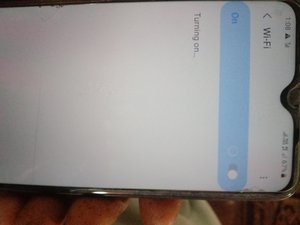
WiFi not opening
Bu yanıt yardımcı oldu mu?
Since the problem occurred with all users of this version of Samsung, this means that its function was stopped in the latest Samsung update.

İtibar: 13
1
My wife and bluetooth are not working on my phone my phone is Samsung A10s
Bu yanıt yardımcı oldu mu?

İtibar: 13
1

İtibar: 13
1
Bluetooth 11
Bu yanıt yardımcı oldu mu?
WiFi and Bluetooth connection is not working

I have an S20+ and a WiFi 6 home network. I'm running the May 2023 update to OneUI 5.1.
Suddenly last night I was unable to connect to my home WiFi network. WiFi worked fine for all my other devices. I did lots of Google searches.... After trying all the obvious simple things (toggling Airplane Mode, Rebooting the phone, etc.), I looked in the S20+ Settings / Developer Options this morning and found "WiFi non-persistent MAC randomization" and turned it ON. WiFi almost instantly started working again on the phone.
I hope this helps others.
Cheers,
Scott.
Bu yanıt yardımcı oldu mu?


My wifi and Bluetooth malfunctioning since last 2 months
Bu yanıt yardımcı oldu mu?
İtibar: 13
1
Why my wife and bluetooth not working on network
Bu yanıt yardımcı oldu mu?
My wife and bluetooth are not working on my phone my phone is Samsung A10s
My bluetooth and wife are not working my phone is Samsung A10s
Me 2 my Samsung A10s is not working
Bluetooth, WiFi and hotshot won't connect
My wifi and bluetooth not working
My Wifi and Bluetooth is not working in Samsung s20+ and developer option is also turned off

My wifi & bluetooth not working, I have samsung Fold 3… .I got sick of samsung, Im going to buy Honor magic v3
Bu yanıt yardımcı oldu mu?

Wifi Bluetooth not working why problem factory already but not solve
Bu yanıt yardımcı oldu mu?


İtibar: 1
1
f your Wi-Fi and Bluetooth aren't working, start by restarting your device and router, and check for simple issues like interference or drivers being outdated. If those don't work, try resetting your network settings, which will erase saved Wi-Fi passwords and Bluetooth pairings but can resolve connection problems. For persistent issues, consider updating your system or, as a last resort, performing a factory reset.
Bu yanıt yardımcı oldu mu?
Son 24 Saat: 28
Son 7 gün: 182
Son 30 gün: 678
Her zaman: 77,644

29 Yorum
Has the phone been dropped or damaged at all?
[deleted] tarafından
I did factory reset but still not working
Luvland Unique tarafından
I went in my hardware but my wifi and bluetooth are not listed in and its says unavoidable
What must I do
Nicodemus Hangusu tarafından
I'm having the same issue on my Samsung Galaxy Note 20 Ultra. After the new update, they both stopped working.
Amado Guerrero tarafından
Check (verify) the time zone on your phone. I had this problem On the last update and resetting the TIMEZONE corrected the problem.
ian.cormie tarafından
24 tane daha yorum göster