Ana içeriğe geç
Onarım Topluluğuna Katılın - Hesap Oluşturun

How do you change the screen?

Hi all. I've popped the hinge covers off which reveals 2 screws. If you remove these, there is still resistance at the edges of the screen, if you try pry it out. I wonder if anyone knows if the screen is mechanically held or if it's just adhesive?

Bu soruyu yanıtla Ben de bu sorunu yaşıyorum

Bu iyi bir soru mu?

Puan 0
Yorum Ekle

1 Cevap

Filtre ölçütü:
En Yararlı Yanıt

Hi Jaimin,

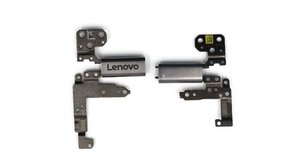
Adhesive. It's got those stretchy Command-style strips along the right and left edges, the same kind used for iPhone batteries. Here's a picture of the hinges so you can see that they don't have the long reinforcing braces going up the sides of the lid like some other laptops do.

Block Image

I located a YouTube video that has a lot of sections on disassembling various parts of your laptop; if you skip to 5:43 it shows the hinge cover removal, and at 6:06 you can watch the LCD removal procedure.

HOW TO DISASSEMBLE/REMOVE PARTS OF Lenovo Yoga C630-13Q50 (81JL) - YouTube

Hope that tells you what you needed to know. Be careful pulling the adhesive; if it breaks it could be very difficult to get the LCD off without damaging it.

Bu yanıt yardımcı oldu mu?

Puan 1
Yorum Ekle

Yanıtını ekle

Jaimin Jethwa sonsuza kadar minnettar olacak.
İstatistikleri Görüntüle:

Son 24 Saat: 0

Son 7 gün: 5

Son 30 gün: 28

Her zaman: 252