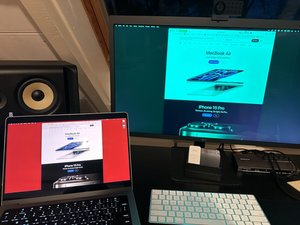
Lukas, have you tried going into the monitor's settings and decreasing the value of the green tint (or increasing the red and blue tint to compensate)?
Bu yoruma uygun yeri bulmak için bu konuyu kaydırın. Ardından, taşımak için "Bu yazıya yorum ekle"ye tıklayın.
2 Yorum:
Hi Shingle,
I tried different color profiles and settings, but not explicitly reducing the green value. Also, this would be just a work-around, I'm interested in fixing the hardware problem. It would be great to hear if somebody here knows, if this is common defect and usually caused by a resistor/capacitor or damaged chip - so if there is a reasonable chance to fix it without replacing the whole board.
Hi @lukash72300 the same has happened to me today, suddenly, when connecting my laptop. I have tried updating the monitor’s firmware, connecting directly or through a Thunderbolt hub, changing color profiles, and connecting to two different MacBooks. The problem stays the same.
Hi Francisco, I had to give it to the official LG support here in the Netherlands, they fixed it for around EUR 320 and were faster than I expected. It came back in perfect condition, so I need to think it was money well spent in the end.
@gianfranco52715 Thank you – I've sent mine to an authorized repair and they quoted me a similar fee for a new motherboard. Reading on the internet, it seems that the thunderbolt connector is poorly mounted onto the board and is rather fragile. I can't confirm it's that that got damaged, but it's a shame, because everything else is impeccable, still working, and the image overall is great. It's good news that a new MB can save all the material from going to waste, but a shame that it seems the board design/work isn't up to the quality of the rest of the display.
Hi, I have a similar problem with an LG 27UD69-W from April 2017.
It gives a sort of 'square inside a square' ghost image that is really, really green.
Resets etc don't seem to help. Interestingly, it DOES seem to work without problems when it is significantly colder and critically less humid.
I suspect hardware somehow, maybe power leaking across a circuit it shouldn't through electromagnetic field, that is affected by humidity? (higher temp means more moisture can be held in the air, exponentially so).
It starts at around 22 degrees Celsius. If it's colder than that, the screen runs fine.
Since it's outside of warranty I expect LG won't help. Maybe something on the monitor's circuit board needs to be electromagnetically insulated.
But I'm not really a hardware guy, so these are just guesses. But I figured I'd post it here, you could try running it with an airco pointed at it or in a colder location and see if it helps.
Salve, vi dò io la risposta corretta e definitiva: SI DEVE OBBLIGATORIAMENTE SOSTITUIRE LA SCHEDA MADRE. È un chip andato, non dicono esattamente quale, am la devi sostituire tutta. Purtroppo ho speso 250€ circa. Non so se ne vale la pena, soprattutto per coloro che hanno comprato l'LG usato, ma non ci sono alternative. Purtroppo, e dico purtroppo, sul mio, ma a questo punto anche su molti altri apparecchi, avevo riscontrato la rottur senza spiegazioni della cornice esterna. Mi fu sostituito anche quella e dopo 1 anno è più rotta di quella di prima. Speravo di trovare un Teardown completo, ma non c'è nemmeno qui.
1 Yorum
Ti ho scritto la risposta più giù. Si può solo sostituire la M.B.
Antonella Madiai tarafından