1.5 Core Solo, 1.66 veya 1.83 Core Duo ya da 1.83 veya 2 GHz Core 2 Duo işlemci.
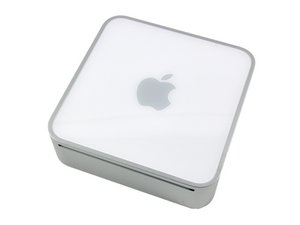
Bu sayfa, 2006'nın başından 2007'nin ortasına kadar üretilen ilk Intel tabanlı Mac Mini modellerini kapsamaktadır.
Is there any way to erase and reinstall the latest OS my Mac can handle? I tried deleting via disk utility but it is greyed out. I've tried command R and Alt+Command+R and nothing, it just starts up as normal. I just want to wipe it! Does connecting the Mac to ethernet do anything regarding this? HELP
The easiest way of fully wiping your existing hard drive will be to reformat it. You could possibly do this within disk utility however you can also use a different device. Just make sure to format it as MacOS extended journaled and back up any important data you wish to keep. if you purchase a new drive, you will still have to format it to MacOS extended journaled.
This system can run the last version of Mac OS X 10.6 "Snow Leopard". However, it cannot boot in 64-bit mode, nor does it support "OpenCL". It also cannot run versions of Mac OS X more recent than 10.6.8.
This will allow you to flash an OS .iso File to a USB stick which is what you will use to re download Mac OS. Here is a guide on how to do this: Balena Etcher how to make a bootable USB. (MAC OS) (youtube.com) You will need a USB stick with a capacity of at least 8GB.
Then just make sure your Mac mini is fully powered off, insert the USB drive, Press the power button and quickly press and hold command+R. After this, you should be able to simply go through the installation steps to re-install MacOS.
I hope this helps, let me know if you have any other questions :)
@abbey66285 Have you tried Pressing and holding Option+Command+R? This in theory should upgrade your mac to the latest version of MacOS that is supported on the Mac Mini
@abbey66285 In that case, go back to the internet archive link and download the .DMG file, not the .ISO onto your mac Mini. Once it has downloaded, open it and follow the steps to install MacOS 10.6
Your system has an older SATA connection standard! SATA I (1.5 Gbps) there are very few SATA SSDs that support this older data rate. Samsung SSDs is all I would use!
But before we can move forward we need to have a bootable external drive setup with the needed OS installed. Here you’ll need a 32GB (or larger) USB thumb drive.
But before we can do this we need to figure out what your system can support for an OS, this gets tricky! This is your systems series A1176 which severely limits you to OS-X Lion 10.7.5 as the highest this series will support.
This series RAM will also limit you (4GB).
So… You face some hurdles here. What is your expectation?
Bu yoruma uygun yeri bulmak için bu konuyu kaydırın. Ardından, taşımak için "Bu yazıya yorum ekle"ye tıklayın.
2 Yorum:
I took it to the apple Genius Bar and they tried to boot it with an external triage thing and all it did was show a grey screen with a circle with a line through it like it isn’t able to reinstall. I just want to figure out how to wipe it!
@abbey66285 - That’s a good sign! All that tells us they didn’t have the correct OS on there test drive. That’s not surprising this system is no longer in the range of their test tools .
Review this article This is how long Macs and MacBooks last That’s not to say this system is not useful! You just need to know it’s limitations and don’t go wild putting to much into it.
For reference I still use a 2012 MacBook Pro! But as there are a lot of risks on the internet, I don’t use it for any personal use (email or using Credit cards)
So you want to make sure you info is not exposed as you are disposing the system. Is that correct?

 1
1 
 3
3 
 977
977 