Ana içeriğe geç
Onarım Topluluğuna Katılın - Hesap Oluşturun

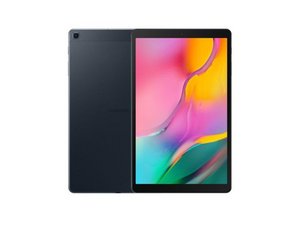
Samsung Galaxy Tab A 10.1'in yeni bir sürümü Şubat 2019'da duyuruldu. Cihaz, Android 9.0 Pie (Android 10 ve 11'e yükseltilebilir), Exynos 7904 yonga seti ve çözünürlüğü değişmeyen bir IPS ekran ile sunuldu. Arka flaş kaldırıldı, S-Pen desteği sonlandırıldı ve batarya küçültüldü; ön kamera 5 MP'ye yükseltildi ve hoparlörler artık stereo. Model numaraları: SM-T515 ve SM-T510.

USB cable transfer to computer not working

I initially had the problem where it says there is moisture in the charging port

and will not turn on. I took it to a repair shop and he replaced the charging

port board. Then it worked alright for a while but now it has stopped working

when I want to transfer files between the computer and tablet via USB cable.

Windows says the device attached is malfunctioning. The tablet still charges

properly though (and normal charge not slow). So could this be a problem with

the connection between the charging port board and the motherboard or the

USB connector on the tablet? In either case maybe I could just take it apart

and clean it up myself? I have a fairly good knowledge of electronics but not

much experience in maintenance. I would be most grateful for any advice

anyone can give me.

Bu soruyu yanıtla Ben de bu sorunu yaşıyorum

Bu iyi bir soru mu?

Puan 0
Yorum Ekle

2 Cevap

Filtre ölçütü:
En Yararlı Yanıt

have you checked that the USB cable is capable of transmitting information and not just current. If there is a genuine problem with the tablet and not the cable you probably need to change the USB port here is a guide Samsung Galaxy Tab A (2019) USB-C Şarj Yuvası Değişimi

Bu yanıt yardımcı oldu mu?

Puan 1
Yorum Ekle

Hello there,

Thanks for your input. I diagnosed that it was indeed the table in the end by connecting my phone to the computer using the same cable and transferring files worked. I had the charging port replaced last year by a repair shop and did not want to have to keep doing it as it costs £60 and you can just buy another tablet for that. Similarly doing it myself will cost £30 in tools and a lot of time and effort. Also the last time I did that was taking a PS/3 apart and when I put it back together the WIFI ceased to work! Admittedly now I have found this site future operations should be a lot less hazardous :-)

In the end I had an idea which is to remove the MicroSD from the tablet and plug it into the computer via a USB/MicroSD adapter I had hanging around. It is transferring 30Gb right now and looks like it will finish in 20 minutes: would have taken over a week via Bluetooth!

Anyway thankyou again for your help.

Regards

Bu yanıt yardımcı oldu mu?

Puan 1
Yorum Ekle

Yanıtını ekle

Lori Fairhead sonsuza kadar minnettar olacak.
İstatistikleri Görüntüle:

Son 24 Saat: 0

Son 7 gün: 2

Son 30 gün: 15

Her zaman: 267